85
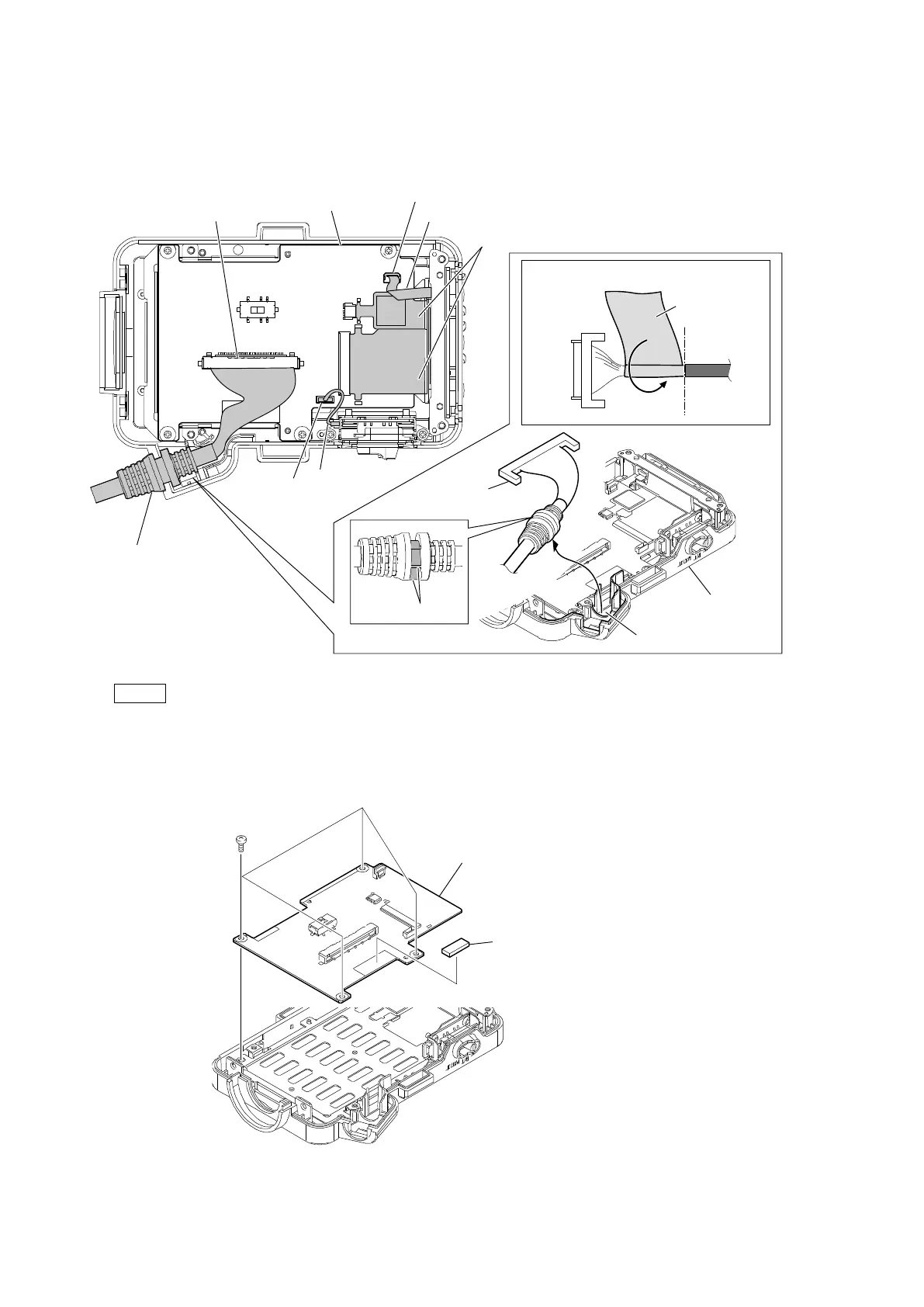
4. Disconnect the flexible flat cable from the connector (CN2003) on the PD-129 board.
5. Disconnect the harness from the connector (CN2004) on the PD-129 board.
6. Disconnect the flexible board from the two connectors (CN2002, CN2005) on the PD-129 board.
7. Disconnect the connection cable from the connector (CN2001) on the PD-129 board, and then release it from the groove of the P
bezel.
Note
• At the time of the installation, install the connection cable with its D-cut angle facing toward the P bezel.
• After replacing the connection cable, check that the VF GND sheet is installed.
8. Remove the gasket (T3 x 5 x 15).
9. Remove the four screws, and then remove the PD-129 board.
10. Install the removed parts by reversing the steps of removal.
CN2003
CN2002
CN2005
CN2001
CN2004
PD-129 board
Flexible flat cable
Harness
Flexible boards
Connection cable
Connection cable
Groove
P bezel
D-cut angle
VF GND sheet
Attaching position of VF GND sheet
PD-129 board
Gasket (T3x5x15)
PTP2 x 5


 To Next Page