38 Chapter 4: Setup and Operation
Touchpad
The touchpad is used to select, adjust, and move objects on the screen. For example, it controls the caliper position,
CPD/Color box position, floating cursor, and more.
Note: The arrow keys control much of the same functionality as the touchpad.
Accessories
For information about accessories and other SonoSite products, refer to the user guide for each product.
Preparing the System for Operation
Installing and Removing the Battery
The battery comprises six lithium-ion cells plus electronics, a temperature sensor, and battery contacts.
If the battery is being installed for the first time, it will need to be charged.
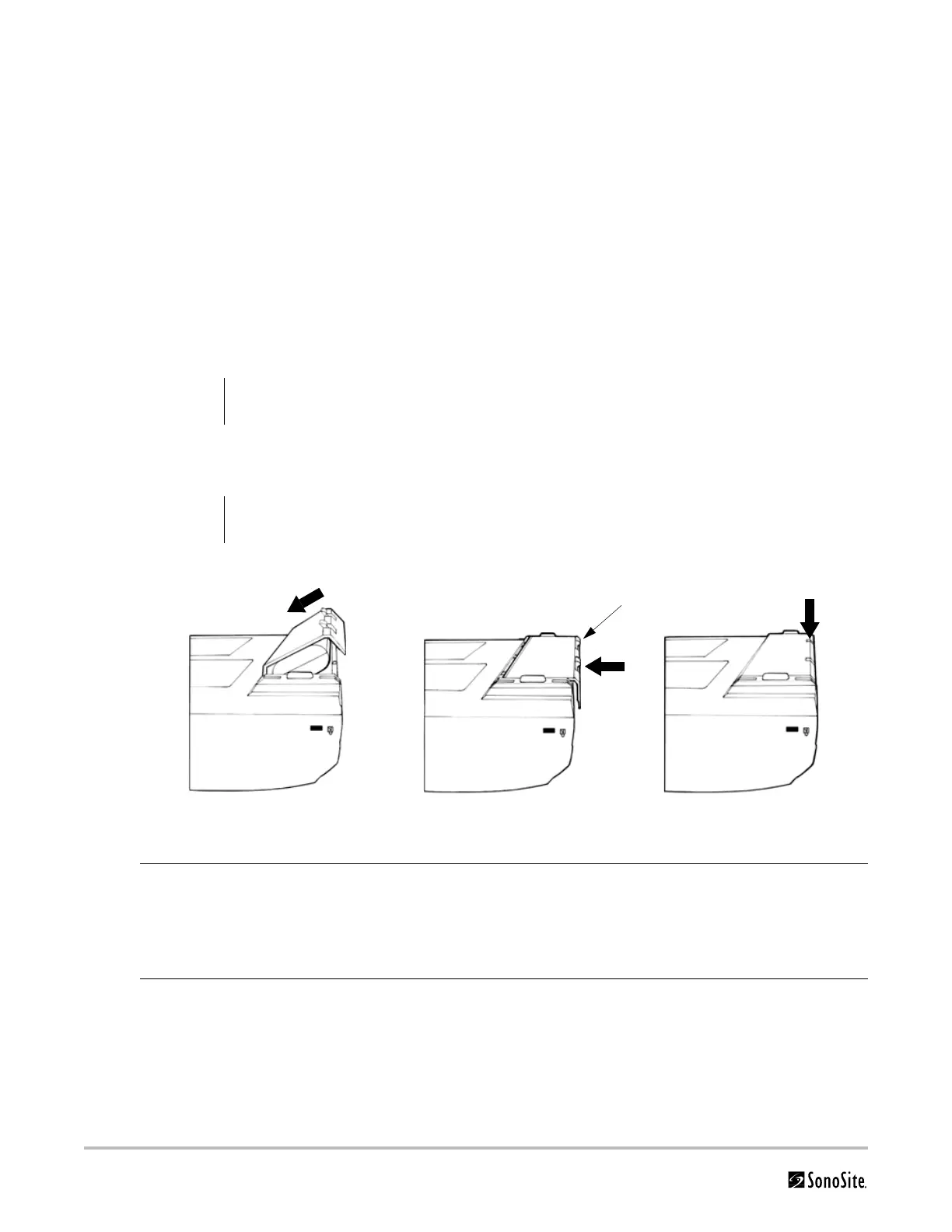
Figure 4.1 Insert Battery into System
Caution:
Use only the specified SonoSite battery pack. For battery safety notes, see “Battery Safety” on
page 7.
WARNING:
To avoid injury to the operator and to prevent damage to the ultrasound system, inspect the
battery for leaks prior to installing.
Install Battery 1 Disconnect the power supply from the ultrasound system.
2 Turn the system upside down.
3 Place the battery into the battery compartment, at a slight angle. See Figure 4.1.
4 Slide the battery forward until it locks into place.
5 Push down on the two locking levers to secure battery.
Remove
Battery
1 Push up on the two locking levers.
2 Slide the battery back.
3 Lift the battery from the compartment.
Locking levers



 To Next Page