Help Guide
Color Video Camera
BRC-AM7
Setting the Pan/Tilt Operation Acceleration
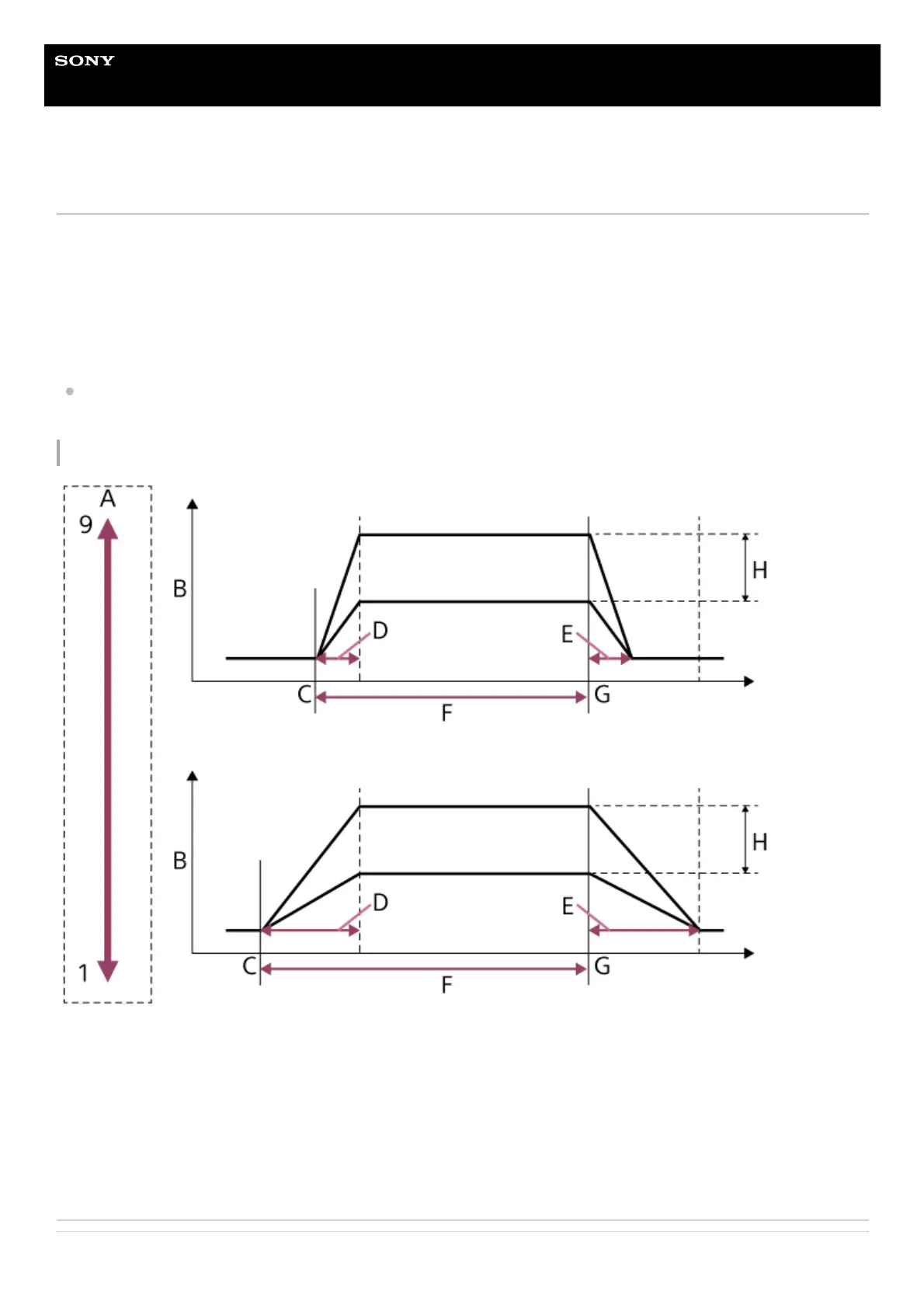
You can set the acceleration operation when using the joystick over nine gradations using [Pan-Tilt] – [P/T Acceleration] –
[Ramp Curve] in the web menu or camera menu. Increase the value for more rapid changes in speed, or decrease the value
for more gradual changes in speed.
For greater responsiveness when operating the pan/tilt, select a value in the range 7 to 9.
Set the preset position acceleration operation using [Pan-Tilt] – [P/T Preset] – [Ramp Curve] in the web menu.
For greater positional accuracy at the start/end of the movement to a preset position, a value in the range 1 to 6 is
recommended.
For details about preset position, see “Saving/Restoring Pan/Tilt and Zoom Position Using the Supplied Infrared Remote
Control.”
Relationship between [Ramp Curve] setting and pan/tilt operation
A: [Ramp Curve] setting (fastest (9) to slowest (1))
B: Operating speed
C: Operation start point
D: Acceleration time
E: Deceleration time
F: Operating time
G: Operation end point
H: Maximum speed
Related Topic



 To Next Page