Help Guide
Color Video Camera
BRC-AM7
Adjusting the Gain Manually
You can adjust the brightness manually using the gain.
You can control the gain when you want to adjust the exposure while using a fixed iris setting or when you want to prevent
the gain increasing due to AGC.
To temporarily adjust the gain manually
You can also adjust the gain temporarily by assigning [ISO/Gain] to a slider function selection button on the
(Main) tab in
the camera control panel and using the slider.
This is useful when you want to adjust the exposure by one step without changing the depth of field.
The adjustment result returns to the preset value configured using [ISO/Gain<L>] after performing any of the following
operations.
Changing ISO/Gain adjustment items
Setting the AGC switch to the on position
Switching the power supply of the unit to standby
To temporarily adjust the gain automatically using an assignable button
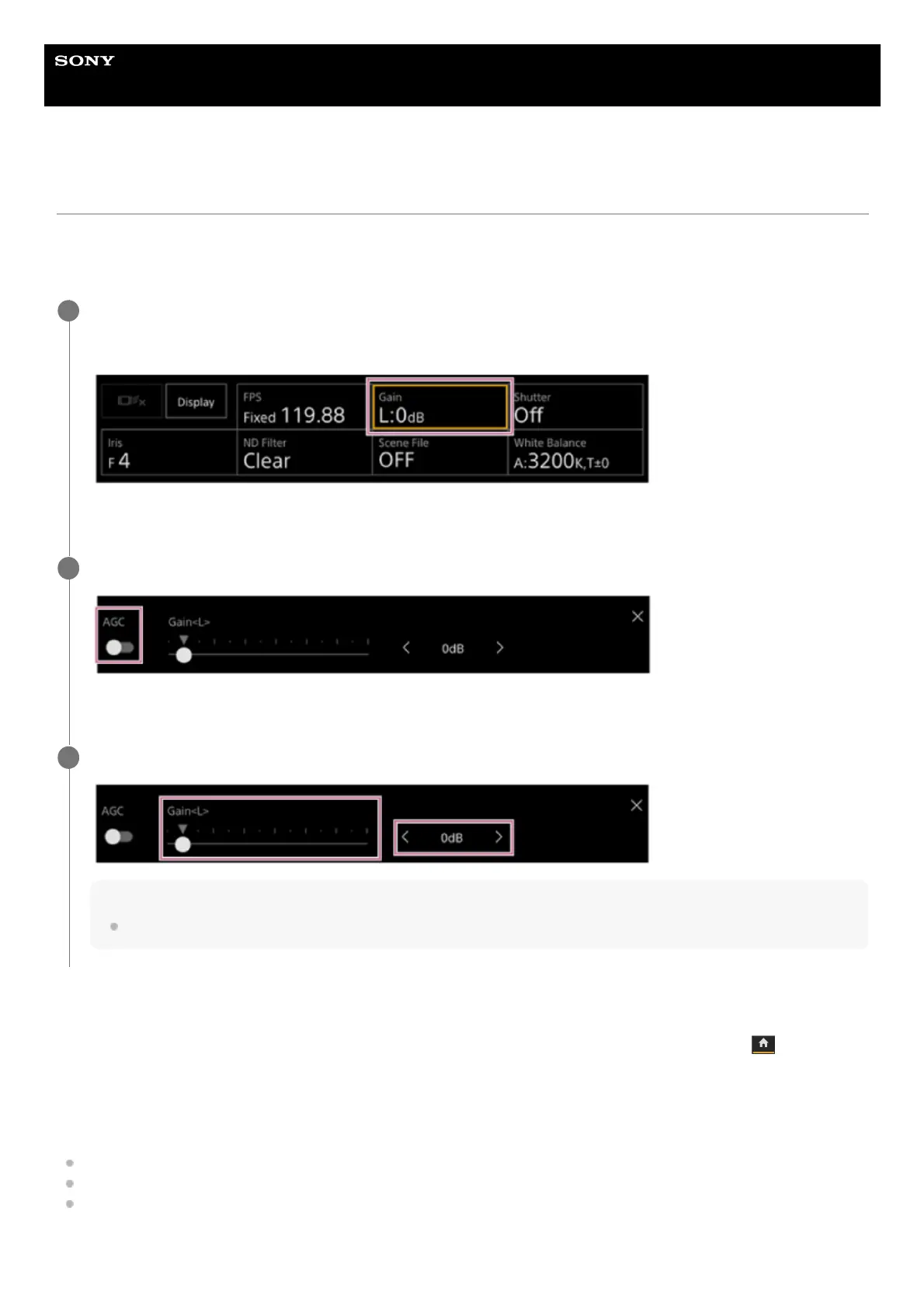
Press the [ISO/Gain] button in the camera basic configuration panel.
The frame of the [ISO/Gain] button changes to orange.
The ISO/Gain adjustment panel appears.
1
Slide the [AGC] switch to the left position to turn it off.
The gain switches to manual adjustment mode.
2
Adjust the gain using the [ISO/Gain] slider or [ISO/Gain] adjustment buttons.
Hint
The slider and adjustment button settings are linked.
3



 To Next Page