Help Guide
Color Video Camera
BRC-AM7
Adjusting in Preset Mode
You can select three ND filter transmittance values beforehand and quickly switch between them when shooting.
Hint
When an assignable button assigned with [ND Filter Position] is pressed, the ND filter changes in the sequence [Clear] → [Preset1] →
[Preset2] → [Preset3] → [Clear].
TP1001804538
5-065-326-11(1) Copyright 2024 Sony Corporation
Set [Shooting] – [ND Filter] – [Mode] to [Preset] in the camera menu.
1
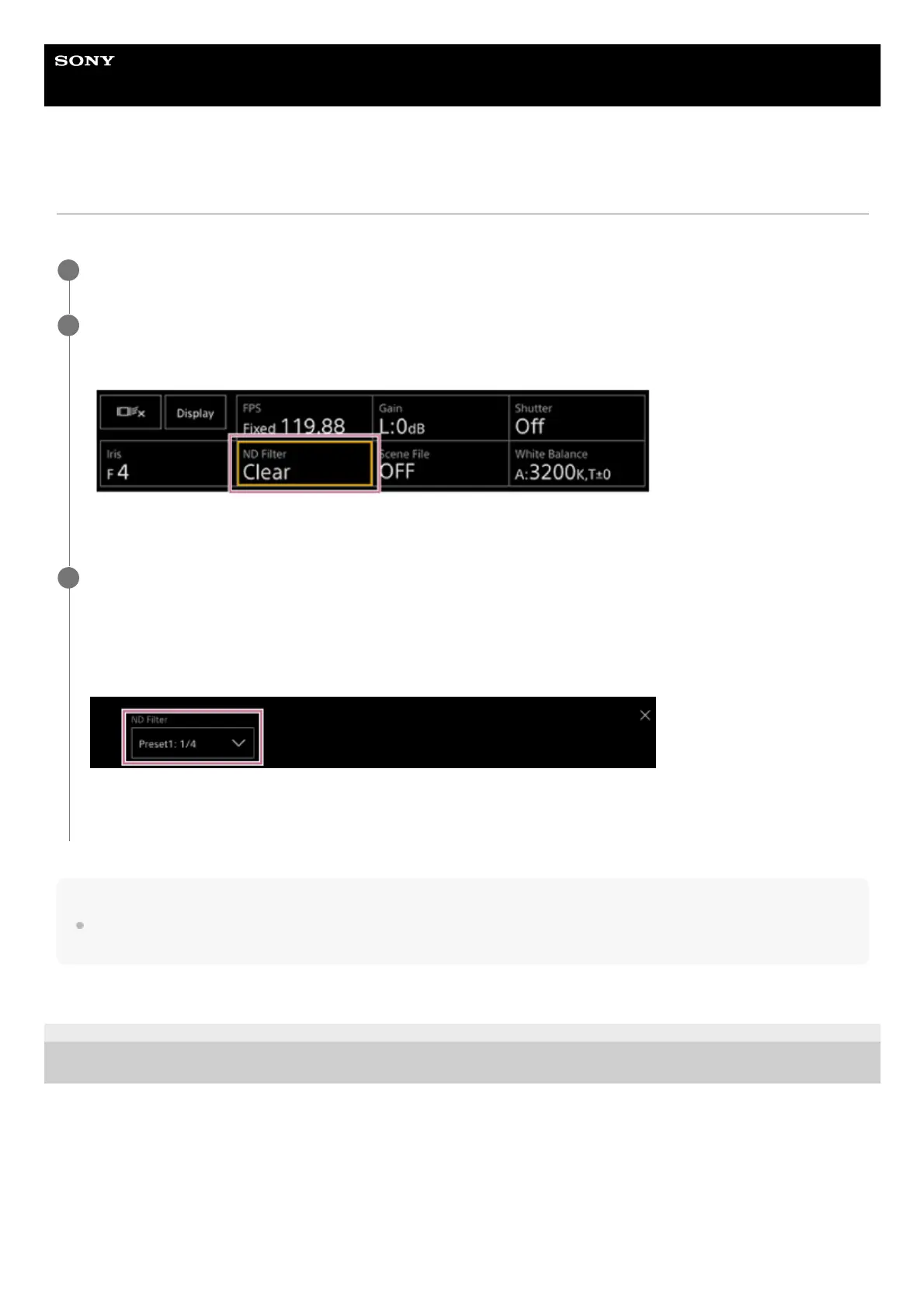
Press the [ND Filter] button in the camera basic configuration panel.
The frame of the [ND Filter] button changes to orange.
The ND Filter adjustment panel appears.
2
Press the [ND Filter] button and select one of the following from the list.
[Clear]: No ND filter.
[Preset1]: Transmittance set by [Shooting] – [ND Filter] – [Preset1] in the camera menu.
[Preset2]: Transmittance set by [Shooting] – [ND Filter] – [Preset2] in the camera menu.
[Preset3]: Transmittance set by [Shooting] – [ND Filter] – [Preset3] in the camera menu.
When one of [Preset1] to [Preset3] is selected for the ND filter, the transmittance value is displayed beside the ND filter
name.
3



 To Next Page