10
GB
2
1
1
2
7
qa
q;
8
4
3
5
6
9
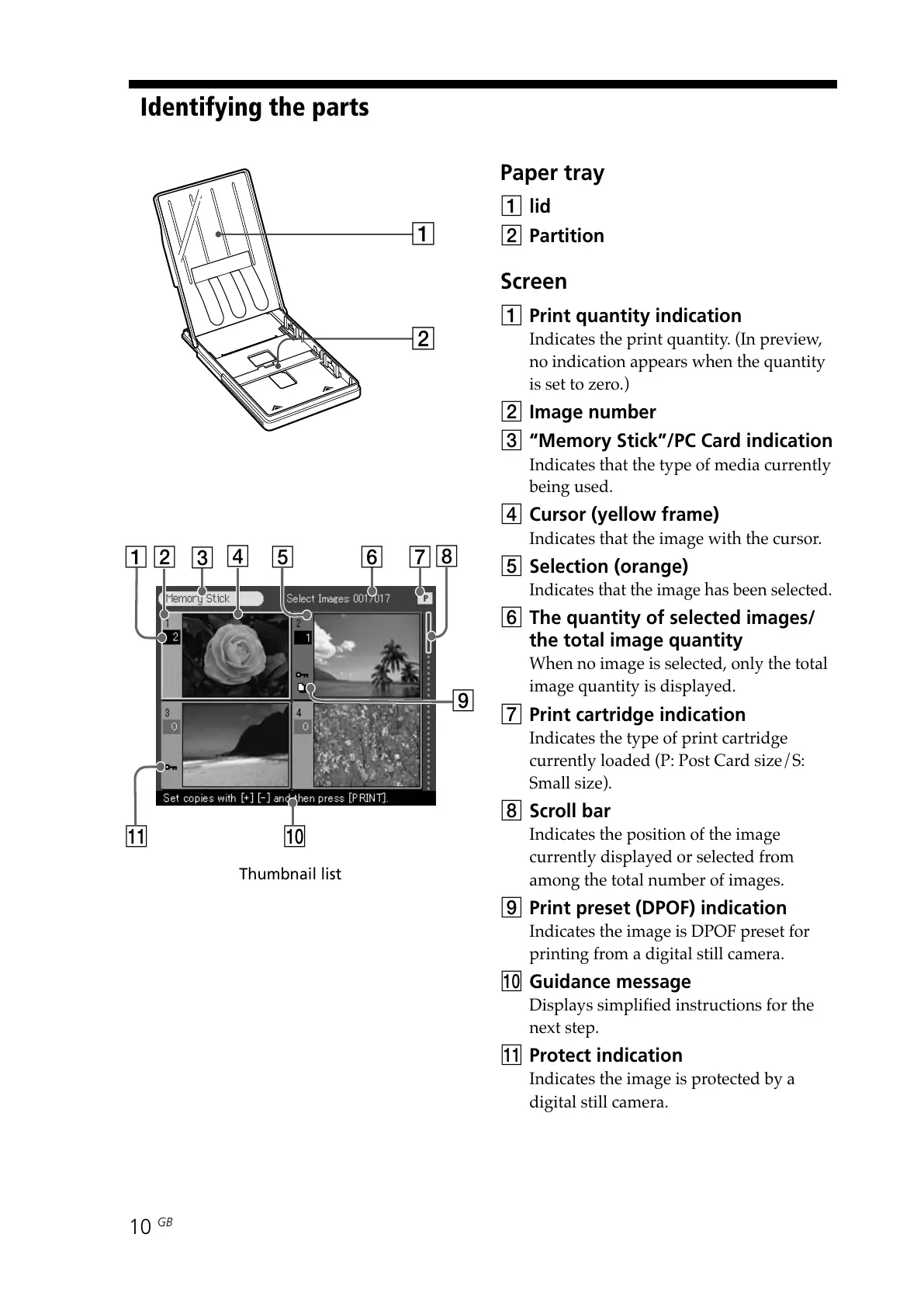
Thumbnail list
Paper tray
1 lid
2 Partition
Screen
1 Print quantity indication
Indicates the print quantity. (In preview,
no indication appears when the quantity
is set to zero.)
2 Image number
3 “Memory Stick”/PC Card indication
Indicates that the type of media currently
being used.
4 Cursor (yellow frame)
Indicates that the image with the cursor.
5 Selection (orange)
Indicates that the image has been selected.
6 The quantity of selected images/
the total image quantity
When no image is selected, only the total
image quantity is displayed.
7 Print cartridge indication
Indicates the type of print cartridge
currently loaded (P: Post Card size/S:
Small size).
8 Scroll bar
Indicates the position of the image
currently displayed or selected from
among the total number of images.
9 Print preset (DPOF) indication
Indicates the image is DPOF preset for
printing from a digital still camera.
0 Guidance message
Displays simplified instructions for the
next step.
qa Protect indication
Indicates the image is protected by a
digital still camera.
Identifying the parts



 To Next Page