27
GB
Basic printing operations
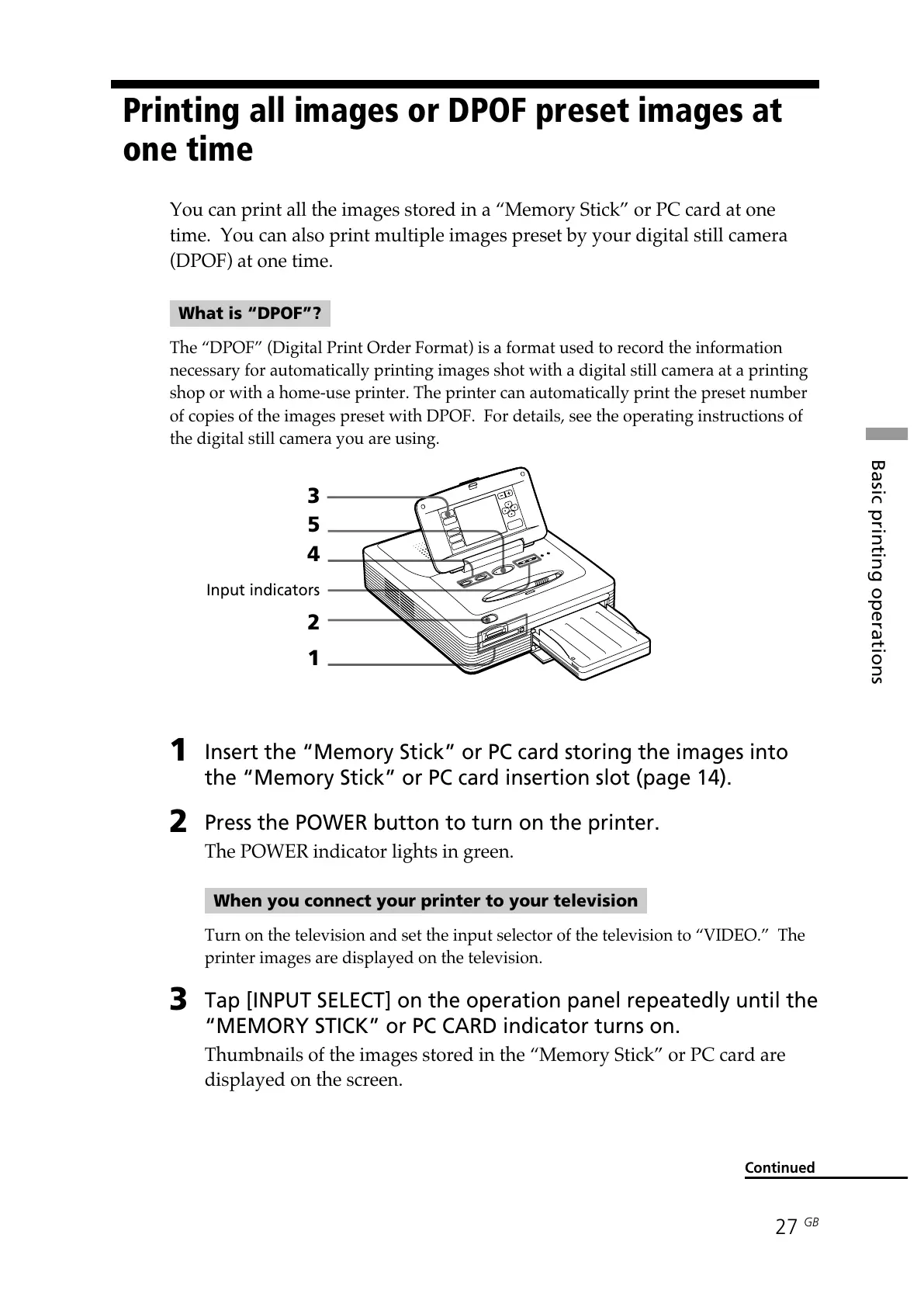
1
Insert the “Memory Stick” or PC card storing the images into
the “Memory Stick” or PC card insertion slot (page 14).
2
Press the POWER button to turn on the printer.
The POWER indicator lights in green.
When you connect your printer to your television
Turn on the television and set the input selector of the television to “VIDEO.” The
printer images are displayed on the television.
3
Tap [INPUT SELECT] on the operation panel repeatedly until the
“MEMORY STICK” or PC CARD indicator turns on.
Thumbnails of the images stored in the “Memory Stick” or PC card are
displayed on the screen.
Continued
3
5
4
Input indicators
2
1
Printing all images or DPOF preset images at
one time
You can print all the images stored in a “Memory Stick” or PC card at one
time. You can also print multiple images preset by your digital still camera
(DPOF) at one time.
What is “DPOF”?
The “DPOF” (Digital Print Order Format) is a format used to record the information
necessary for automatically printing images shot with a digital still camera at a printing
shop or with a home-use printer. The printer can automatically print the preset number
of copies of the images preset with DPOF. For details, see the operating instructions of
the digital still camera you are using.



 To Next Page