Customizing
your
camcorder
What
you
can
do
with
the
;1;
(SETTINGS)
category
of
the
ft
HOME
MENU
66
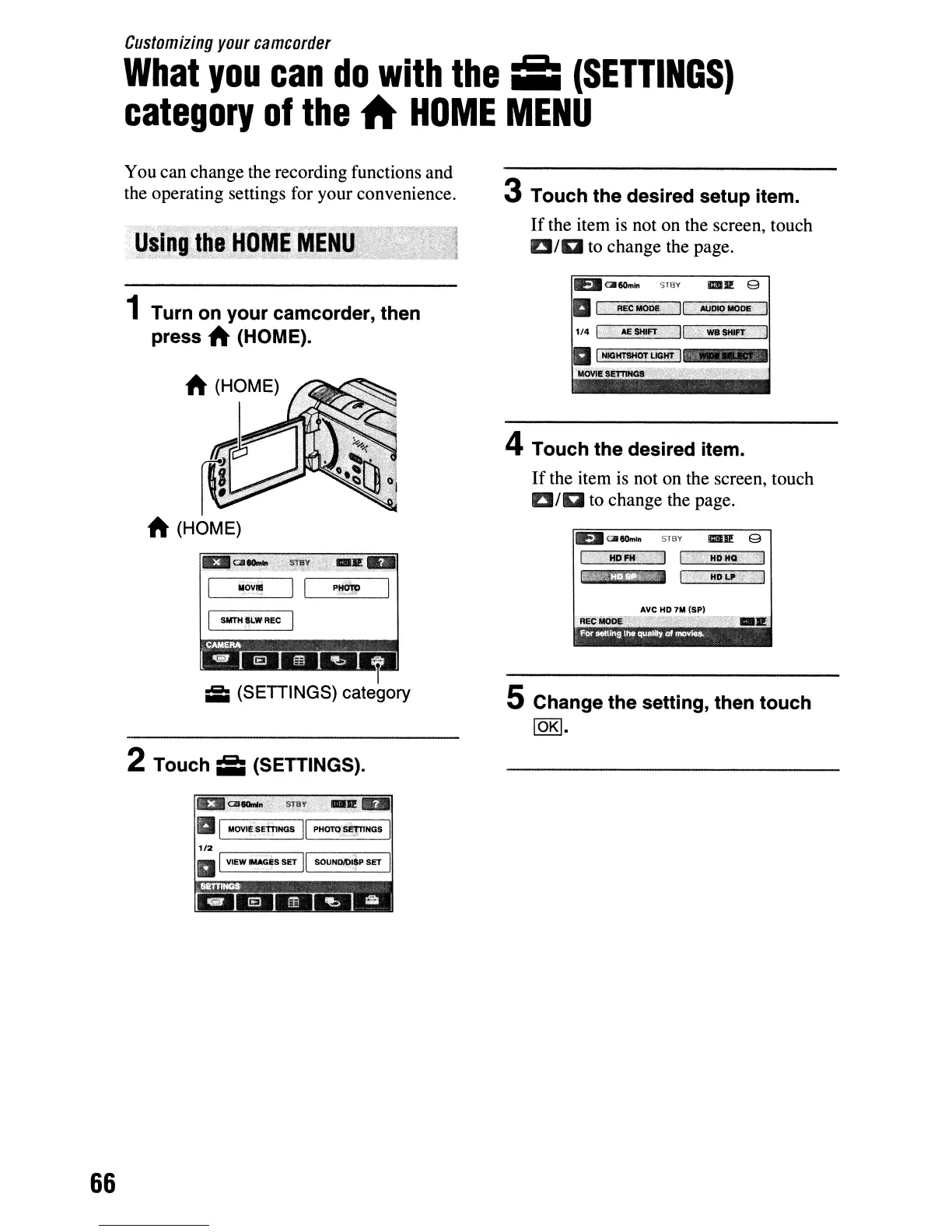
You can change the recording functions and
the operating settings for your convenience.
1 Turn on your camcorder, then
press
A (HOME).
A (HOME)
ill
(SETTINGS) category
2 Touch
;II
(SETTINGS).
III
I
MOVI~$EWNGS
II
PH01"Q~NGS
I
1/2
,..--~~~
r--...",.--,I
III
VIEW
rMAG~S
SET
II
SOUNDII:ltfP SET I
3 Touch the desired setup item.
If
the item is not on the screen, touch
DID
to change the page.
E.1I
Ql60m"
','flY
IlmU!! 9
a
I'
··REC'Mo*>;
II;'»
.
.t4Ill.f9~ile/
4 Touch the desired item.
If
the item is not on the screen, touch
DID
to change the page.
E.1I aII6Om'n
SllW
IIllilIl! 9
Ave
HD
7M (SP)
5 Change the setting, then touch
lOKI.




 To Next Page