Playback
You
can
play back the images
on
the media selected in the media setting (p. 22).
In
the default
setting, the images on the hard disk are
played
back.
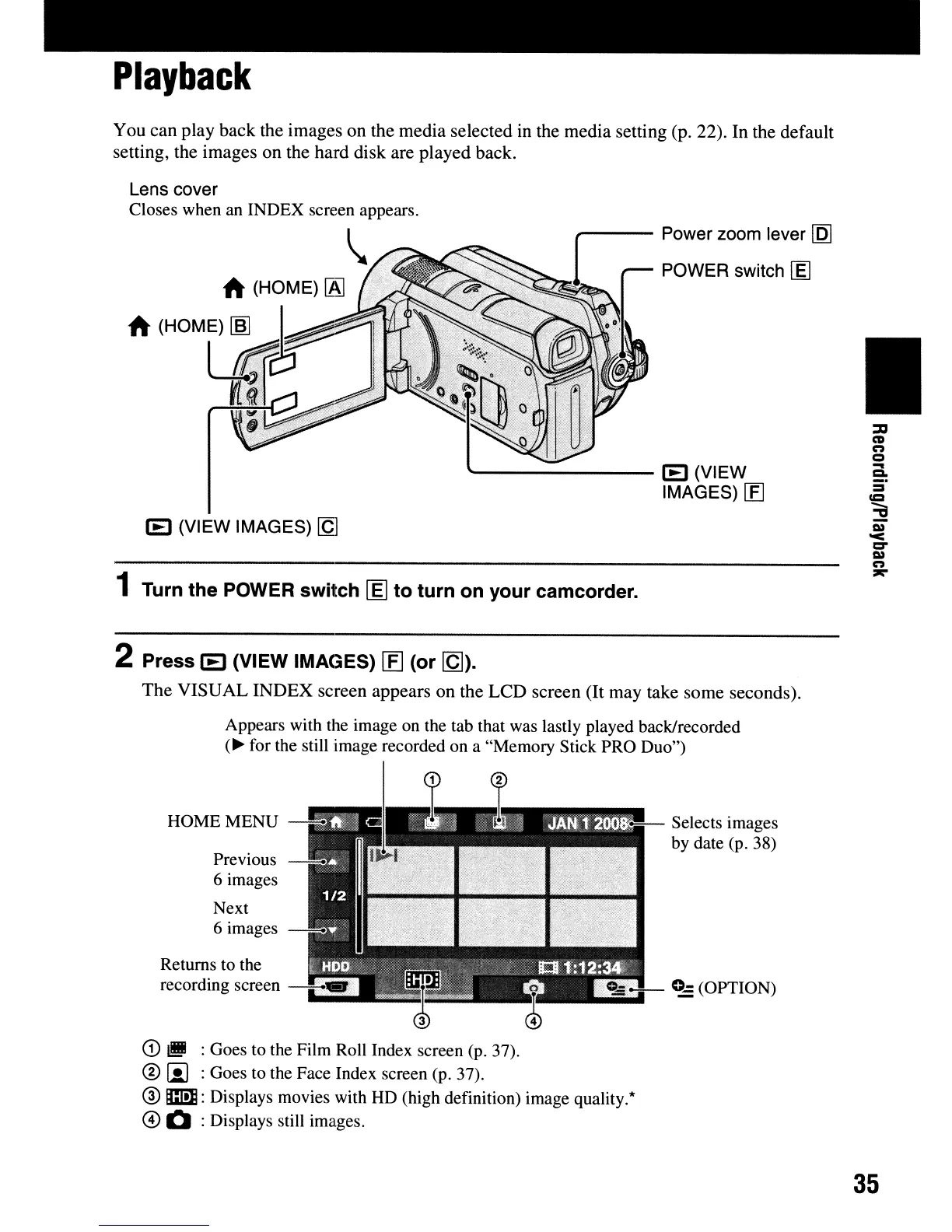
Lens cover
Closes when
an
INDEX screen appears.
'-------
IE
(VIEW
IMAGES)
[fJ
IE
(VIEW IMAGES)
[g
1 Turn the POWER switch
[:eJ
to turn on your camcorder.
2 Press
IE
(VIEW IMAGES)
[E]
(or
[Q]).
The
VISUAL
INDEX
screen appears on the
LCD
screen (It may take some seconds).
Appears with the image
on
the tab that was lastly played back/recorded
(~for
the still image recorded on a "Memory Stick PRO Duo")
•
HOME MENU
-=0
Previous
6 images
Next
6 images
H ;
~
Selects images
by date (p. 38)
G)
III!
:Goes to the Film Roll Index screen (p. 37).
®
iii
:Goes to the Face Index screen (p. 37).
@
m:
Displays movies with HD (high definition) image quality.*
@ Q :Displays still images.
35












 To Next Page