REDEYE
REDUC
ft
See page 72.
DIAL
SETTING
ft
See page 72.
FACE
DETECTION
ft
See page 72.
CONVERSION
LENS
ft
See page 73.
VIEW
IMAGES
SET
(Items
to
customize
the
display)
BII!_
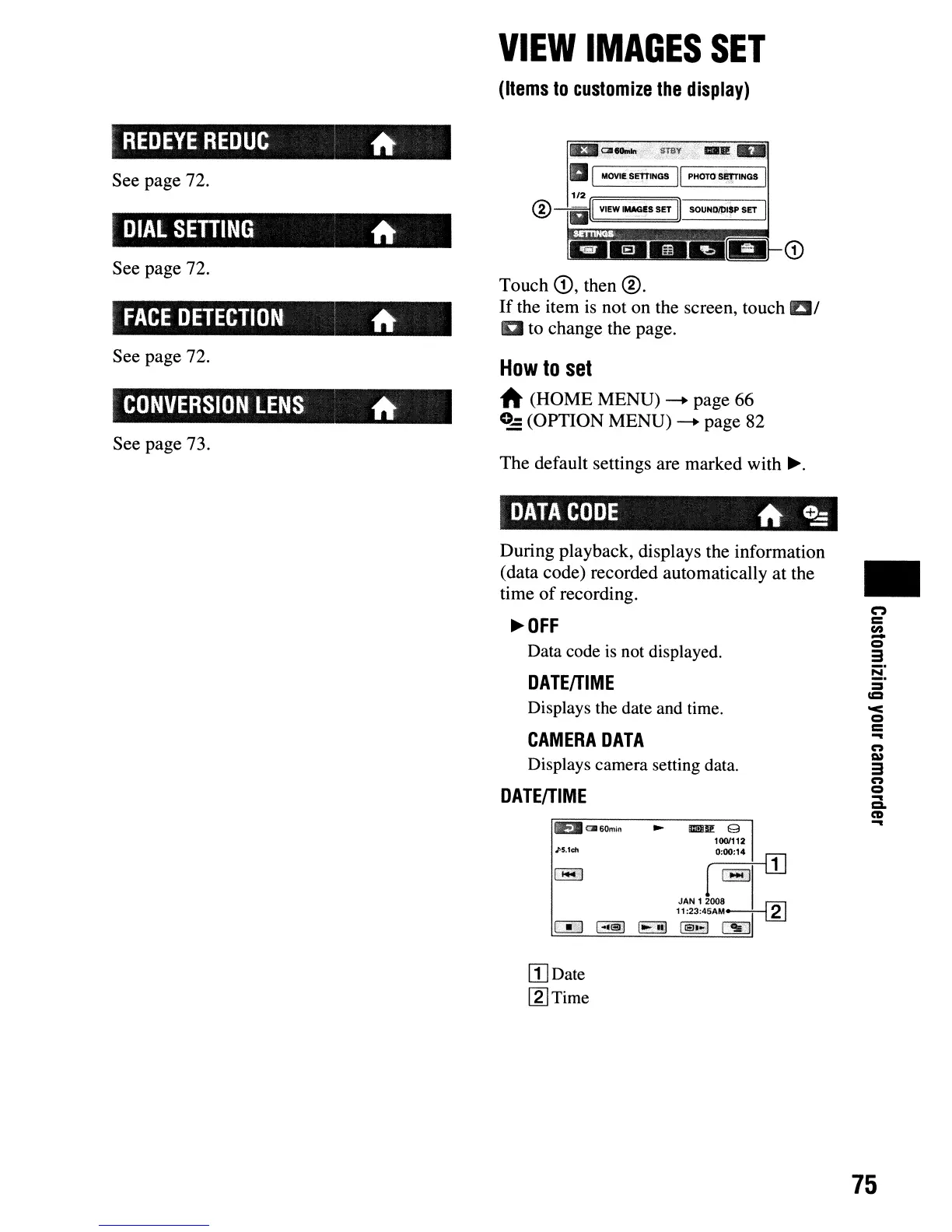
Touch
CD,
then @.
If
the item
is
not on the screen, touch 1:1/
a to change the page.
How
to
set
A (HOME MENU)
--+
page 66
0-
(OPTION MENU)
--+
page 82
The default settings are marked with
~.
DATA
CODE
ft
C5
During playback, displays the information
(data code) recorded automatically at the
time
of
recording.
~OFF
Data code is not displayed.
DATEITIME
Displays the date and time.
CAMERA
DATA
Displays camera setting data.
DATEITIME
tEll
0I60min
J>$.1c:h
[TIDate
[2] Time
•
("')
=
en
-
Q
3
8:
=
=
'<
Q
=
...
n
Q)
3
n
Q
...
a-
CD
...
75











 To Next Page