To
turn
off
the
power
Turn the POWER switch to OFF (CHG).
" Notes
•
If
you do not use your camcorder for about 3
months, the built-in rechargeable battery gets
discharged and the date and time settings may
be cleared from the memory. In that case,
charge the built-in rechargeable battery and then
set the date and time again (p. 110).
• It takes a few seconds for your camcorder to be
ready to shoot after the power
is
turned on. You
cannot operate your camcorder during this time.
• The lens cover opens automatically when the
power
is
turned on. It closes when the playback
screen is selected,
or
the power
is
turned off.
• In the setting at the time
of
purchase, the power
turns
off
automatically
if
you leave your
camcorder without any operation attempted for
approximately 5 minutes, to save battery power
([A.SHUT OFF],
p.
80).
.~.
Tips
• The date and time does not appear during
recording, but they are automatically recorded
on the media, and can be displayed during
playback (see page 75 for [DATA CODE]).
• Refer to page
103
for information concerning
"World time difference."
•
If
the buttons on the touch panel do not work
correctly, adjust the touch panel
(CALIBRATION)
(p.
109).
You can change the on-screen displays to
show messages in a specified language. To
select the screen language, touch
A (HOME)
-+
iii
(SETTINGS)
-+
[CLOCK!
00
LANG]
-+
[00
LANGUAGE SET] (p. 79).
Step
4:
Making
setting
adjustments
before
recording
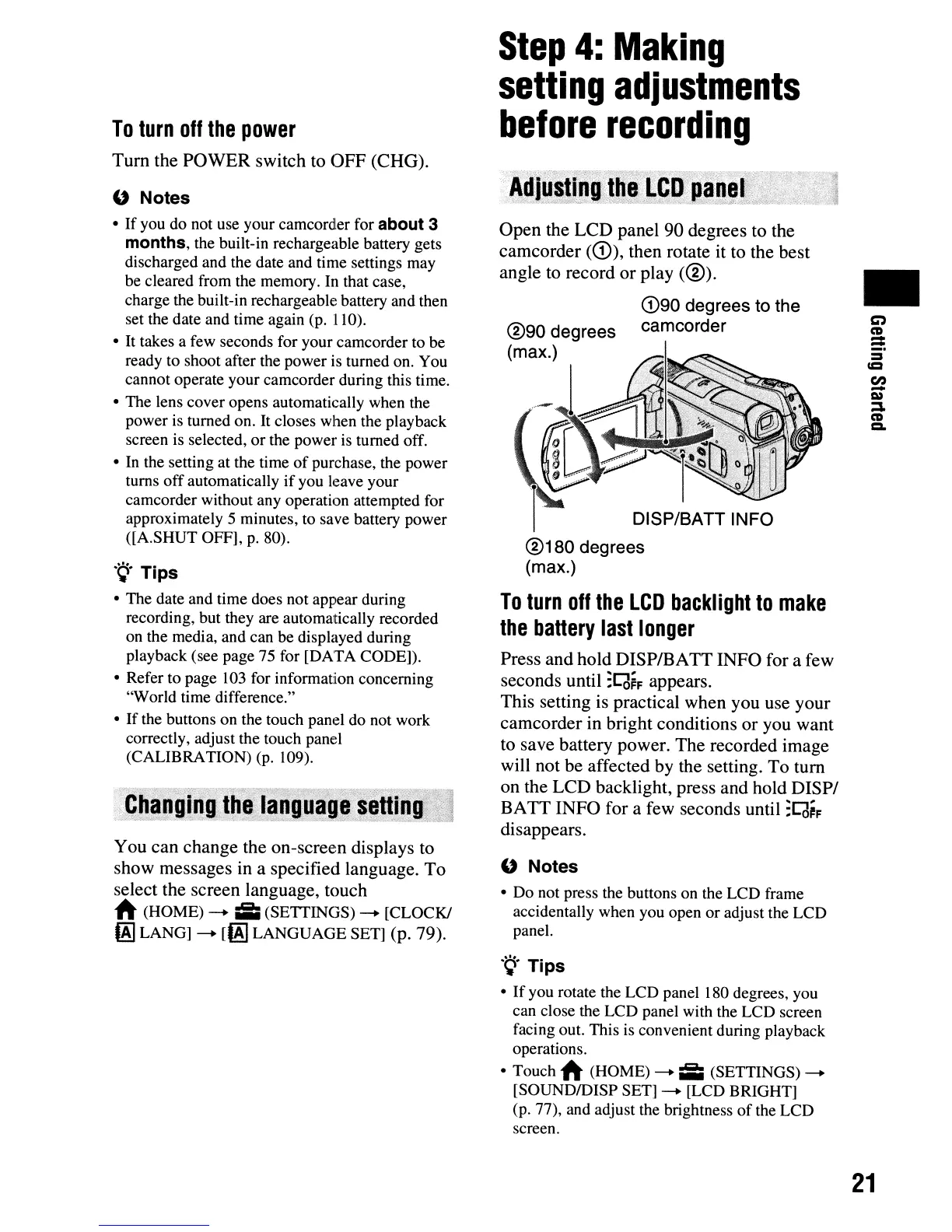
Open the LCD panel 90 degrees to the
camcorder
(G)),
then rotate it to the best
angle
to
record or play
(®)
.
eD90
degrees to the
camcorder
DISP/BATT INFO
®180
degrees
(max.)
To
turn
off
the
LCD
backlight
to
make
the
battery
last
longer
Press and hold DISP/BATT INFO for a few
seconds until
:C(J~F
appears.
This setting is practical when you use your
camcorder in bright conditions or you want
to save battery power. The recorded image
will not be affected by the setting. To turn
on the LCD backlight, press and hold
DISPI
BATT INFO for a few seconds until
:C(J~F
disappears.
" Notes
• Do not press the buttons on the LCD frame
accidentally when you open or adjust the LCD
panel.
.~.
Tips
•
If
you rotate the LCD panel 180 degrees, you
can close the LCD panel with the LCD screen
facing out. This is convenient during playback
operations.
• Touch
A (HOME)
-+
;;;
(SETTINGS)
-+
[SOUNDIDISP SET]
-+
[LCD BRIGHT]
(p. 77), and adjust the brightness
of
the LCD
screen.
•
21












 To Next Page