*
ijsoij
appears when you select the movie with SO (standard definition) image quality
in
[MOVIE
MEDIA SET] (p. 22).
.
~.
Tips
• The number
of
the images on the VISUAL INDEX screen can be changed
6.-.
12
by moving the power
zoom lever
[Q].
To fix this number, press A (HOME)
~
(or!Al) -
iii:;
(SETTINGS) - [VIEW
IMAGES SET] -
[~
DISPLAY] (p. 76).
3 Start playing back.
Playing
movies
lt1
Touch the
!Imll
or
ijsog
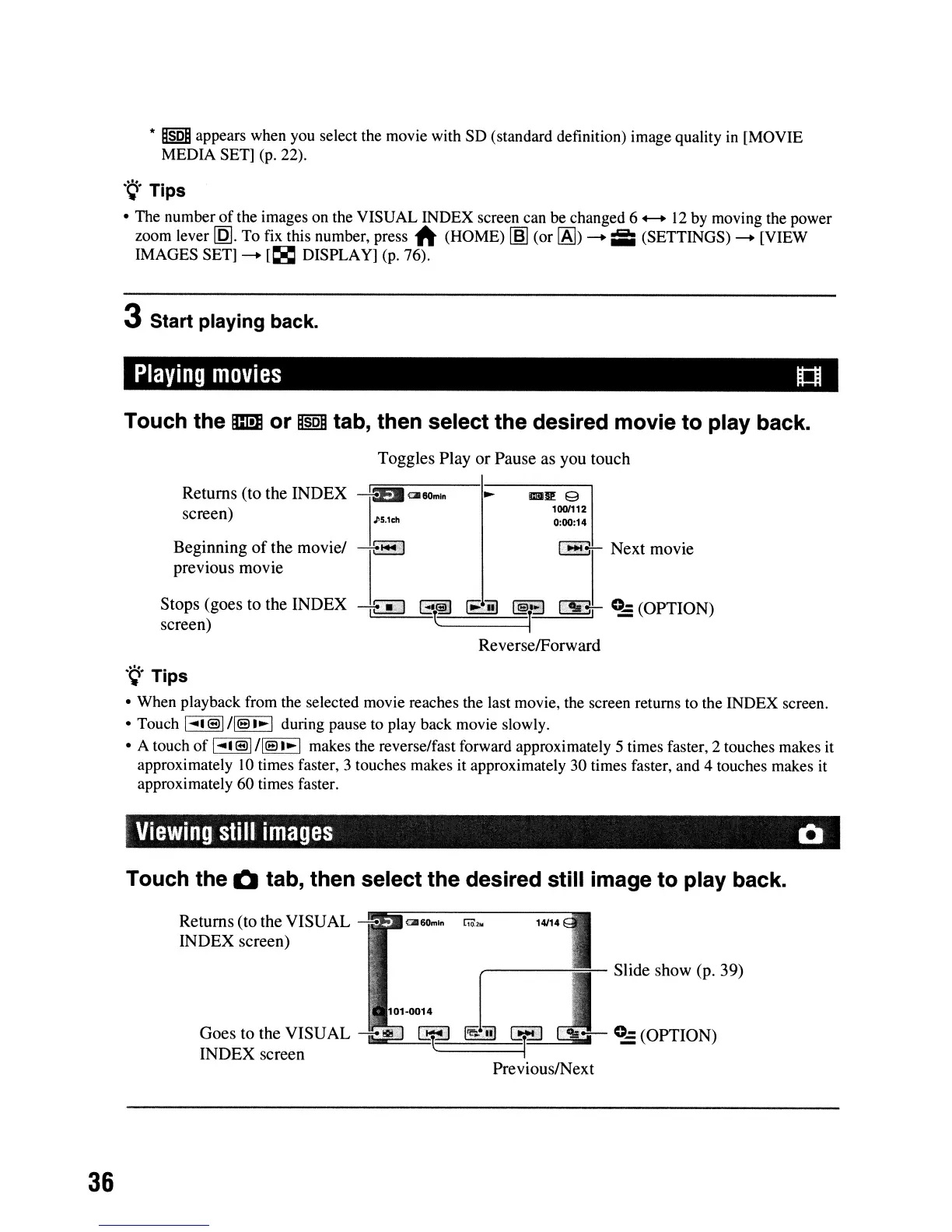
tab, then select the desired movie to play back.
Toggles
Play
or
Pause
as you touch
Returns (to the
INDEX
~
<:1II60mln
screen)
J'5,lch
i1aR: 9
100/112
0:00:14
Beginning
of
the
movie/
-+-'1
previous
movie
I-c+-
Next
movie
Stops (goes to the
INDEX
~
G'~
lB:ill
(§lT
a
~
0..,:
(OPTION)
screen) i
ReverselForward
.~.
Tips
• When playback from the selected movie reaches the last movie, the screen returns to the INDEX screen.
• Touch
1
....
'®I/lsl~1
during pause to play back movie slowly.
• A touch
of
I
....
'
®I
/Is
I~
I makes the reverse/fast forward approximately 5 times faster, 2 touches makes it
approximately
10
times faster, 3 touches makes it approximately 30 times faster, and 4 touches makes it
approximately 60 times faster.
Viewing
still
images
Q
Touch the Q tab, then select the desired still image to play back.
Slide
show
(p.
39)
Goes to the VISUAL
---
..
,. ¥
j;;;]
INDEX
screen
~===
Returns (to the
VISUAL
~
~6OIn1n
ria2.
14/14
INDEX
screen)
36












 To Next Page