•
When
you
connect your camcorder
to
a TV
compatible
with
the
10-1110-2 system, set
[TV
TYPE]
to
[16:9]. The TV switches
to
full
mode
automatically. Refer also
to
the
instruction
manuals supplied with your
TV.
DISP
OUTPUT
ft
~LCD
PANEL
Shows displays such as the time code in
the viewfinder and on the LCD screen.
V-OUT/PANEL
Shows displays such as the time code
in
the viewfinder, on the TV screen and LCD
screen.
U Notes
•
The
setting of [DISP
OUTPUT]
may
be
changed according
to
the
setting of [CTRL FOR
HOMI] (p. 81).
COMPONENT
ft
Select
[COMPONENT]
when
connecting
your
camcorder
to a
TV
with
the
component
input
jack.
480i
Select when connecting your camcorder to
a TV with the component input jack.
~
1080i/48Oi
Select when connecting your camcorder to
a TV that has the component input jack
and is capable
of
displaying the I080i
signal.
CLOCK/tAl
LANG
(Items
to
set
clock
and
language)
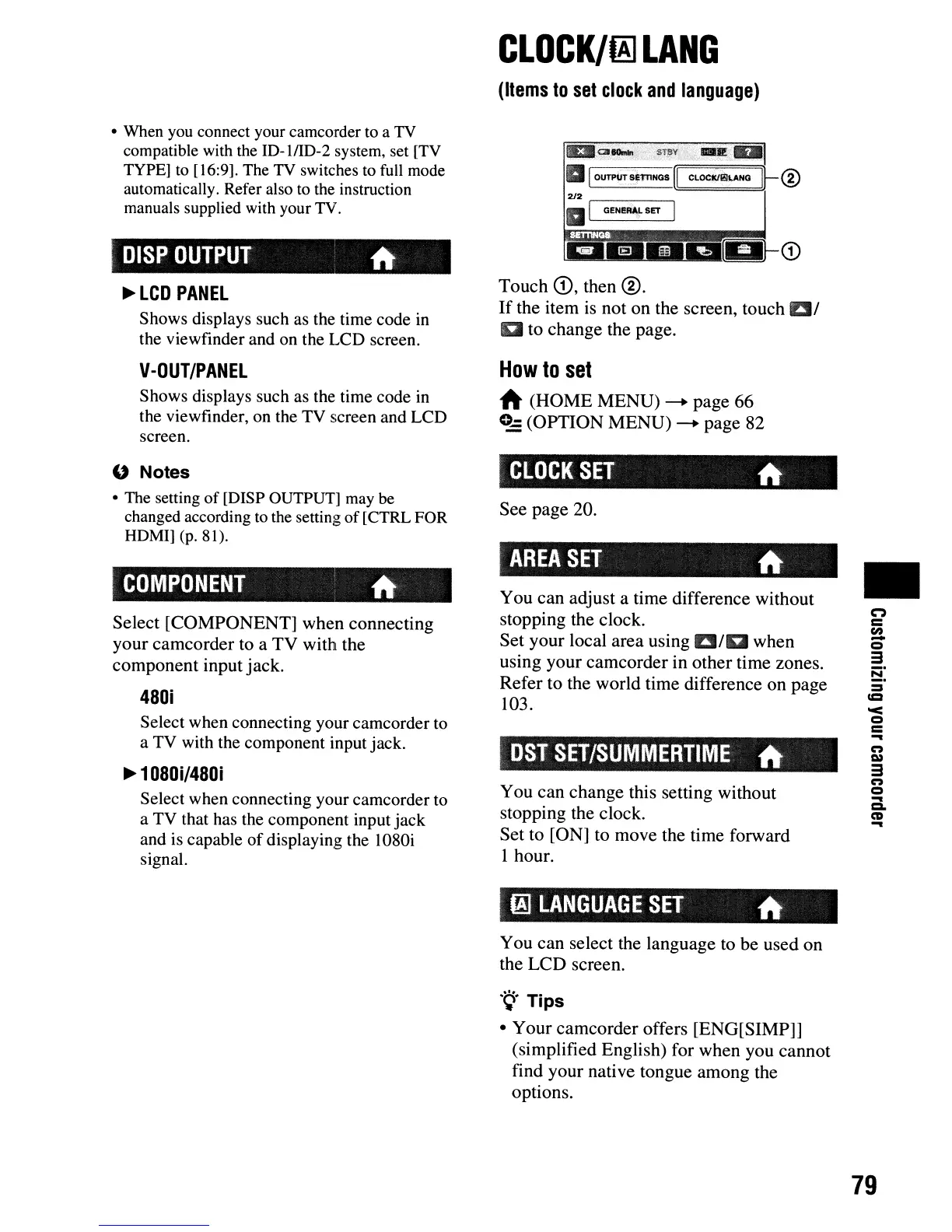
Touch
CD,
then
®.
If
the item is not
on
the screen, touch
al
g to
change
the page.
How
to
set
A
(HOME
MENU)
-+
page
66
0-
(OPTION
MENU)
-+
page
82
CLOCK
SET
ft
See
page
20.
AREA
SET
ft
You
can
adjust a time difference without
stopping the clock.
Set
your
local
area
using
aiD
when
using
your
camcorder
in
other
time zones.
Refer
to the
world
time difference
on
page
103.
DST
SET/SUMMERTIME
ft
You
can
change
this setting without
stopping the clock.
Set
to [ON] to move the time forward
1 hour.
~
LANGUAGE
SET
ft
You
can
select the language to
be
used
on
the
LCD
screen.
'9'
Tips
•
Your
camcorder
offers [ENG[SIMP]]
(simplified English) for
when
you
cannot
find your native tongue
among
the
options.
•
C"')
c
en
-
Q
3
!S!:
:=
CCI
'<
Q
C
...
C")
Q)
3
C")
Q
...
c:a.
CD
...
79




 To Next Page