1 Insert the "Memory Stick PRO
Duo."
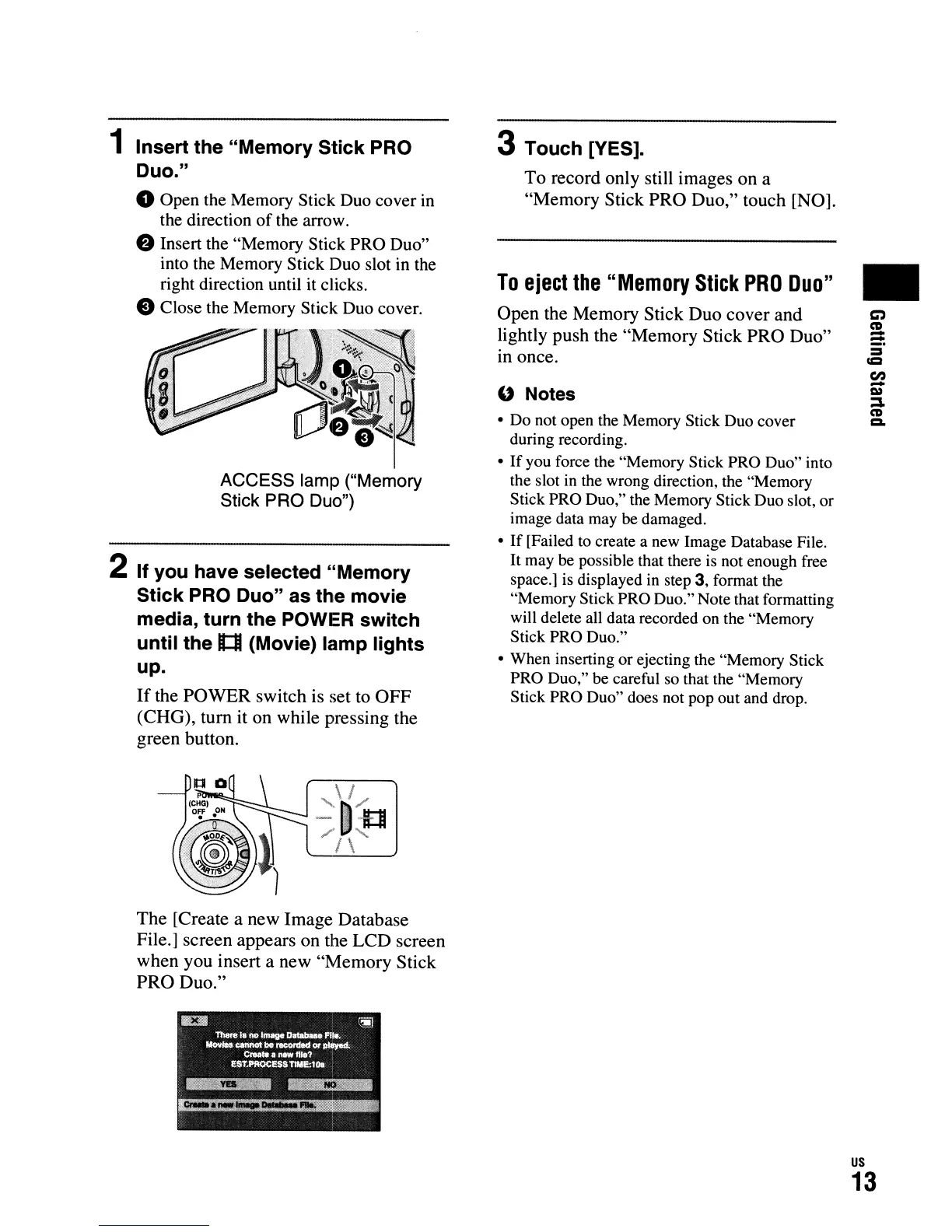
o Open the Memory Stick Duo cover
in
the direction ofthe arrow.
e Insert the "Memory Stick PRO Duo"
into the Memory Stick Duo slot
in
the
right direction until it clicks.
e Close the Memory Stick Duo cover.
\1
I
'n
ACCESS lamp ("Memory
Stick
PRO Duo")
2 If you have selected "Memory
Stick PRO Duo" as the movie
media, turn the POWER switch
until the
tt:lI
(Movie) lamp lights
up.
If
the POWER switch is set to
OFF
(CHG), turn it on while pressing the
green button.
The [Create a new Image Database
File.] screen appears on the LCD screen
when you insert a new "Memory Stick
PRO Duo."
3 Touch [YES].
To record only still images on a
"Memory Stick PRO Duo," touch [NO].
To
eject
the
"Memory
Stick
PRO
Duo"
Open the Memory Stick Duo cover and
lightly push the "Memory Stick PRO Duo"
10
once.
" Notes
• Do not open the Memory Stick Duo cover
during recording.
•
If
you force the "Memory Stick PRO Duo" into
the slot
in
the wrong direction, the "Memory
Stick PRO Duo," the Memory Stick Duo slot, or
image data may
be damaged.
•
If
[Failed to create a new Image Database File.
It may be possible that there is not enough free
space.] is displayed
in
step
3,
format the
"Memory Stick PRO Duo." Note that formatting
will delete all data recorded on the "Memory
Stick PRO Duo."
• When inserting or ejecting the "Memory Stick
PRO
Duo,"
be careful so that the "Memory
Stick PRO Duo" does not pop out and drop.
•
us
13




 To Next Page