EasyManua.ls Logo

Sony HDR-SR11 - Page 155

Sony HDR-SR11
188 pages
Print Icon
To Next Page IconTo Next Page
To Previous Page IconTo Previous Page
Loading...
Upper
right
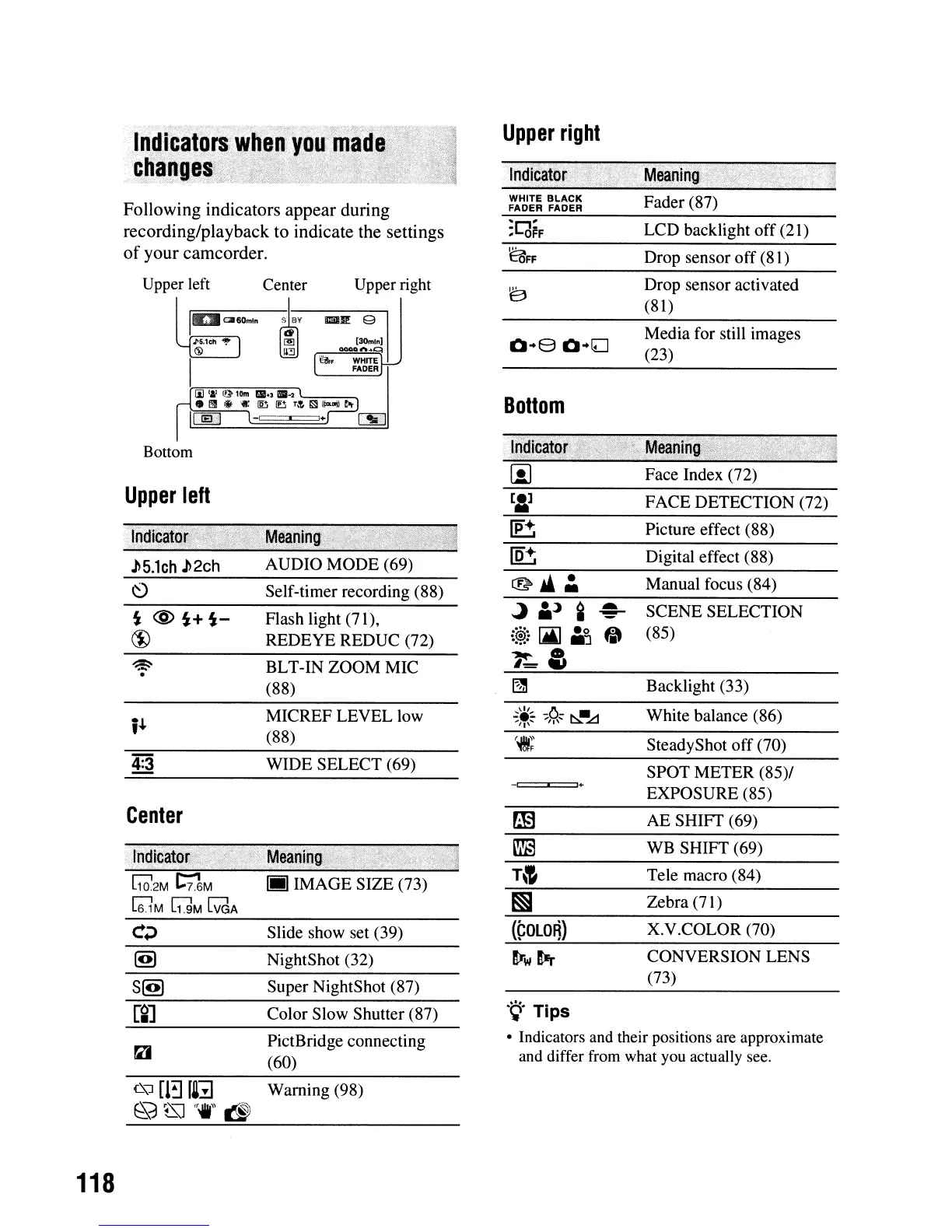
Following
indicators
appear
during
recording/playback
to
indicate the settings
of
your
camcorder.
WHITE
BLACK
FADER FADER
~I"""I'
:L(jFF
~FF
Fader (87)
LCD backlight off (21)
Drop sensor
off
(81)
SCENE SELECTION
(85)
Backlight (33)
Digital effect (88)
Manual focus (84)
Picture effect (88)
FACE DETECTION (72)
Face Index (72)
Media for still images
(23)
Drop sensor activated
(81)
~
A:J
Q
~@.:
[Ai]
A~
"
~&
Bottom
Upper right
IIlIiIII! 9
BLT-IN ZOOM MIC
(88)
AUDIO MODE (69)
Flash light (71),
REDEYE REDUC (72)
Self-timer recording (88)
Upper left Center
~
II;WCilI60mln
~':V
J>5.1C11
"!'
~
® U3
,.",--=~
I
Bottom
~
.
~5.1ch
~2ch
Upper
left
.~.
Tips
• Indicators
and
their positions
are
approximate
and
differ
from
what
you
actually
see.
Tele macro (84)
White balance (86)
SPOT METER (85)/
EXPOSURE (85)
X.V.COLOR (70)
WB SHIFT (69)
AE SHIFT (69)
SteadyShot
off
(70)
Zebra (71)
CONVERSION LENS
(73)
_I
'+
(~OlO~)
PictBridge connecting
(60)
Super NightShot (87)
NightShot (32)
Slide show set (39)
Color Slow Shutter (87)
WIDE SELECT (69)
MICREF LEVEL low
(88)
Ijj]
IMAGE SIZE (73)
raJ
i'"
Center
111d.icat~
R2M~M
[6l
M
[1]M
l:V"aA
Warning (98)
118

Table of Contents