Read
this
before
operating
your
camcorder
Using
the
camcorder
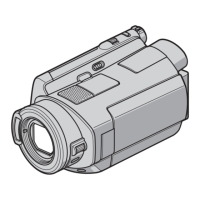
• Do not hold the camcorder by the
following parts, and also do not hold the
camcorder by the jack covers.
Shoe cover
Battery pack
Viewfinder
• "Memory Stick PRO Duo" and "Memory
Stick PRO-HG Duo" are both referred to
as "Memory Stick PRO Duo" in this
manual.
• You cannot use any type
of
memory card
other than those mentioned above.
• "Memory Stick PRO Duo" can be used
only with "Memory Stick PRO"
compatible equipment.
• Do not attach a label or the like on a
"Memory Stick PRO Duo" or a Memory
Stick Duo adaptor.
• Insert the "Memory Stick PRO Duo" into
the Memory Stick Duo adaptor when
using a "Memory Stick PRO Duo" with
"Memory Stick" compatible equipment.
Types
of
"Memory
Stick"
you
can
use
in
your
camcorder
• For recording movies, it
is
recommended
that you use a "Memory Stick PRO Duo"
of
1 GB or larger marked with:
-
MEMORY
STI[K
PRD
Duo
("Memory Stick
PRO Duo")*
-
MEMORYSmKPRO-HGOUD
("Memory Stick
PRO-HG
Duo")
* Marked with Mark2 or not, either can be
used.
• See page 24 for the recordable time of a
"Memory Stick PRO Duo."
"Memory Stick PRO Duo"/"Memory Stick
PRO-HG Duo"
(This size can be used with your
camcorder.)
Handling
the
images
recorded
on
your
camcorder
on
the
computer
Refer to "PMB Guide" stored on the
supplied CD-ROM.
Before operating the unit, please read this
Handbook thoroughly, and retain it for
future reference.
."Nbiii~tofi'<u:
~
'""
.",.
-
~,/
':i1i'i::S.a~
:ii,':l"'ir&
In
"Handycam
Handbook"
(this
Handbook)
The operations and handling
of
your
camcorder are explained. Refer also to
"Operating Guide" (the separate volume).
"Memory Stick"
(You cannot use it in your camcorder.)
• The camcorder
is
not dustproofed,
dripproofed or waterproofed. See "About
handling
of
your camcorder" (p. 108).
• Do not do any
of
the following when the
o (Movie
)/Q
(Still) mode lamps
(p. 20) or the ACCESS lamps (p. 29) are
lit or flashing.
Otherwise, the media may be damaged,
recorded images may be lost or other
malfunctions could occur.
2






 To Next Page