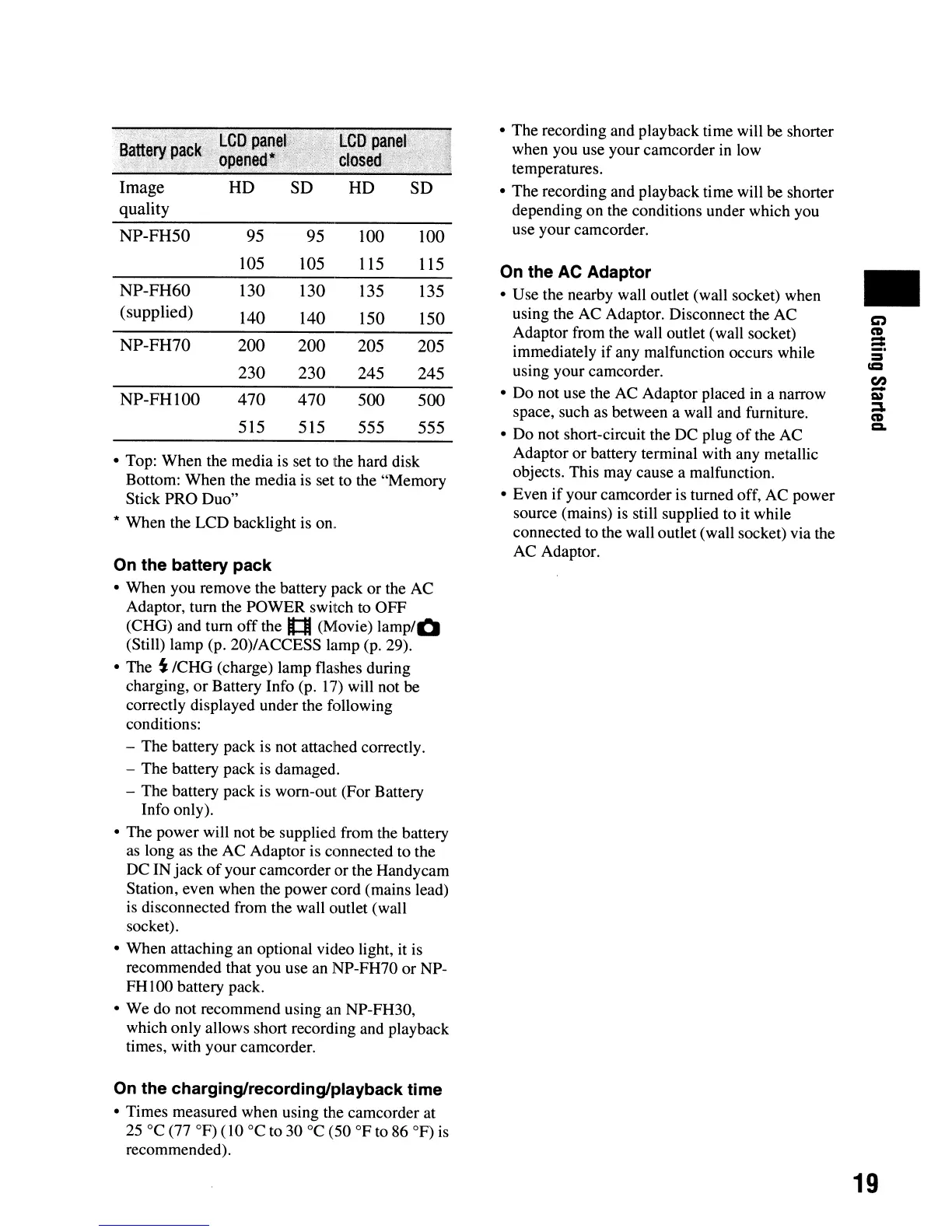
Image
SD
quality
NP-FH50
95
95
100
100
105 105 115
115
NP-FH60
130 130
135 135
(supplied)
140
140
150
150
NP-FH70
200
200
205
205
230 230
245 245
NP-FHI00 470 470
500
500
515
515
555 555
• Top: When the media is set to the hard disk
Bottom: When the media is set to the "Memory
Stick PRO Duo"
* When the
LCD
backlight is on.
On the battery pack
• When you remove the battery pack
or
the AC
Adaptor, turn the
POWER
switch to
OFF
(CHG) and turn
off
the
l1
(Movie)
lamp/O
(Still) lamp (p. 20)/ACCESS lamp (p. 29).
• The
S:
ICHG
(charge) lamp flashes during
charging,
or
Battery Info (p.
17)
will not be
correctly displayed under the following
conditions:
- The battery pack is not attached correctly.
- The battery pack is damaged.
- The battery pack is worn-out (For Battery
Info only).
• The power will not be supplied from the battery
as long as the
AC
Adaptor is connected to the
DC
IN
jack
of
your camcorder or the Handycam
Station, even when the power cord (mains lead)
is disconnected from the wall outlet (wall
socket).
• When attaching an optional video light, it is
recommended that you use an NP-FH70
or
NP-
FH
I00 battery pack.
• We do not recommend using an NP-FH30,
which only allows short recording and playback
times, with your camcorder.
On the charging/recording/playback time
• Times measured when using the camcorder at
25°C
(77
OF)
(10 °C to
30°C
(50
OF
to 86
OF)
is
recommended).
•
The
recording and playback time will be shorter
when you use your camcorder in low
temperatures.
•
The
recording and playback time will be shorter
depending
on
the conditions under which you
use your camcorder.
On the AC Adaptor
• Use the nearby wall outlet (wall socket) when
using the AC Adaptor. Disconnect the AC
Adaptor from the wall outlet (wall socket)
immediately
if
any malfunction occurs while
using your camcorder.
•
Do
not use the AC Adaptor placed in a narrow
space, such as between a wall and furniture.
•
Do
not short-circuit the DC plug
of
the AC
Adaptor
or
battery terminal with any metallic
objects. This may cause a malfunction.
• Even
if
your camcorder is turned off, AC power
source (mains) is still supplied to it while
connected to the wall outlet(wall socket) via the
AC Adaptor.
•
19




 To Next Page