MHC-V41D
16
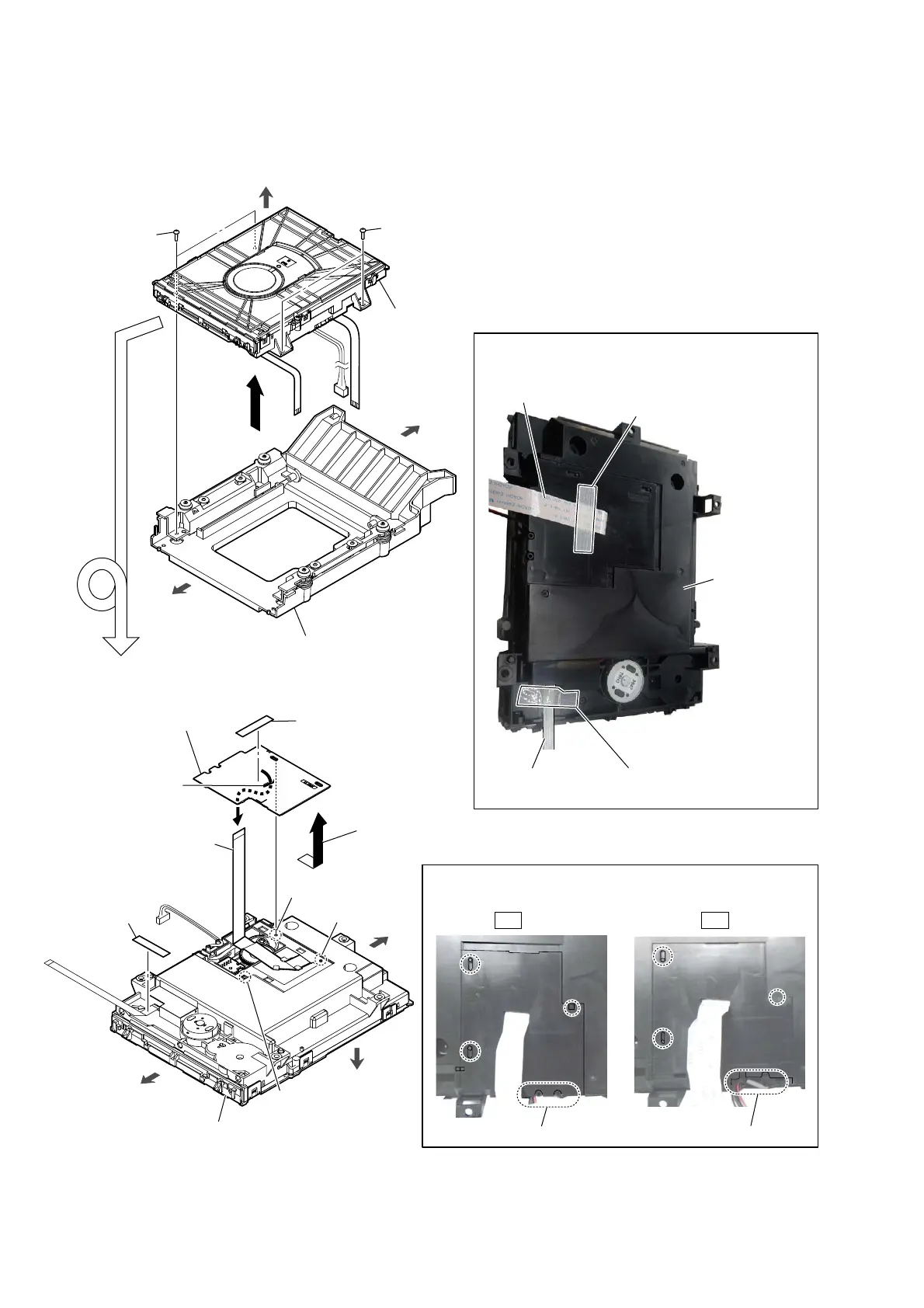
2-8. FFC HOLDER
1 two screws
(BVTP3 u 8)
4 DVD mechanism deck block
1 two screws
(BVTP3 u 8)
2
3 CDM bracket block
boss
boss
claw
6 Remove the
FFC holder
in the direction of the arrow.
8
FFC holder (See Fig. H)
Note:
When installing the FFC holder,
check that installed firmly
two bosses and claw.
hole
3DVWLQJSRVLWLRQRIILODPHQWWDSHVXEPDWHULDO
There is a gap.
There is no gap.
OK NG
–BRWWRPYLHZ–
5 filament tape
(sub material)
(See Fig.G)
filament tape
(sub material)
filament tape
(sub material)
DVD mechanism deck block
7 Draw the flexible flat cable
out of the hole.
5 filament tape
(sub material)
(See Fig.G)
front side
rear side
top side
front side
rear side
top side
Turn over.
1RWHDERXWLQVWDOOLQJWKH))&KROGHU
)LJ*!
DVD mechanism
deck block
flexible flat cable
(24P)
flexible flat cable
(5P)
)LJ+!



 To Next Page
 Loading...










