MHC-V41D
31
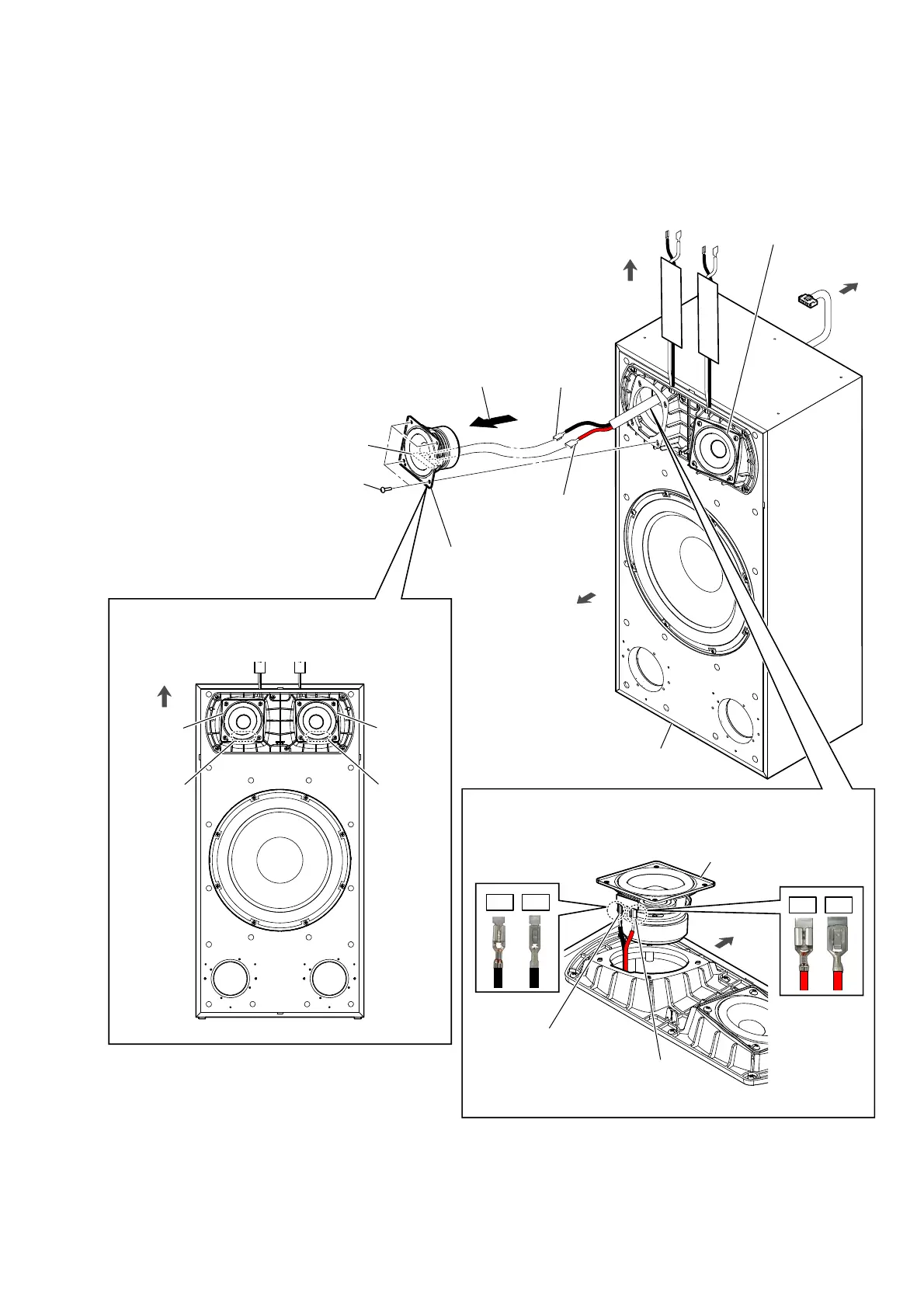
2-25. LOUDSPEAKER (MIDRANGE)
Note 1: The left and right loudspeakers can be removed using the same procedure.
This explanation uses illustrations from the left side.
2 Remove the midrange
(L-ch) in the direction
of the arrow.
– Front view –
Note 2:
When installing the midrange, make the position
of terminals as shown in the figure below.
midrange
(L-ch)
terminals
position
rear side
,QVWDOODWLRQGLUHFWLRQIRUWKHPLGUDQJH
top side
1 four tapping screws
(3.5 u 14)
3 terminal
(wide side)
[red]
3 terminal
(narrow side)
[black]
,QVWDOODWLRQGLUHFWLRQIRUWKHVSHDNHUFDEOHWHUPLQDO
Note 3:
When connecting the speaker cable terminal to the midrange (L-ch),
take care for the direction of the terminal and connect it.
terminal
(wide side)
[red]
terminal
(narrow side)
[black]
top side
midrange (L-ch)
OK
NG
OK
NG
midrange
(R-ch)
terminals
position
4 loudspeaker
(midrange: L-ch)
front side
top side
terminal
speaker cabinet block
loudspeaker
(midrange: R-ch)



 To Next Page
 Loading...










