161Key Setting Operations Using Menus
Chapter 4 Keys
2
Select the edge type in the <Edge> group.
For an overview of the key edge modifications, see “Edge modifiers”
(page 143).
Normal: unadorned edge
Border: edge with border applied
Drop Border: edge with drop border applied
Shadow: edge with shadow applied
Outline: edge used as outline
Emboss: embossing effect applied to edge
If you select [Normal], skip to step 7.
3
Set the border width and other parameters.
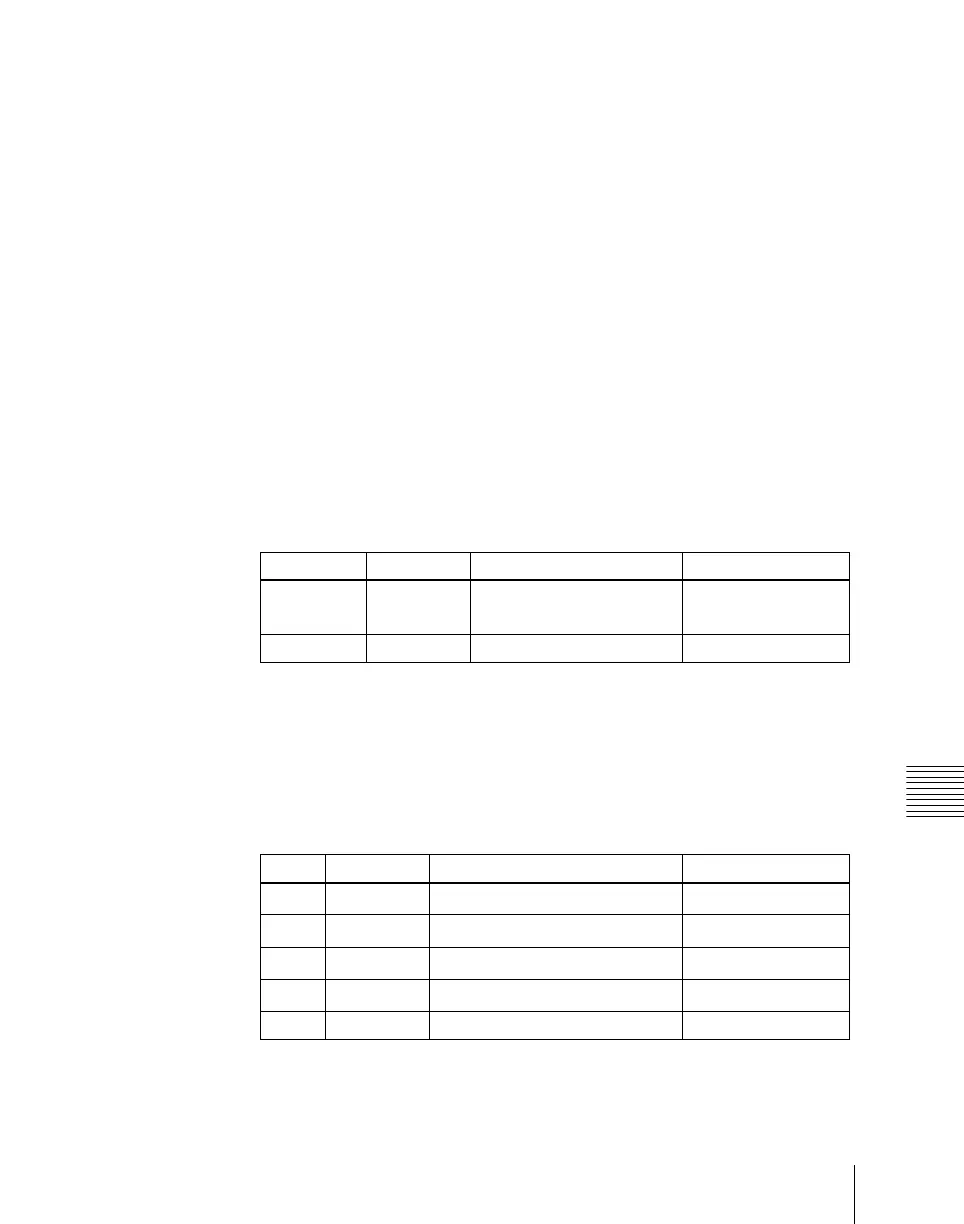
When border or outline is selected: The setting parameters depend on
the key type and whether the separate edge function is enabled or not.
To enable the separate edge function, press [Separate Edge], setting it
on.
• Separate edge off
a) In the “4H mode” and when [Fine Key] (page 163) is on, the setting value range is 0.00
to 4.00.
b) When a wipe pattern key or key wipe pattern key is selected as the key type
• Separate edge on
The left, right, top, and bottom border or outline widths can be adjusted
independently. The separate edge function is only valid when a
luminance key, linear key, or chroma key is selected as the key type.
a) In the “4H mode” and when [Fine Key] (page 163) is on, the setting value range is 0.00
to 4.00.
Knob Parameter Adjustment Setting values
1WidthWidth
0.00 to 8.00
a)
(0.00 to 100.00)
b)
3 Density Density 0.00 to 100.00
Knob Parameter Adjustment Setting values
1 Top Top edge width
0.00 to 8.00
a)
2 Left Left edge width
0.00 to 8.00
a)
3 Right Right edge width
0.00 to 8.00
a)
4 Bottom Bottom edge width
0.00 to 8.00
a)
5 Density Density 0.00 to 100.00













 To Next Page