100
Troubleshooting
Appendix
External devices
Alarm messages
When operating this unit, the unit may
sometimes output alarm messages such as
the one shown below to the monitor screen.
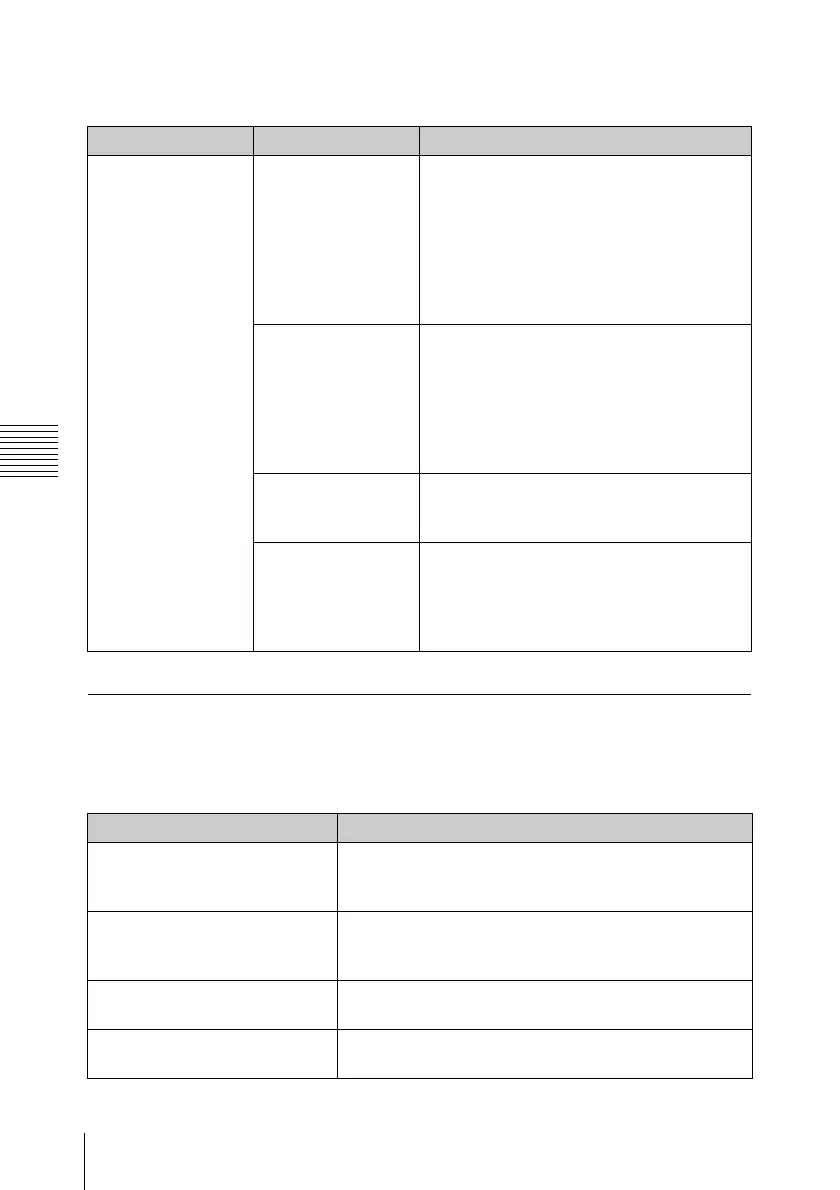
Symptoms Cause Remedy
The device
connected via
i.LINK interface
does not react as
expected; for
example, no picture
appears on its
screen.
It sometimes takes
time for the
connected device to
recognize the
operation.
Wait for about 15 seconds. If the
connected device still does not react, do
the following:
• Check the i.LINK cable, for example, by
replugging it.
• Turn the power off, and connect the
cable again.
• Change the i.LINK cable.
The input format
(HDV or DVCAM)
set on the
connected device
does not match with
the output format
set on this unit.
Set the connected device to the same
video format as that on this unit. (see page
31).
The video format is
not set to SP1080/
60i on this unit.
Set the video format on this unit to
SP1080/60i (see page 31).
A clip recorded in
the video format
other than SP1080/
60i and SP1080/
24P is played back.
Play back a clip recorded in SP1080/60i-
or SP1080/24P-format.
Alarm messages Cause and measures
Media Near Full Free space on the SxS memory card has become
insufficient. Replace it with another at the earliest
opportunity.
Media Full No space is left on the SxS memory card. Recording,
clip copying and clip division cannot be performed.
Replace it with another.
Voltage Low The DC IN voltage has become low (stage 1). Check
the power supply.
Insufficient Voltage The DC IN voltage is too low (stage 2). Recording
cannot be performed. Connect other power source.



 To Next Page