90
Setup Menu List
Chapter 8 Menu Configuration and Detailed Settings
LCD SET menu
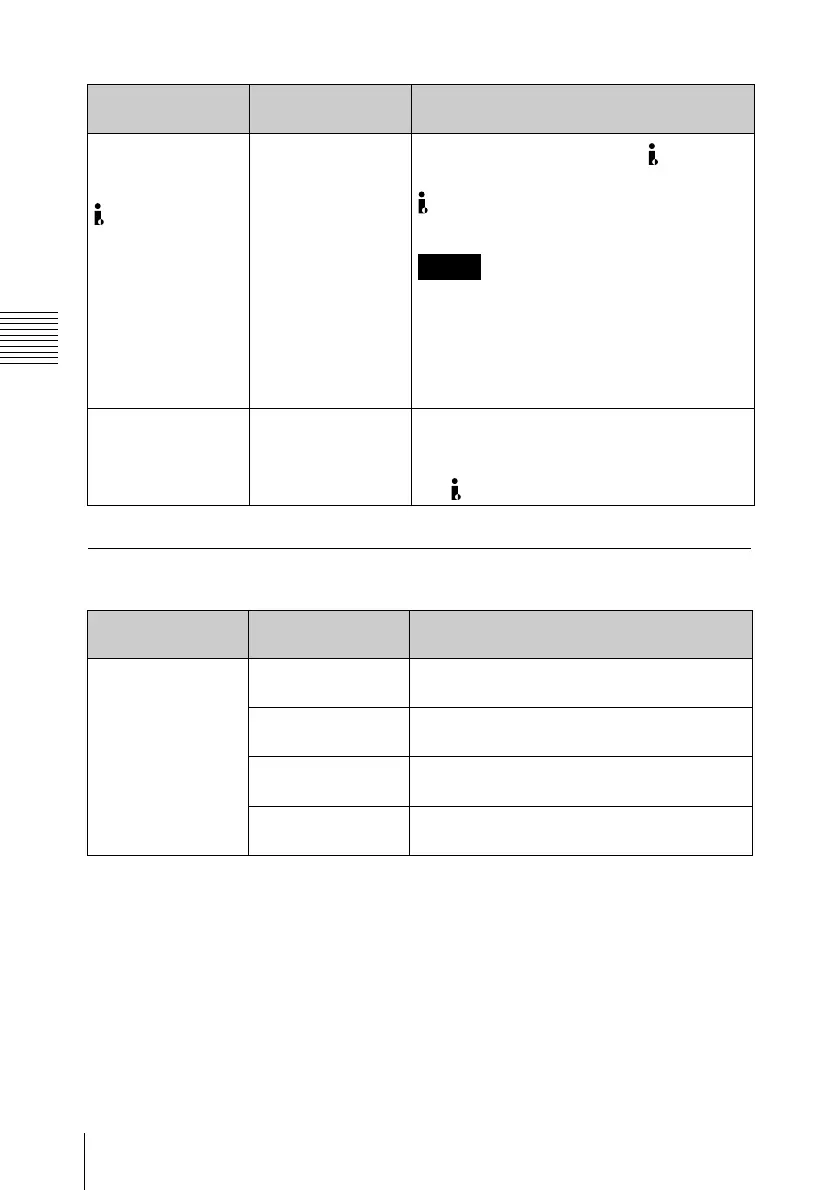
i.LINK I/O Select
Setting for input/
output of the
HDV/DV
connector
HDV /DVCAM / Off
Disable the input/output of the HDV/DV
connector (Off) or select the format of the
HDV/DV connector input/output (HDV or
DVCAM).
Notes
• Playback signals of clips recorded in HQ
1080/24P or HQ 720/24P format cannot
be output as converted to DVCAM
signals.
• It is impossible to use the DVCAM format
signal for recording or E-E picture display.
Wide Mode
Selecting whether
to add screen-
related information
On / Off Select “On” to add wide screen-related
information to SD signals output from the
COMPOSITE, S-VIDEO, COMPONENT,
and HDV/DV connectors.
Menu items Subitems and
setting values
Description
LCD
Making settings for
the LCD display
Color
–99 to +99 (±0)
Set the color density of pictures on the LCD
display.
Contrast
–99 to +99 (±0)
Set the contrast of pictures on the LCD
display.
Brightness
–99 to +99 (±0)
Set the brightness of pictures on the LCD
display.
Backlight
–99 to +99 (±0)
Set the backlight brightness of the LCD
display.
Menu items Subitems and
setting values
Description



 To Next Page