98
Troubleshooting
Appendix
Troubleshooting
If an alarm message appears on the monitor
screen, or if the unit appears to be
malfunctioning, please check the following
before contacting a Sony dealer.
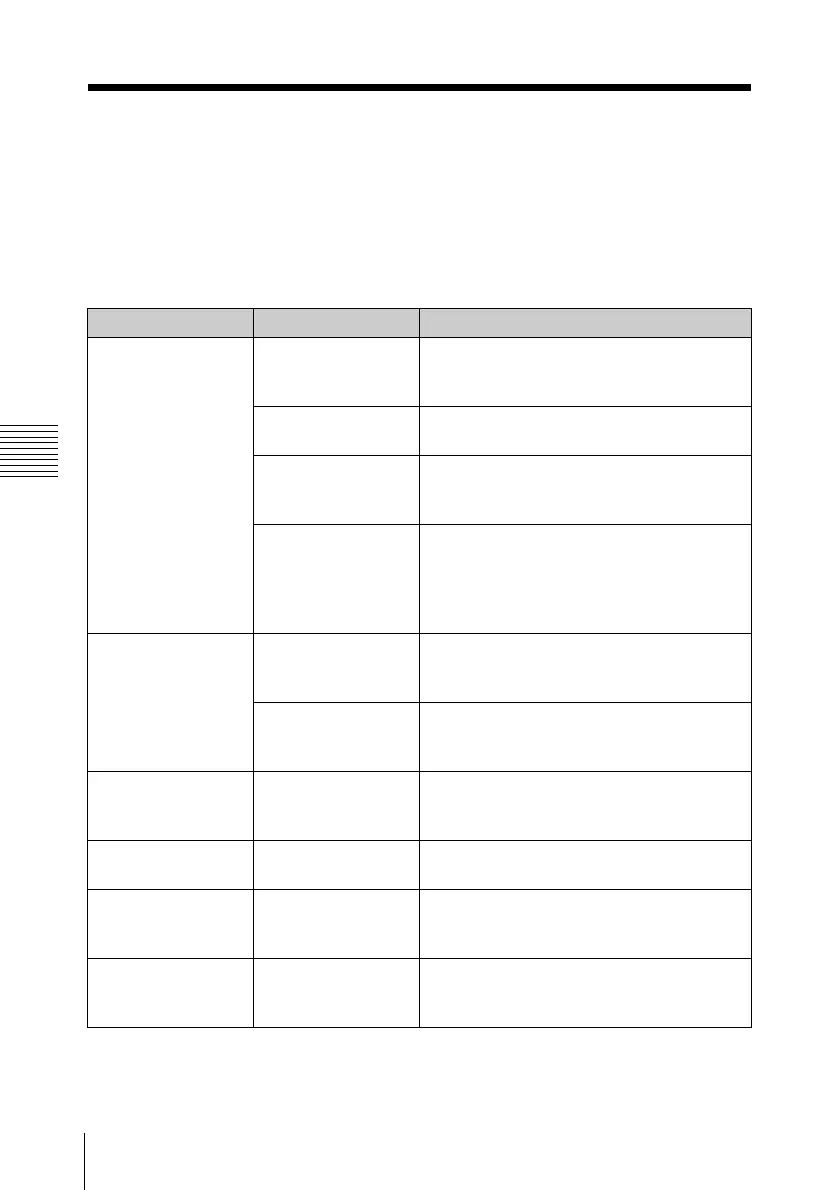
Recording/playback
Symptoms Cause Remedy
Recording does not
start when you
press the REC
button.
The SxS memory
card is write-
protected.
Release the write protection (see page
37), or replace the card with a non-
protected SxS memory card.
The SxS memory
card is full.
Replace the card with one having
sufficient space.
The SxS memory
card needs
restoration.
Restore the memory card (see page 40).
The video format of
the input signal
does not match with
the video format set
on this unit.
Set this unit to the same video format as
that of the input signal. (see page 31).
The supplied IR
remote commander
does not work.
Remote control
operation is
disabled.
Enable remote control operation (see page
44).
The battery of the IR
remote commander
is exhausted.
Replace the battery with a new one (see
page 45).
Audio recording is
not possible.
The REC LEVEL
controls are set to
the minimum level.
Adjust the audio recording levels with the
REC LEVEL controls (see page 49), and
record again.
The recorded sound
is distorted.
The audio level is
too high.
Change the AUDIO INPUT LEVEL switch
setting (see page 48), and record again.
The recorded sound
has a high noise
level.
The audio level is
too low.
Adjust the audio recording levels with the
REC LEVEL controls (see page 49), and
record again.
The REC LEVEL
controls do not
work.
The audio recording
levels are set to the
preset values.
Set “Rec Level” in “Audio Input” of the
AUDIO SET menu to “Manual” (see page
87).



 To Next Page