59
Clip Operations
Chapter 4 Clip Operations
Image of the previous clip
Press the PREV or < button to switch to
the CLIP INFO screen of the previous clip.
Image of the next clip
Press the NEXT or , button to switch to
the CLIP INFO screen of the next clip.
Adding the OK mark to a
clip
By adding the OK mark to clips, you can
obtain a thumbnail screen of only the
marked clips when you press the
THUMBNAIL button.
Clips with the OK mark cannot be deleted
or divided. To delete or divide the clip,
remove the OK mark.
To add the OK mark
1 Select “OK MARK ADD” from the
Clip Operation menu.
The CLIP INFO screen for the clip
appears and a confirmation message
appears below the index frame.
OK
CLIP
I NFO
0011 / 0300
PREV
CLIP NEXT
CLIP
JPAN0011
(
1
)
01 / JAN / 2008
10:53
HQ
1080 / 24p
S
&
Q
M
otion
29/24fps
TCR
00:05:00:02
TCR
00:05:00:00
STR
TCR
00:08:19:23
END
DUR
00:03:20:00
CH1/CH2/CH3/CH4
DC IN 12.0V
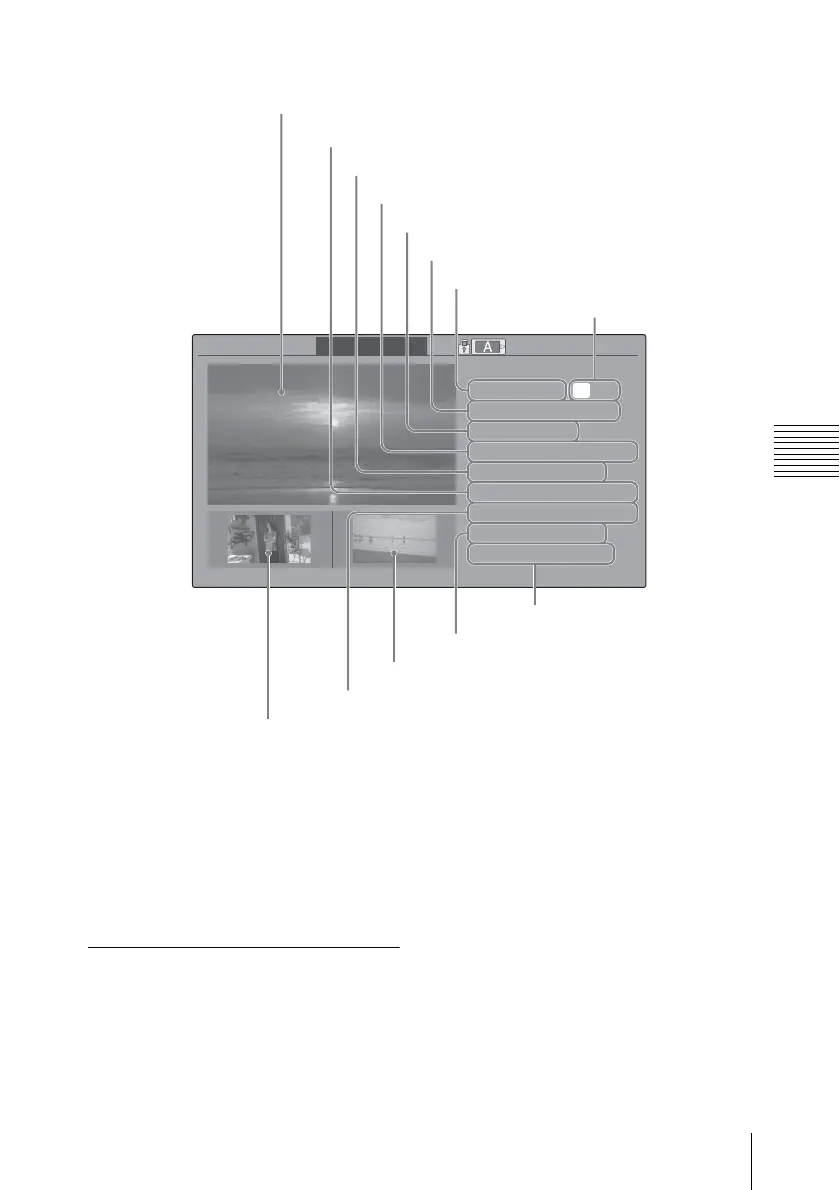
Image of the current clip
Image of the previous clip
Image of the next clip
Clip name
OK mark (see page 54)
Date and starting time of recording
Duration of the clip
Special recording information (see page 54)
Timecode of the displayed frame
Timecode at the recording ending point
Timecode at the recording starting point
Recorded audio channels
Recording format



 To Next Page