Chapter
8
Chapter 8 Menu Configuration and Detailed Settings
83
Overview of the Setup Menus
Menu Configuration and
Detailed Settings
Overview of the
Setup Menus
This unit allows you to make various
settings for recording and playback with
setup menus on the monitor screen.
For connections of an external video monitor, see
“Connecting External Video Monitors” (page 69).
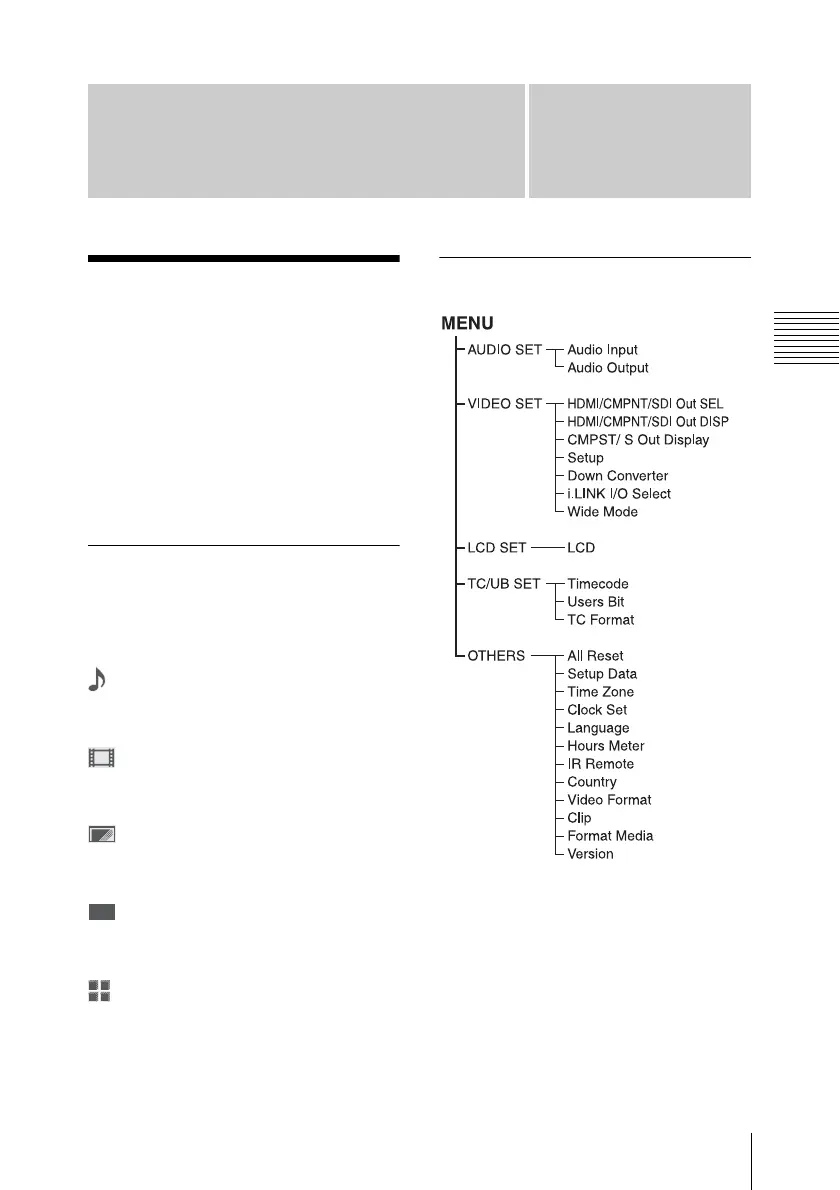
Setup menu configuration
The following menu icons are displayed
when you press the MENU button, allowing
you to select the corresponding menus.
AUDIO SET menu
For setting the audio-related items (see
page 87).
VIDEO SET menu
For setting the items related to video
outputs (see page 88).
LCD SET menu
For setting the items related to the displays
on the LCD display (see page 90).
TC/UB SET menu
For setting the items related to timecodes
and user bits (see page 91).
OTHERS menu
For setting the other items (see page 92).
Setup menu layers
00:00



 To Next Page