91
Setup Menu List
Chapter 8 Menu Configuration and Detailed Settings
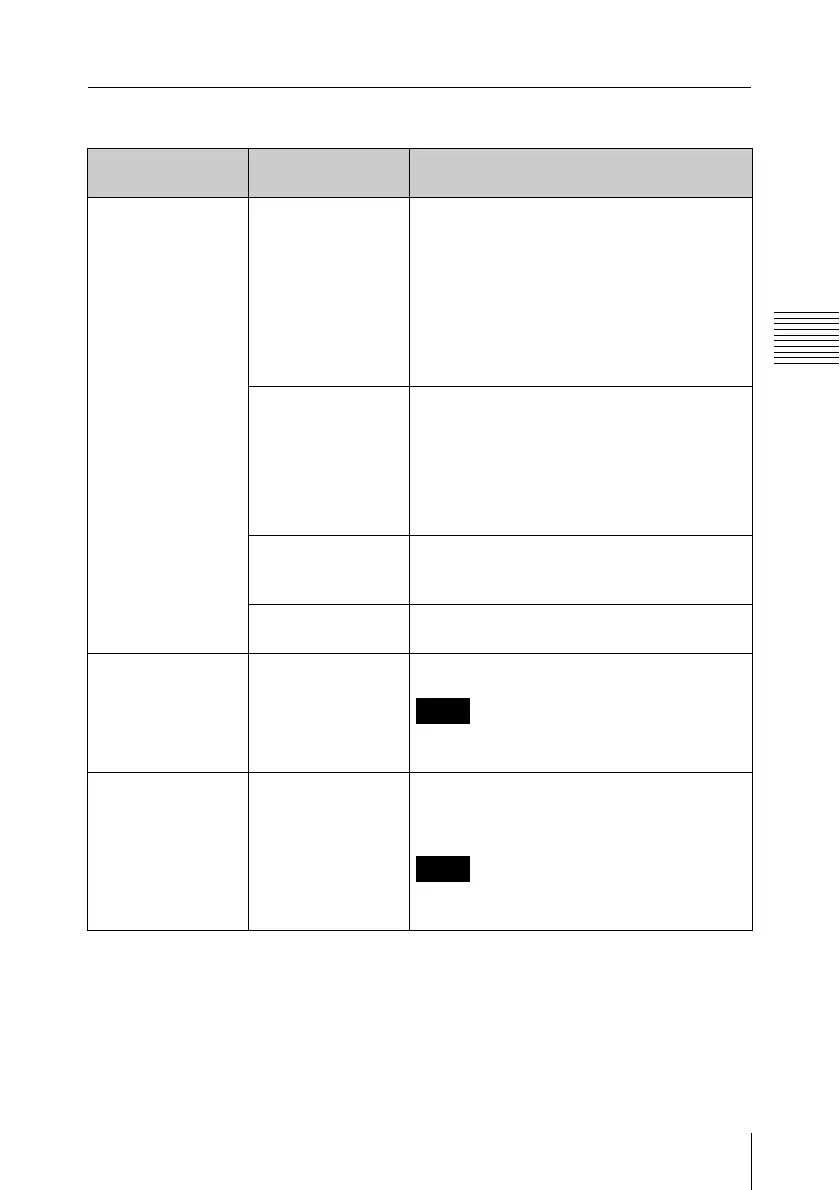
TC/UB SET menu
Menu items Subitems and
setting values
Description
Timecode
Setting the
timecode
Mode
Preset / Regen /
Ext Regen
Set the timecode advance mode.
Preset: To start the timecode from the
specified value
Regen (regeneration): To continue the
timecode from that of the previous clip
Ext Regen (external regeneration): To
synchronize to the SDI embedded
timecode input to the HD SDI INPUT
connector
Run
Rec Run / Free
Run
Set the timecode generator running mode
when the timecode advance mode is set to
“Preset”.
Rec Run: The timecode advances only
during recording mode.
Free Run: The timecode keeps advancing
regardless of the operating mode.
Setting Set the timecode to a desired value when
the timecode advance mode is set to
“Preset”. Select “SET” to finish the setting.
Reset
Execute / Cancel
Select “Execute” to reset the timecode to
00:00:00:00.
Users Bit
Setting the user bits
Setting Set the user bits to a desired value.
Note
This item is disabled when “Mode” in the
“Timecode” setting is set to “Ext Regen”.
TC Format
Setting the NTSC
time code format
DF / NDF Set the NTSC timecode format.
DF: Drop frame
NDF: Non drop frame
Note
This item is disabled when “Mode” in the
“Timecode” setting is set to “Ext Regen”.



 To Next Page