92
Setup Menu List
Chapter 8 Menu Configuration and Detailed Settings
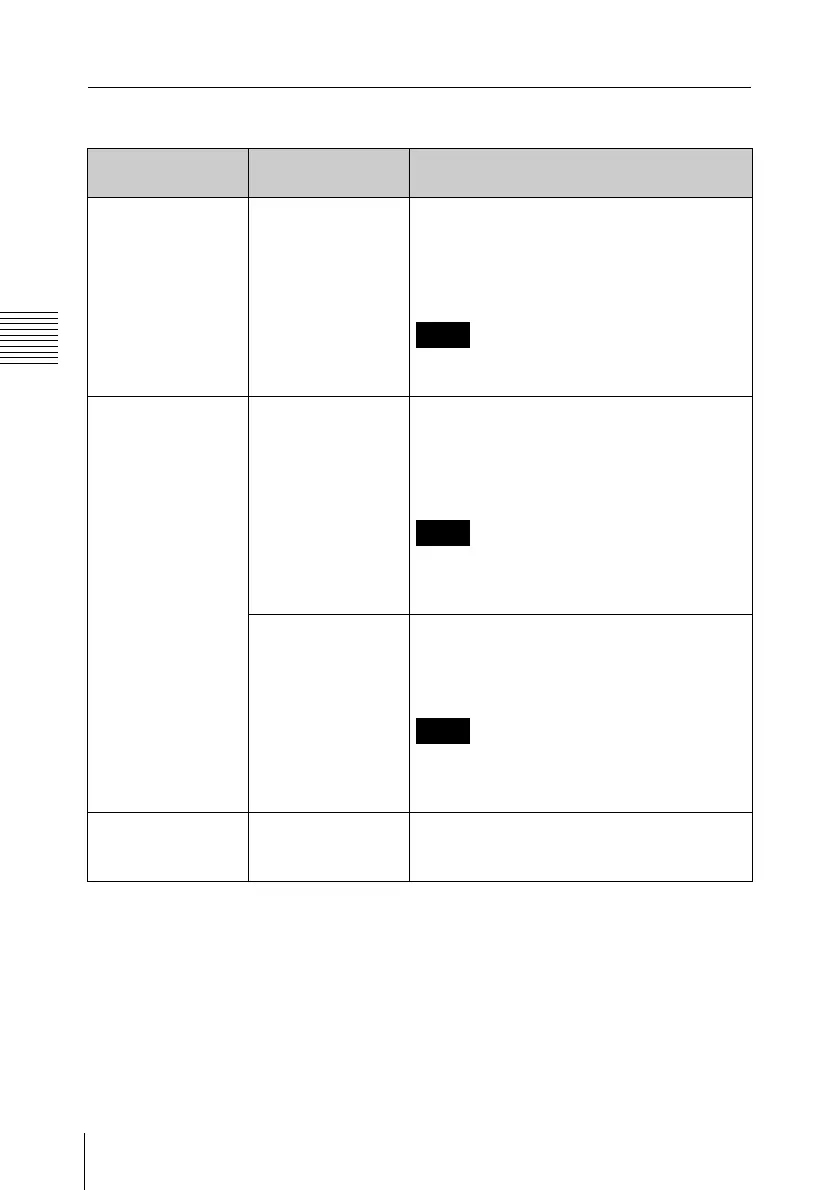
OTHERS menu
Menu items Subitems and
setting values
Description
All Reset
Resetting to the
factory status
Execute / Cancel Select “Execute” to reset this unit to the
factory status. (The “Date/Time” setting,
“Time Zone” setting and timecode
generated by the timecode generator are
not reset.)
Note
This item is disabled (displayed in grey)
during recording or playback.
Setup Data
Storing/recalling all
settings
Store
Execute / Cancel
Select “Execute” to store all setting values
on the SxS memory card. (The “Date/Time”
setting, “Time Zone” setting and timecode
generated by the timecode generator are
not stored.)
Note
This item is disabled (displayed in grey)
when a write-protected memory card is
loaded or during recording or playback.
Recall
Execute / Cancel
Select “Execute” to retrieve the setting
values from the SxS memory card. (The
“Date/Time” setting and “Time Zone” setting
are not retrieved.)
Note
This item is disabled (displayed in grey)
when an unavailable memory card is loaded
or during recording or playback.
Time Zone
Setting the time
difference
UTC –12:00 to UTC
+14:00
(UTC +9.00)
Set the time-zone difference from UTC in
steps of 30 minutes.



 To Next Page