21
Names and Functions of Parts
Chapter 1 Overview
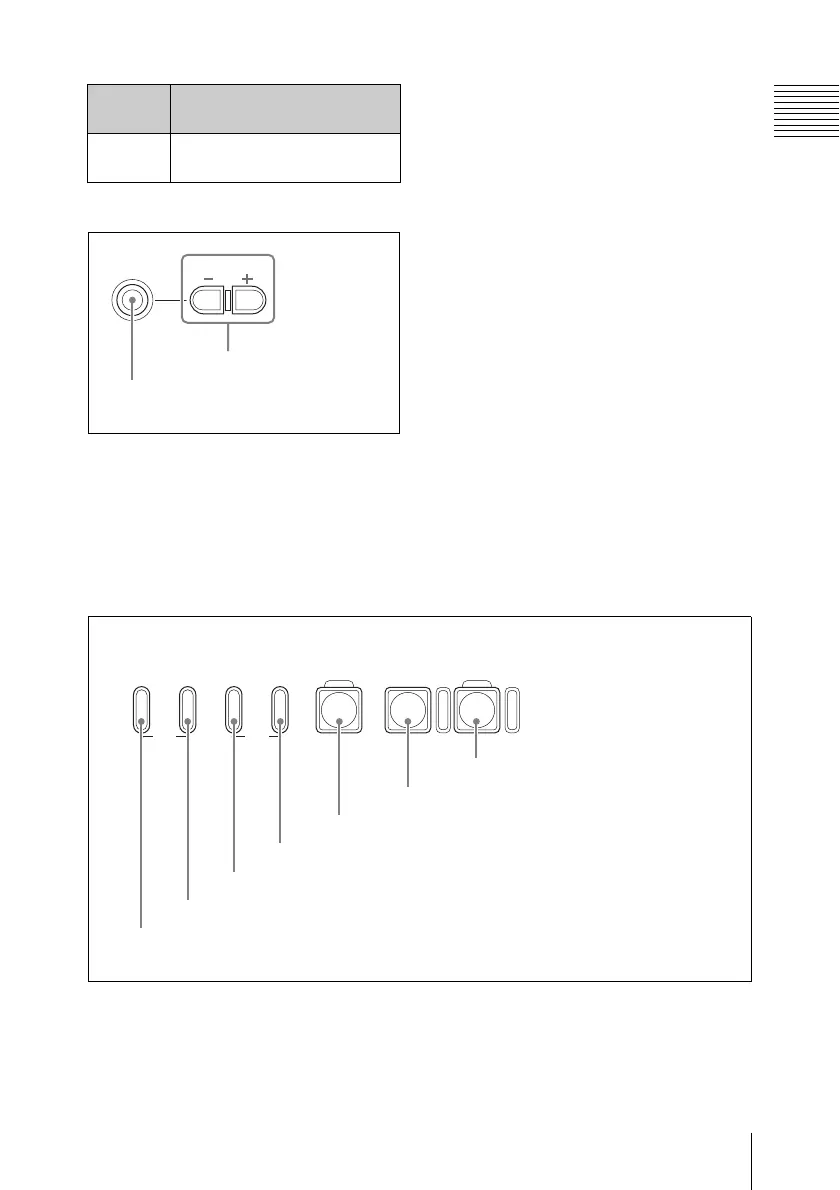
D Headphones connection section
a PHONES (headphones) jack (stereo-
mini)
Connect stereo headphones to the jack for
audio monitoring during recording and
playback.
A channel to monitor can be selected by
changing the setting of “Monitor CH” (see
page 88) in the “Audio Set” setting of the
AUDIO SET menu. During playback, also
change the “Output CH” setting (see page
88) as required.
b PHONE LEVEL (headphones
volume) buttons
Adjust the volume of the audio output from
the PHONES jack. Press the + button to
turn up the volume and press the – button to
turn down the volume.
During adjustment, a volume meter appears
on the LCD display and an external monitor
screen. The meter display is displayed for
about three seconds after the adjustment
completes.
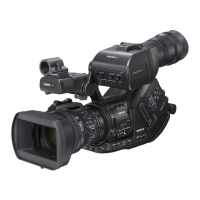
E Recording/playback control section
a F REV (fast reverse) button and
indicator
Use this button for high-speed playback
(with audio muted) in the reverse direction.
Each time you press the button, the
playback speed switches between 4 times
and 15 times normal speed. To return to
NXT Jump to the top of the next
clip
Guide
marks
Functions
PHONES
PHONE LEVEL
2 PHONE LEVEL
buttons
1 PHONES
jack
F REV PLAY/PAUSE
m
u
PREV
.
NEXT
>
F FWD
M
STOP
x
REC
z
TOP END
1 F REV button and indicator
2 PREV button and indicator
3 NEXT button and indicator
4 F FWD button and indicator
5 PLAY/PAUSE button and indicator
6 STOP button
7 REC button and indicator


 To Next Page