EasyManua.ls Logo

Sony SLV-360 - Height Adjustment of Guide Rollers No. 3 and no; TG8 Guide Roller Height Adjustment (Fig. 4-2)

Sony SLV-360
127 pages
Print Icon
To Next Page IconTo Next Page
To Previous Page IconTo Previous Page
Loading...
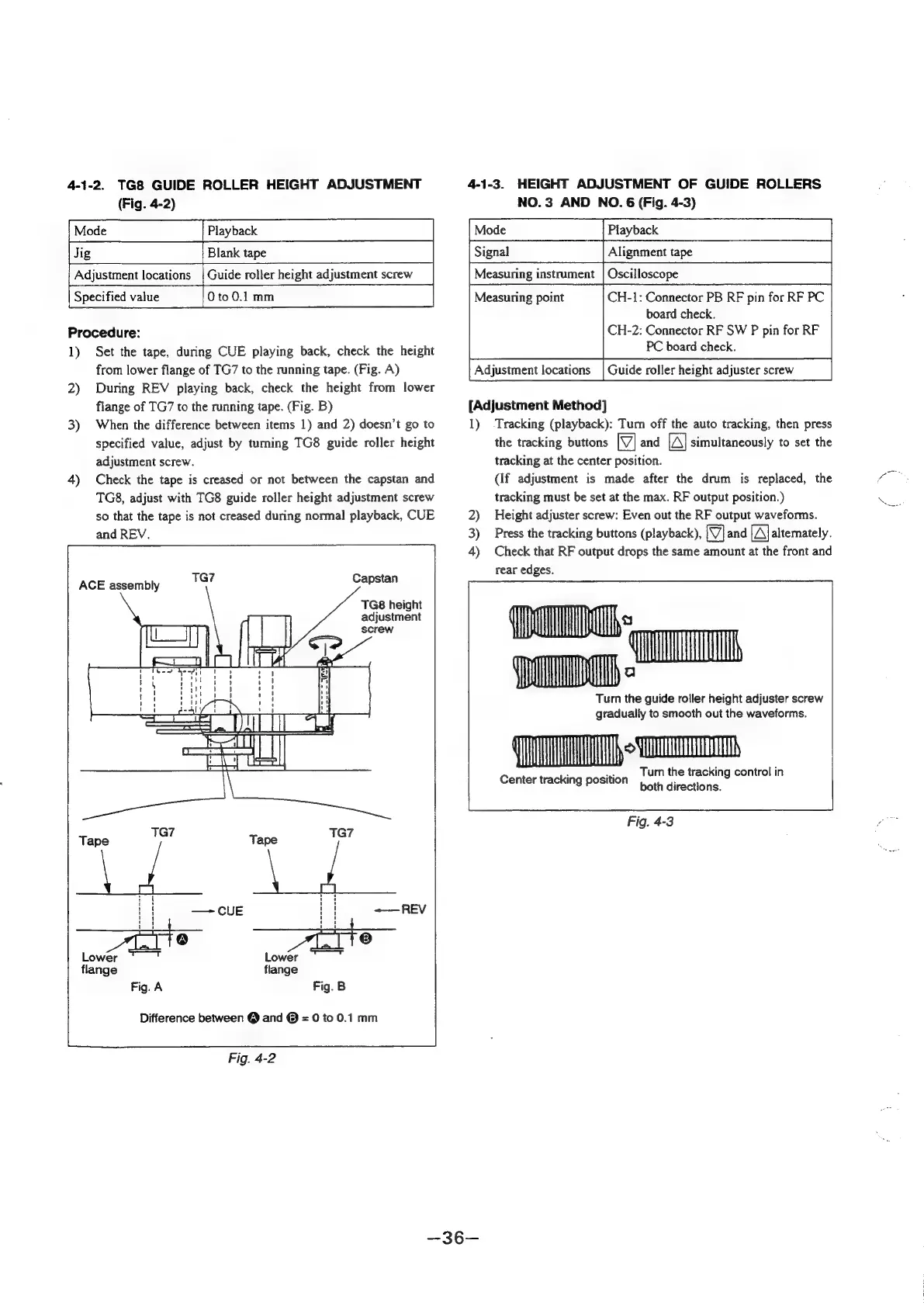
4-1-2.
TG8
GUIDE
ROLLER
HEIGHT
ADJUSTMENT
(Fig.
4-2)
Procedure:
1)
Set
the
tape,
during
CUE
playing
back,
check
the
height
from
lower
flange
of
TG7
to
the
running
tape.
(Fig.
A)
2)
During
REV
playing
back,
check
the
height
from
lower
flange
of
TG7
to
the
running
tape.
(Fig.
B)
3)
When
the
difference
between
items
1)
and
2)
doesn’t
go
to
specified
value,
adjust
by
turning
TG8
guide
roller
height
adjustment
screw.
4)
Check
the
tape
is
creased
or
not
between
the
capstan
and
TG8,
adjust
with
TG8
guide
roller
height
adjustment
screw
so
that
the
tape
is
not
creased
during
normal
playback,
CUE
and
REV.
ACE
assembly
19”
Capstan
TG8
height
adjustment
screw
Tape
TG7
Tape
TG7
if
Hse
f{
—*CuUE
|i
=—REV
7]
iD
8)
Lower
Lower
flange
flange
Fig.
A
Fig.
B
Difference
between
@
and
@
=
0
to
0.1
mm
Fig.
4-2
4-1-3.
HEIGHT
ADJUSTMENT
OF
GUIDE
ROLLERS
NO.
3
AND
NO.
6
(Fig.
4-3)
Playback
Alignment
tape
Measuring
instrument
|
Oscilloscope
CH-1:
Connector
PB
RF
pin
for
RF
PC
board
check.
CH-2:
Connector
RF
SW
P
pin
for
RF
PC
board
check.
Guide
roller
height
adjuster
screw
Measunng
point
Adjustment
locations
[Adjustment
Method]
1)
Tracking
(playback):
Turn
off
the
auto
tracking,
then
press
the
tracking
buttons
[VJ]
and
[A]
simultaneously
to
set
the
tracking
at
the
center
position.
(If
adjustment
is
made
after
the
drum
is
replaced,
the
tracking
must
be
set
at
the
max.
RF
output
position.)
2)
Height
adjuster
screw:
Even
out
the
RF
output
waveforms.
3)
Press
the
tracking
buttons
(playback),
[VY]
and
[A]
alternately.
4)
Check
that
RF
output
drops
the
same
amount
at
the
front
and
rear
edges.
Turn
the
guide
roller
height
adjuster
screw
gradually
to
smooth
out
the
waveforms.
TO
mm
.
a
Turn
the
tracking
control
in
Center
tracking
position
botfi
directions:
Fig.
4-3

Table of Contents

Related product manuals