EasyManua.ls Logo

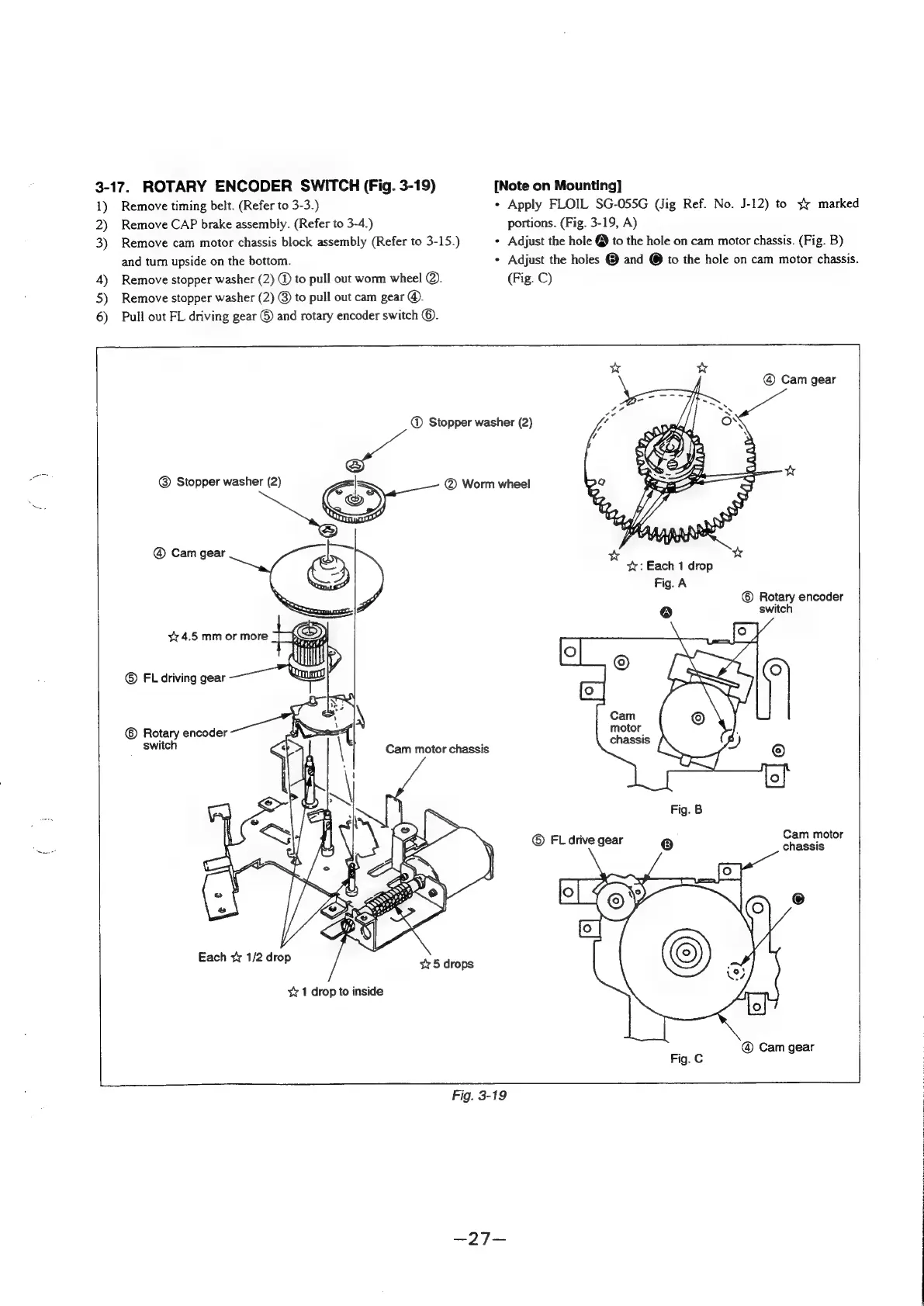
Sony SLV-360 - Rotary Encoder Switch (Fig. 3-19)

Sony SLV-360
127 pages
Print Icon
To Next Page IconTo Next Page
To Previous Page IconTo Previous Page
Loading...
3-17.
ROTARY
ENCODER
SWITCH
(Fig.
3-19)
[Note
on
Mounting]
1)
Remove
timing
belt.
(Refer
to
3-3.)
+
Apply
FLOIL
SG-055G
(Jig
Ref.
No.
J-12)
to
¥
marked
2)
Remove
CAP
brake
assembly.
(Refer
to
3-4.)
portions.
(Fig.
3-19,
A)
3)
Remove
cam
motor
chassis
block
assembly
(Refer
to
3-15.)
*
Adjust
the
hole
@
to
the
hole
on
cam
motor
chassis.
(Fig.
B)
and
turn
upside
on
the
bottom.
+
Adjust
the
holes
@
and
@
to
the
hole
on
cam
motor
chassis.
4)
Remove
stopper
washer
(2)
@
to
pull
out
worm
wheel
@).
(Fig.
C)
5)
Remove
stopper
washer
(2)
@
to
pull
out
cam
gear
@.
6)
Pull
out
FL
driving
gear
©
and
rotary
encoder
switch
©.
@
Cam
gear
@
Stopper
washer
(2)
Stopper
washer
(2)
|
@
Worm
wheel
——
@
Cam
gear
v
w
<,
ty:
Each
1
drop
Fig.
A
©
Rotary
encoder
@
switch
©
Rotary
encoder
switch
chassis
Cam
motor
chassis
©
FL
drive
gear
Cam
motor
Each
¥
1/2
drop
x1
drop
to
inside
Fig.
3-19
as
ig
oe
ae
a
SO
aoe
Pee
RATER
Ses
Foe
ee
MN
Ae
ER
ee
EL
Ree
eee
See
CTE

Table of Contents

Related product manuals