EasyManua.ls Logo

Sony SLV-360 - X-Value Adjustment

Sony SLV-360
127 pages
Print Icon
To Next Page IconTo Next Page
To Previous Page IconTo Previous Page
Loading...
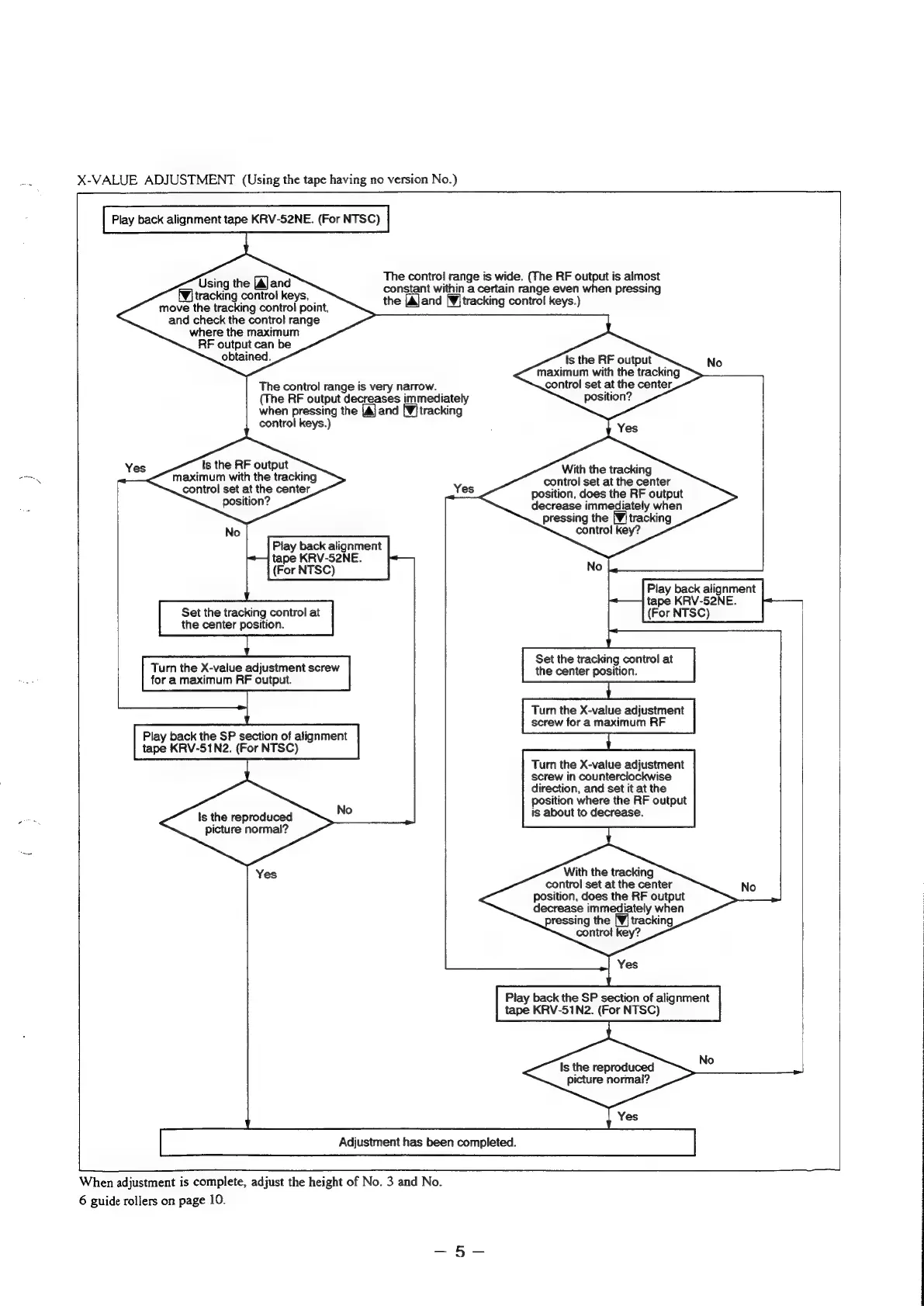
X-VALUE
ADJUSTMENT
(Using
the
tape
having
no
version
No.)
Play
back
alignment
tape
KRV-52NE.
(For
NTSC)
The
control
range
is
wide.
(The
RF
output
is
almost
constant
within
a
certain
range
even
when
pressing
the
[Aland
[¥itracking
control
keys.)
Using
the
[A]
and
f¥]
tracking
control
keys,
move
the
tracking
control
point,
and
check
the
control
range
where
the
maximum
RF
output
can
be
obtained.
Is
the
RF
output
maximum
with
the
tracking
control
set
at
the
center,
position?
No
The
control
range
is
very
narrow.
(The
RF
output
decreases
immediately
when
pressing
the
[A]
and
[¥]tracking
control
keys.)
Is
the
RF
output
maximum
with
the
tracking
control
set
at
the
center
position?
Yes
With
the
tracking
control
set
at
the
center
position,
does
the
RF
output
decrease
immediately
when
pressing
the
[¥j
tracking
control
key?
No
Play
back
alignment
tape
KRV-52NE.
(For
NTSC)
Set
the
tracking
control
at
the
center
position.
Turn
the
X-value
adjustment
screw
for
a
maximum
RF
output.
|
Play
back
alignment
tape
KRV-52NE.
(For
NTSC)
Set
the
tracking
control
at
the
center
position.
Turn
the
X-value
adjustment
screw
for
a
maximum
|
nN
Play
back
the
SP
section
of
alignment
tape
KRV-51N2.
(For
NTSC)
Turn
the
X-value
adjustment
screw
in
counterclockwise
direction,
and
set
it
at
the
position
where
the
RF
output
is
about
to
decrease.
Is
the
reproduced
picture
normal?
With
the
tracking
control
set
at
the
center
position,
does
the
RF
output
decrease
immediately
when
pressing
the
[Wj
tracking
control
key?
No
Yes
Play
back
the
SP
section
of
alignment
tape
KRV-51N2.
(For
NTSC)
Is
the
reproduced
Ne
picture
normal?
Yes
Adjustment
has
been
completed.
When
adjustment
is
complete,
adjust
the
height
of
No.
3
and
No.
6
guide
rollers
on
page
10.

Table of Contents

Related product manuals