EasyManua.ls Logo

Sony SLV-SE620 - Step 3: Connecting the VCR

Sony SLV-SE620
96 pages
Print Icon
To Next Page IconTo Next Page
To Previous Page IconTo Previous Page
Loading...
Step
3
:
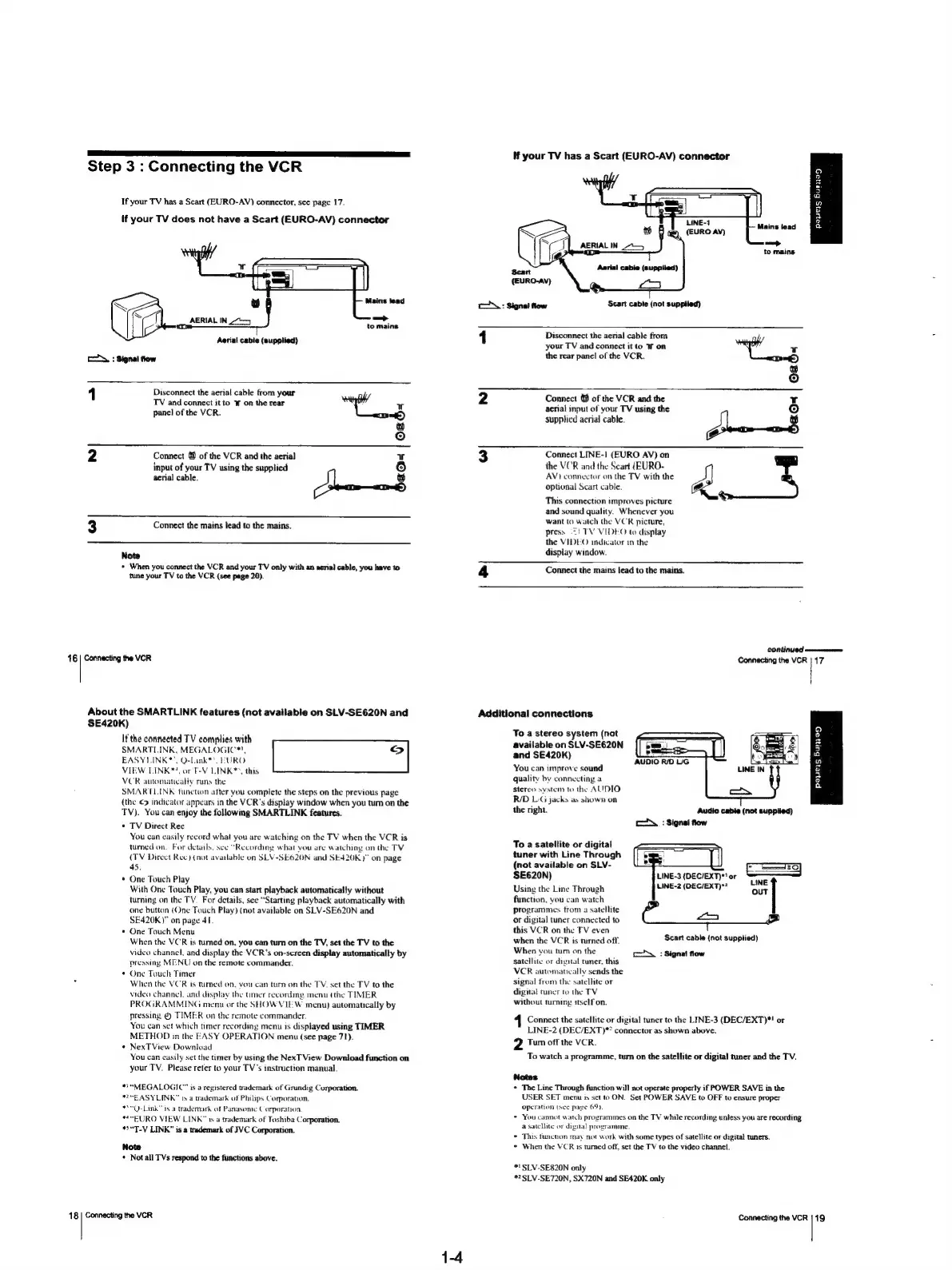
Connecting
the
VCR
If
your
TV
has
a
Scart
(EURO-AV)
connector,
see
page
17.
If
your
TV
does
not
have
a
Scart
(EURO-AV)
connector
Vie
snahidise
ae
Aerial
cable
(supplied)
cl
:
Signal
flow
_
Disconnect
the
aerial
cable
from your
TV
and
connect
it
to
W
on
the
rear
panel
of
the
VCR.
ie
oad-
Ls)
Connect
&%
of
the
VCR
and
the
aerial
input
of
your
TV
using
the
supplied
aerial
cable.
r
Connect
the
mains
lead
to
the
mains.
oo
Note
*
When
you
connect
the
VCR
and
your
TV
only
with
an
aerial
cable,
you
have
to
tune
your
TV
to
the
VCR
(see
page
20).
16
|
Connecting
the
VCR
About
the
SMARTLINK
features
(not
available
on
SLV-SE620N
and
SE420K)
If
the
connected
TV
complies
with
SMARTLINK,
MEGALOGIC*!,
LS)
EASYIINK*’.
Q-Link**,
EURO
VIEW
LINK*!,
or
T-V
LINK®>,
this
VCR
attomatically
runs
the
SMARTLINK
function
after
you
complete
the
steps
on
the
previous
page
(the
¢>
indicator
appears
in
the
VCR's
display
window
when
you
tum
on
the
TV).
You
can
enjoy
the
following
SMARTLINK
features.
TV
Direct
Rec
You
can
easily
record
what
you
are
watching
on
the
TV
when
the
VCR
is
tumed
on.
For
details,
see
“Recording
what
you
are
watching
on
the
TV
(TV
Direct
Ree)
(not
available
on
SLV-SE620N
and
SE420K)"
on
page
45.
One
Touch
Play
With
One
Touch
Play,
you
can
start
playback
automatically
without
turning
on
the
TV.
For
details,
see
“Starting
playback
automatically
with
one
button
(One
Touch
Play)
(not
available
on
SLV-SE620N
and
SE420K)"
on
page
41.
One
Touch
Menu
When
the
VCR
is
turned
on,
you
can
turn
on
the
TV,
set
the
TV
to
the
video
channel,
and
display
the
VCR's
on-screen
display
automatically
by
pressing
MENU
on
the
remote
commander.
One
Touch
Timer
When
the
VCR
is
turned
on,
you
can
turn
on
the
TV.
set
the
TV
to
the
video
channel,
and
display
the
mer
recording
menu
(the
TIMER
PROGRAMMING
menu
or
the
SHOW
VIEW
menu)
automatically
by
pressing
&
TIMER
on
the
remote
commander.
You
can
set
which
timer
recording
menu
is
displayed
using
TIMER
METHOD
in
the
FASY
OPERATION
menu
(see
page
71).
¢
NexTView
Download
You
can
casily
set
the
timer
by
using
the
NexT
View
Download
function
on
your
TV.
Please
refer
to
your
TV's
instruction
manual.
™*“MEGALOGIC”
is
a
registered
trademark
of
Grundig
Corporation.
*E
ASYLINK™
iy
a
trademark
of
Philips
Corporation.
-Link"
is
a
trademark
of
Panasome
Corporation
™~EURO
VIEW
LINK”
is
a
trademark
of
Toshiba
Corporation.
*5“T-V
LINK”
is
a
trademark
of
JVC
Corporation.
Note
+
Not
all
TVs
respond
to
the
functions
above.
18
|
Connecting
the
VCR
1-4
c\:
Signal
flow
lf
your
TV
has
a
Scart
(EURO-AV)
connector
be)
i
AERIAL
IN
7
Scart
({EURO-AV)
oO
oa
=
a
2
3
a
2
a
Mains
lead
ead
to
mains
Aarial
cable
(supplied)
[am
Scart
cable
(not
supplied)
1
Additional
connections
Disconnect
the
aerial
cable
from
your
TV
and
connect
it
to
W
on
the
rear
panel
of
the
VCR.
Connect
&
of
the
VCR
and
the
aerial
input
of
your
TV
using
the
supplied
aerial
cable.
if
oab-
Connect
LINE-1]
(EURO
AV)
on
the
VCR
and
the
Scart
(EURO-
AV}
connector
on
the
TV
with
the
optional
Scart
cable.
This
connection
improves
picture
and
sound
quality.
Whenever
you
want
to
watch
the
VCR
picture,
press
=)
TV
VIDEO
to
display
the
VIDEO
indicates
in
the
display
window.
Connect
the
mains
lead
to
the
mains.
continued
Connecting
the
VCR
17
To
a
stereo
system
(not
available
on
SLV-SE620N
and
SE420K)
You
can
improve
sound
quality
by
connecting
a
stereo
system
to
the
AUDIO:
R/D
LiG
jacks
as
shown
on
the
right.
AUDIO
R/D
UG
Q
®
z
2
2
a
a
o
a
=
Audio
cable
(not
supplied)
SX
:
Signal
fow
To
a
satellite
or
digital
tuner
with
Line
Through
(not
available
on
SLV-
LINE-3
(DEC/EXT)*'
or
SE620N)
INE
Using
the
Line
Through
MINES
(DECENT
OUT
function,
you
can
watch
programmes
trom
a
satellite
or
digital
tuner
connected
to
this
VCR
on
the
TV
even
when
the
VCR
is
tured
off.
When
you
tum
on
the
satellite
or
digital
tuner.
this
VCR
automatically
sends
the
signal
from
the
satellite
or
digital
tuner
to
the
TV
without
turning
itself
on.
SoG
Scart
cable
(not
supplied)
coy
:
Signal
flow
1
Connect
the
satellite
or
digital
tuner
to
the
LINE-3
(DEC/EXT)*!
or
LINE-2
(DEC/EXT)**
connector
as
shown
above.
2
Turn
off
the
VCR.
To
watch
a
programme,
tum
on
the
satellite
or
digital
tuner
and
the
TV.
Notes
*
The
Line
Through
function
will
not
operate
properly
if
POWER
SAVE
in
the
USER
SET
menu
is
set
to
ON.
Set
POWER
SAVE
to
OFF
to
ensure
proper
operation
(see
pave
69}
*
You
cannot
watch
programmes
on
the
TV
while
recording
unless
you
are
recording
a
satellite
or
digital
programme.
©
This
function
may
not
work
with
some
types
of
satellite
or
digital
tuners.
©
When
the
VCR
1s
tumed
off,
set
the
TV
to
the
video
channel.
#1
SLV-SE820N
only
*2SLV-SE720N,
SX720N
and
SE420K
only
Connecting
the
VCR
{19

Table of Contents

Related product manuals