EasyManua.ls Logo

Sony STR-DA5300ES - Page 10

Sony STR-DA5300ES
172 pages
Print Icon
To Next Page IconTo Next Page
To Previous Page IconTo Previous Page
Loading...
@]
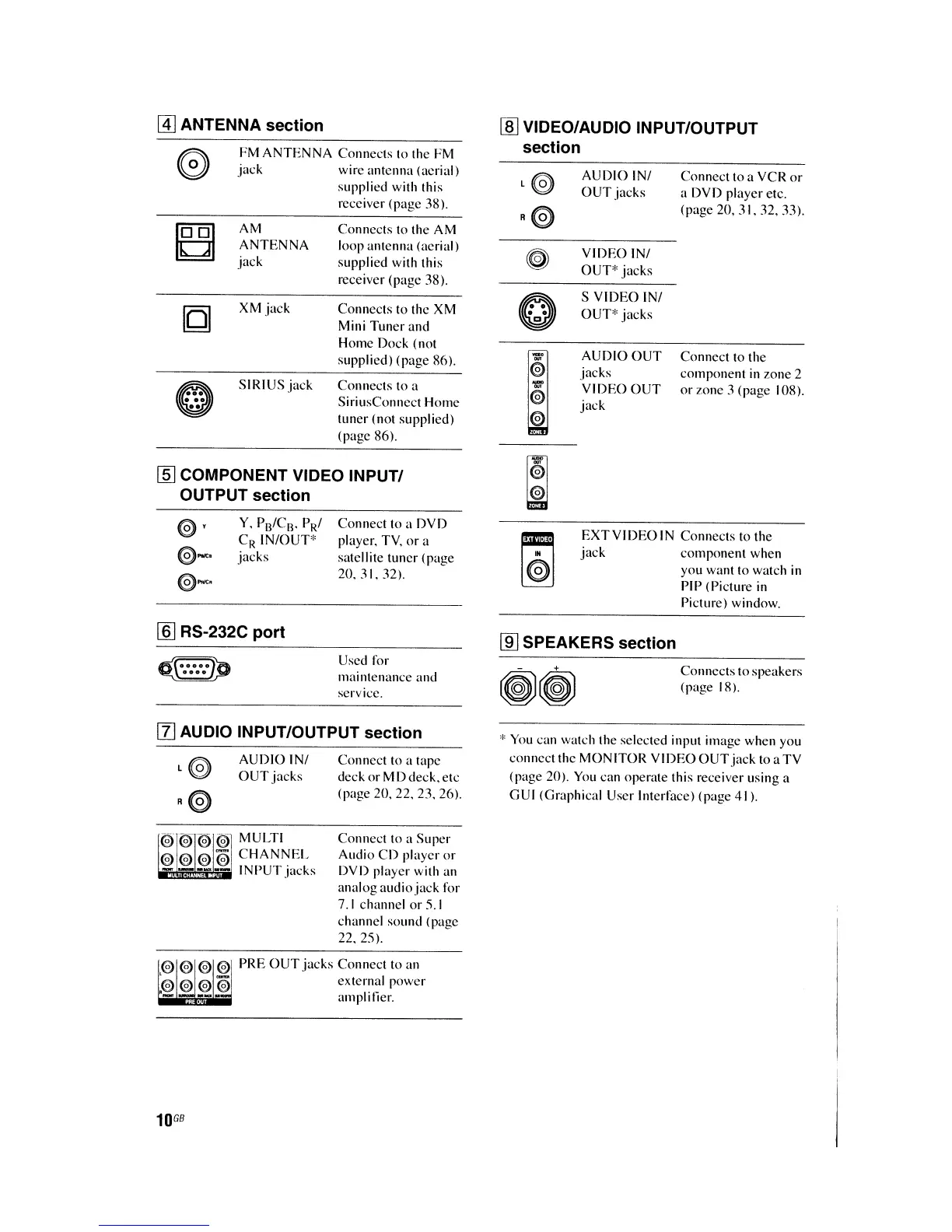
ANTENNA section
FM
ANTENNA
Connects to the PM
jack
wire antenna (acrial)
supplied with this
receiver (page 38).
rnJ
VIDEO/AUDIO INPUT/OUTPUT
section
Connect to the
component
in
zone 2
or
wne
3 (page 108).
Connect
to a VCR
or
a DVD player etc.
(page 20. 31. 32. 33).
VIDEO
INI
OUT*
jacks
S
VIDEO
INI
OUT"
jacks
AUDIO INI
OUT
jacks
AUDIO
OUT
jacks
VIDEO
OUT
jack
Connects to a
SiriusConnect Home
tuner (not supplied)
(page 86).
Connects to the XM
Mini Tuner
and
Home Doek (not
supplied) (page 86).
Connects
to the AM
loop antenna (aerial)
supplied with this
receiver (page 38).
XM
jack
SIRIUSjack
AM
ANTENNA
jack
~
..
...
..
[§]
COMPONENT VIDEO INPUT/
OUTPUT section
Y. P
13
/C
B
PRI
C
R
IN/OUT'
jacks
Connect to a DVD
player. TV.
or
a
satellite tuner (page
20.31.32).
EXT
VIDEO
IN Connects to
the
jack
component
when
you want to watch
in
PIP <Picture
in
Picture) window.
[§] RS-232C port
~~p
~
Used for
mainlenance and
service.
lID
SPEAKERS section
Connects
to
speakers
(page 18).
[I]
AUDIO INPUT/OUTPUT section
AUDIOINI
OUT
jacks
MULTI
CHANNEL
INPUT
jacks
Connect to a tape
deck
or
MD deck. etc
(page 20. 22. 23. 26).
Connect to a
Super
Audio
CD
player
or
DVD player with an
analog
audiojack
for
7.1
channel
or
5.1
channel
sound
(page
22.25).
"
You
can watch the selected input image when you
connect the
MONITOR
VIDEO
OUT
jack
loa
TV
(page 20).
You
can operate this receiver using a
GUI (Graphical User Interface) (page 41).
PRE
OUT
jacks
Connect to an
external
power
amplilier.
10
GB

Table of Contents

Other manuals for Sony STR-DA5300ES

Related product manuals