Name
~
CLEAR
>10
D.TUNING
~
2CHI
A.DIRECT
[g§]
A.F.D.
jgZJ
SHIFT
~TV
~
RM
SETUP
Function
Prcss to
- clear a mistake when you
press the incorrect numeric
bulton.
- return to continuous
playback. etc.
of
the satellite
tuner
or
DVD player.
Press to select
- track numbers ovcr
10
of
the
VCR. satellite tuner.
CD
player
or
MD
dcck.
- channel numhers
of
the
Digital CATV tcrminal.
Press to
enter
direct tuning
mode
(page 83. 88).
Press to sclect
sound
field
(page
62)
or
to switch the audio
of
the selected input to analog
signal without any adjustment
(page 121).
Press to select
sound
Iield
(page 65).
Press to light up the hutton.
It
changes
the remote button
function to activate the buttons
with pink printing.
Press to enable the
TV
operation.
Press to set up the remote.
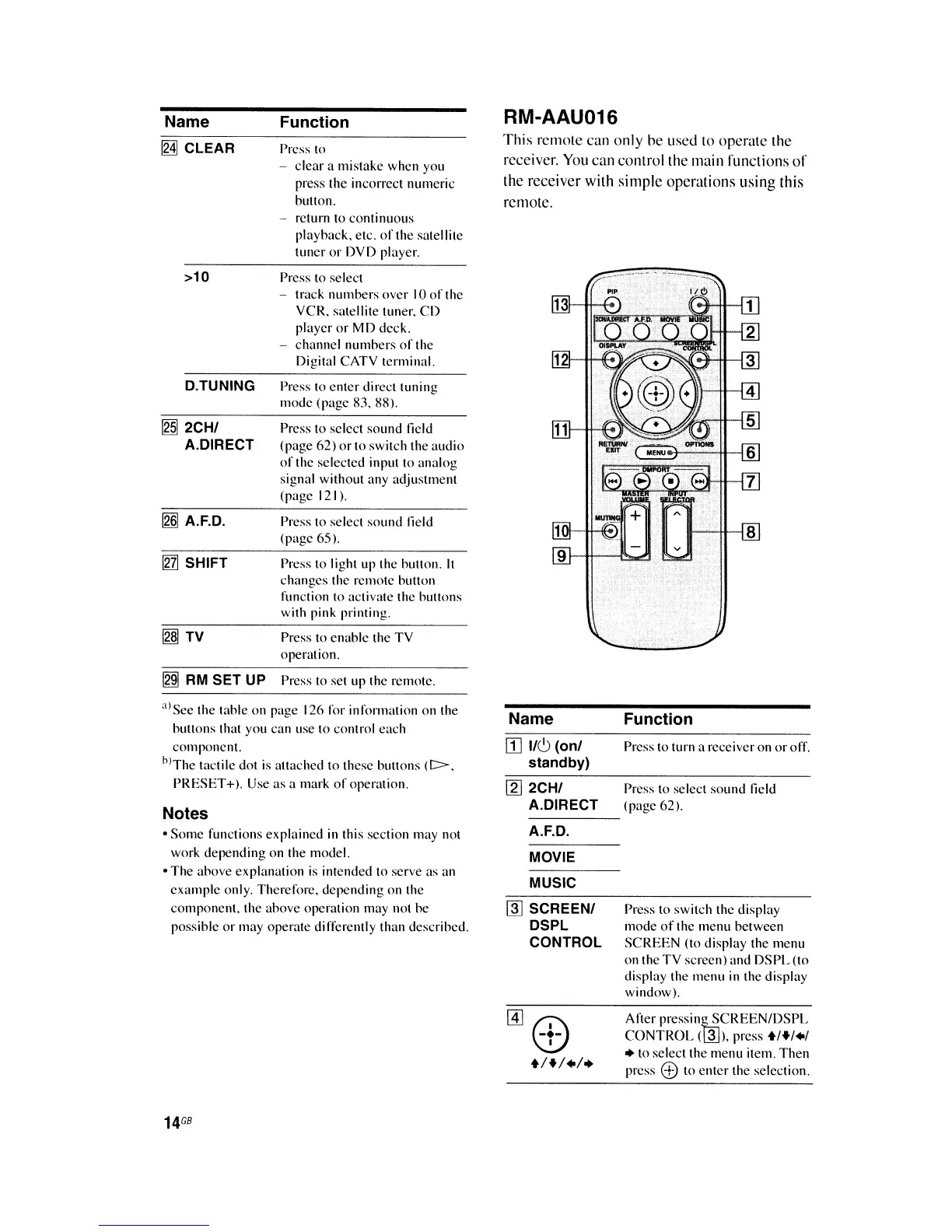
RM-AAU016
This remote
can
only
be
used
to operate the
receiver.
You
can
conlrolthe
main functions
of
the receiver with simple operations using this
remote.
alS
ee
the table
on
page 126 lor information
on
the
huttons that you can use to control each
component.
hl
The
tactile dot
is
attached
to
these buttons
(C>.
PRESET
+).
Use
as
a mark
of
operation.
Notes
•
Some
functions explained in this section may not
work depending on the model.
• The ahove explanation
is
intended to serve as an
example
only. Therefore.
depending
on the
component.
the ahove operation may not he
possihle
or
may operate differently than described.
14
GB
Name
ill
110
(anI
standby)
[g]
2CHI
A.DIRECT
A.F.D
.
MOVIE
MUSIC
~
SCREENI
DSPL
CONTROL
@]G:>
+1+1.1.
Function
Press to turn a receiver on
or
off.
Press to select
sound
Iield
(page 62).
Press to switch the display
mode
of
the
menu
between
SCREEN
(to display the menu
on the
TV
screen) and
DSPL
(to
display the menu in the display
window).
After
pressin~CREEN/DSPL
CONTROL
(~).
press +1+1.1
• to select the menu item. Then
prcss
e to
enter
the selcction.















 To Next Page