Press to
adjuslthe
volume level
of
all speakers at the
same
time.
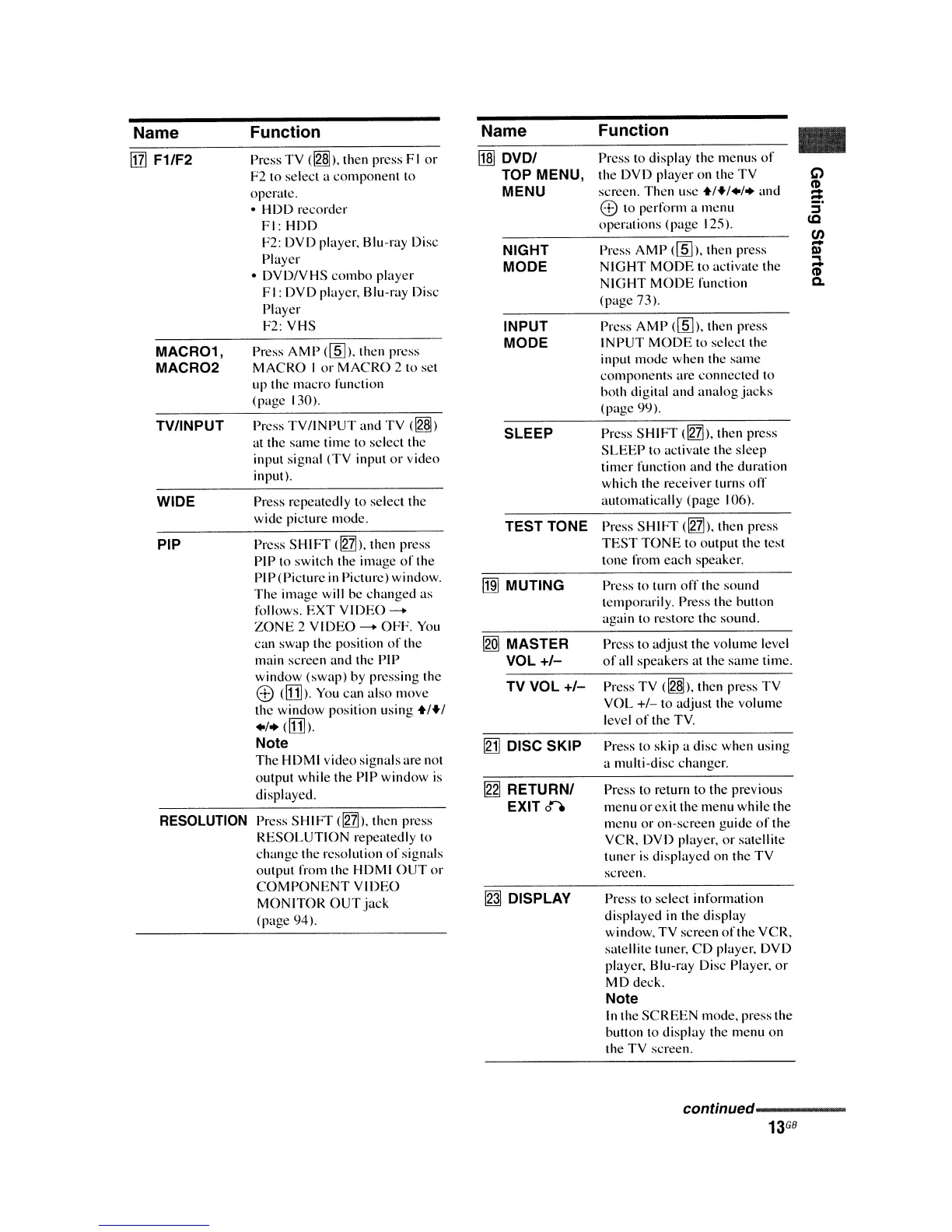
Name
I1lJ
F1/F2
MACR01,
MACR02
TVIINPUT
WIDE
PIP
RESOLUTION
Function
Press TV
(~).
then press
1"1
or
1"2
10 select a
componenl
to
operate.
• HDD recorder
1"1:
HDD
1"2:
DVD player. Blu-ray Disc
Player
•
DVD/yHS
combo
player
1"1:
DVD player. Blu-ray Disc
Player
1"2:
VHS
Press
AMP
(lID).
then press
MACRO
I
or
MACRO
210
set
up the
macro
function
(page 130).
Press
TV/INPUT
and TV ([g§])
allhe
same time to selecl the
input signal (TV input
or
video
inputl.
Press repealedly
10 select the
wide piclure mode.
Press
SHIFT
dnh.
then press
1'11'10
switch Ihe image
of
the
PI
I'
(Picture
in
Picture) window.
The
image will be
changed
as
follows.
EXT
VIDEO-+
ZONE
2
VIDEO
-+
OFF.
You
can swap the position
of
the
main screen and the
I'll'
window (swap) by pressing the
e
dDl>.
You
can also move
the window position using
+1+1
+1+dDh.
Note
The
HDMI video signals are not
output while the
I'll'
window is
displayed.
Press
SHIFT
dnll.
then press
RESOLUTION
repeatedly to
change the resolulion
of
signals
output from the HDMI
OUT
or
COMPONENT
VIDEO
MONITOR
OUT
jack
(page 94).
Name
I1ID
DVD/
TOP MENU,
MENU
NIGHT
MODE
INPUT
MODE
SLEEP
TEST TONE
IffiI
MUTING
[gQJ
MASTER
VOL
+/-
TV VOL
+/-
[gj]
DISC SKIP
~
RETURN/
EXIT
0"-'
~
DISPLAY
Function
Press to display the menus
of
Ihe DVD player
onlhe
TV
screen. Then use
+1+1+1+
and
8)
10 perform a menu
operations (page 125).
Press
AMP
(lID).
then press
NIGHT
MODE
10 aClivate Ihe
NIGHT
MODE
funclion
(page 73).
Press
AMP
(lID).
then press
INPUT
MODE
to
sekctthe
input
mode
when the same
componenls
are connected 10
hoth digilal
and
analog
jacks
(page 99).
Press
SHIFT
dnil.
then press
SLEEP
10 activate the sleep
timer function and the duralion
which the receiver turns
off
automatically (page 106).
Press
SHIFT
dnh.
then press
TEST
TONE
to output the test
tone from
each
speaker.
Press to turn
off
the sound
lemporarily. Press Ihe button
again to restore the sound.
Press TV
(~).
then press TV
VOL
+1-
to adjust the volume
level
of
the
TV.
Press to skip a disc when using
a multi-disc changer.
Press to return to Ihe previous
menu
or
ex
it
the menu while the
menu or on-screen guide
of
the
VCR. DVD player.
or
satellite
tuner
is
displayed on the TV
screen.
Press to select information
displayed
in
Ihe display
window. TV screen
of
the VCR.
salellite tuner.
CD
player. DVD
player. Blu-ray Disc Player.
or
MD deck.
Note
In
the
SCREEN
mode. press the
hullon to display the menu on
the
TV
screen.
..
conNnued----------
13
GB















 To Next Page