are output from the
VIDEO
jack. Input
480i component video signals.
• When component input signals other than
480p arc output, usc the
COMPONENT
VIDEO
OUT
jack
and set
"Resolution"
to
"DIRECT."
Images of the source with HOMI
connection
is
not output to the
TV.
• Make sure that cables are correctly and
securely connected to components.
• Depending on the playback
component,
component may need to be set up. Refer to
the operating instructions supplied with
the each component.
• Be sure to use a
connecting
cahle
for the
HDMI
jack
corresponding to high speed
(an
HDMI
version I.:la, category 2 cahle)
when you view images
or
listen to sound
during a DeepColor transmission.
Recording cannot be carried out.
• Check that the
components
arc connected
cOITeetly (page 27).
• Select the source
component
using
INPUT
SELECTOR
(page
5:1).
The GUI does not appear on the TV
screen.
• Press
SHiFf,
then press
MENU
to show
"GUI
MODE"
on the display.
• Check the
TV
is connected correctly.
Tuner
The FM reception is poor.
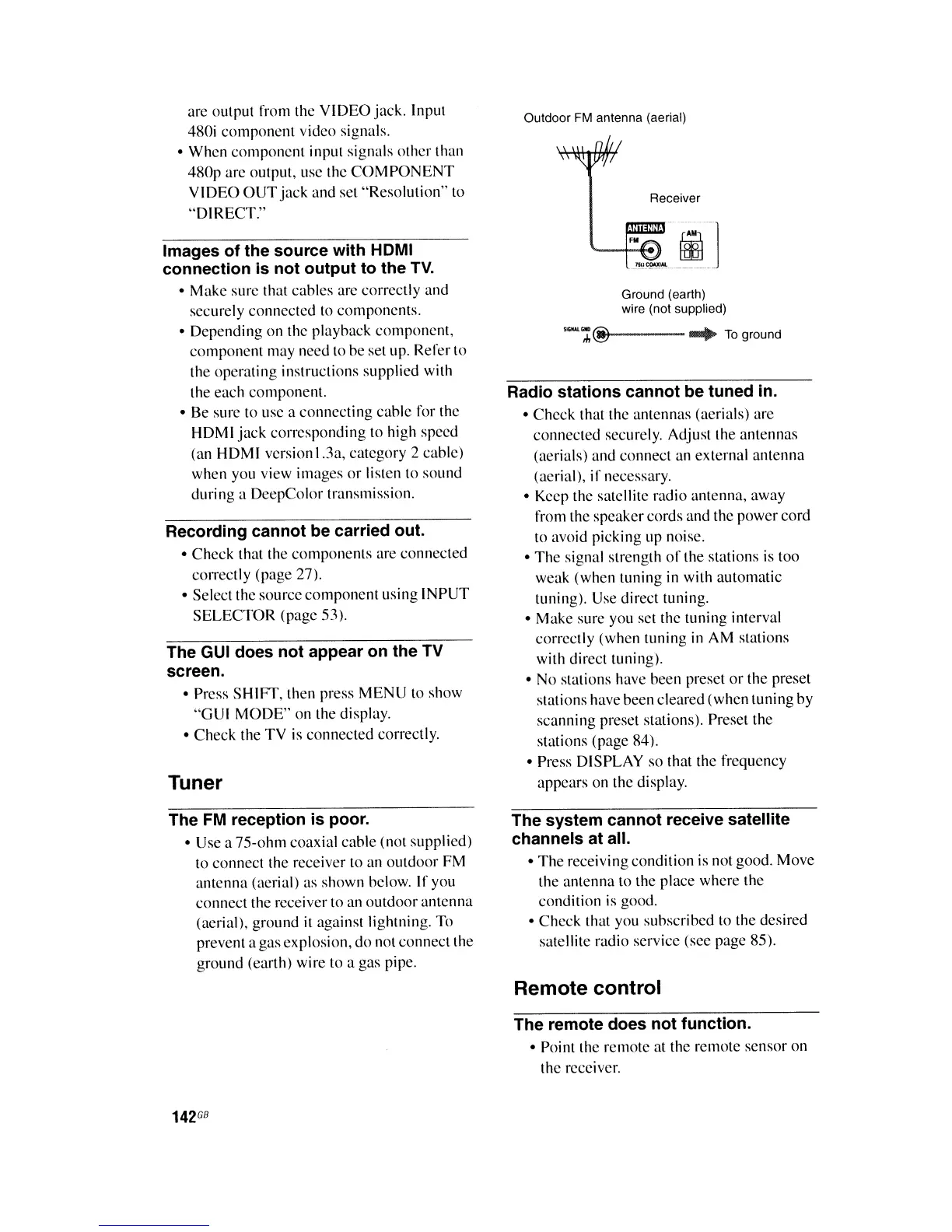
• Use a 75-ohm coaxial cahle (not supplied)
to connect the receiver to an
outdoor
FM
antenna (aerial) as shown helow. If you
connect the receiver to an
outdoor
antenna
(aerial), ground it against lightning. To
prevent a
gas
explosion,
do
not connect the
ground (earth) wire to a gas pipe.
142
GB
Outdoor
FM
antenna (aerial)
Receiver
Ground (earth)
wire (not supplied)
,
...
,,:;;@~---
....
To
ground
Radio stations cannot be tuned in.
•
Check
that the antennas (aerials) are
connected securely. Adjust the antennas
(aerials) and connect an external
antenna
(aerial),
if
necessary.
• Keep the satellite radio antenna, away
from the speakercords and the
power
cord
to avoid picking up noise.
•
The
signal strength
of
the stations is too
weak (when tuning in with automatic
tuning). Use direct tuning.
• Make sure you set the tuning interval
correctly (when tuning
in
AM stations
with direct tuning).
• No stations have been preset
or
the preset
stations have been cleared (when tuning by
scanning preset stations). Preset the
stations (page 84).
• Press DISPLAY so that the frequency
appears on the display.
The system cannot receive satellite
channels at all.
•
The
receiving condition is not good. Move
the antenna to the place
where
the
condition is good.
• Check that you suhscrihed to the desired
satellite radio service (see page 85).
Remote control
The remote does not function.
• Point the remote at the remote sensor on
the receiver.















 To Next Page