Connecting
a
TV
and
other
components
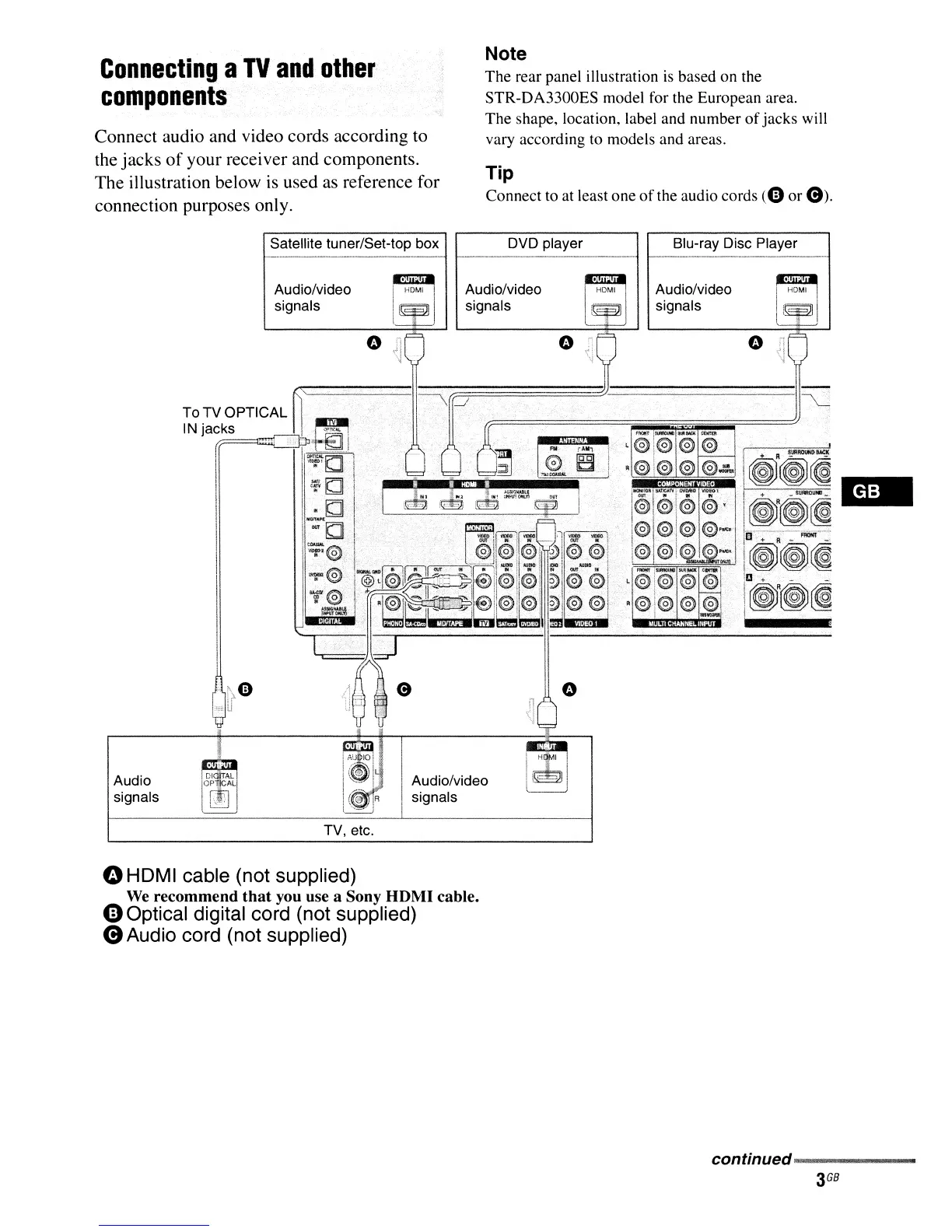
Connect audio and video cords according to
the jacks
of
your receiver and components.
The illustration below is used as reference for
connection purposes only.
Satellite tuner/Set-top box
Note
The rear panel illustration
is
based on the
STR-DA3300ES model for the European area.
The shape, location, label and number
of
jacks will
vary according to models and areas.
Tip
Connect to at least
one
of
the audio cords
(0
or
e).
DVD player Blu-ray Disc Player
Audio/video
signals
Audio
signals
TV, etc.
II
Audio/video
I signals
Audio/video
signals
~
i HOMI I
I~T~I
()
HDMI cable (not supplied)
We
recommend
that
you use a Sony
HDMI
cable.
eOptical digital cord (not supplied)
eAudio cord (not supplied)
continued~~~~~
3
GB















 To Next Page