Connecting
components
with
analog
video
and
audio
jack
The
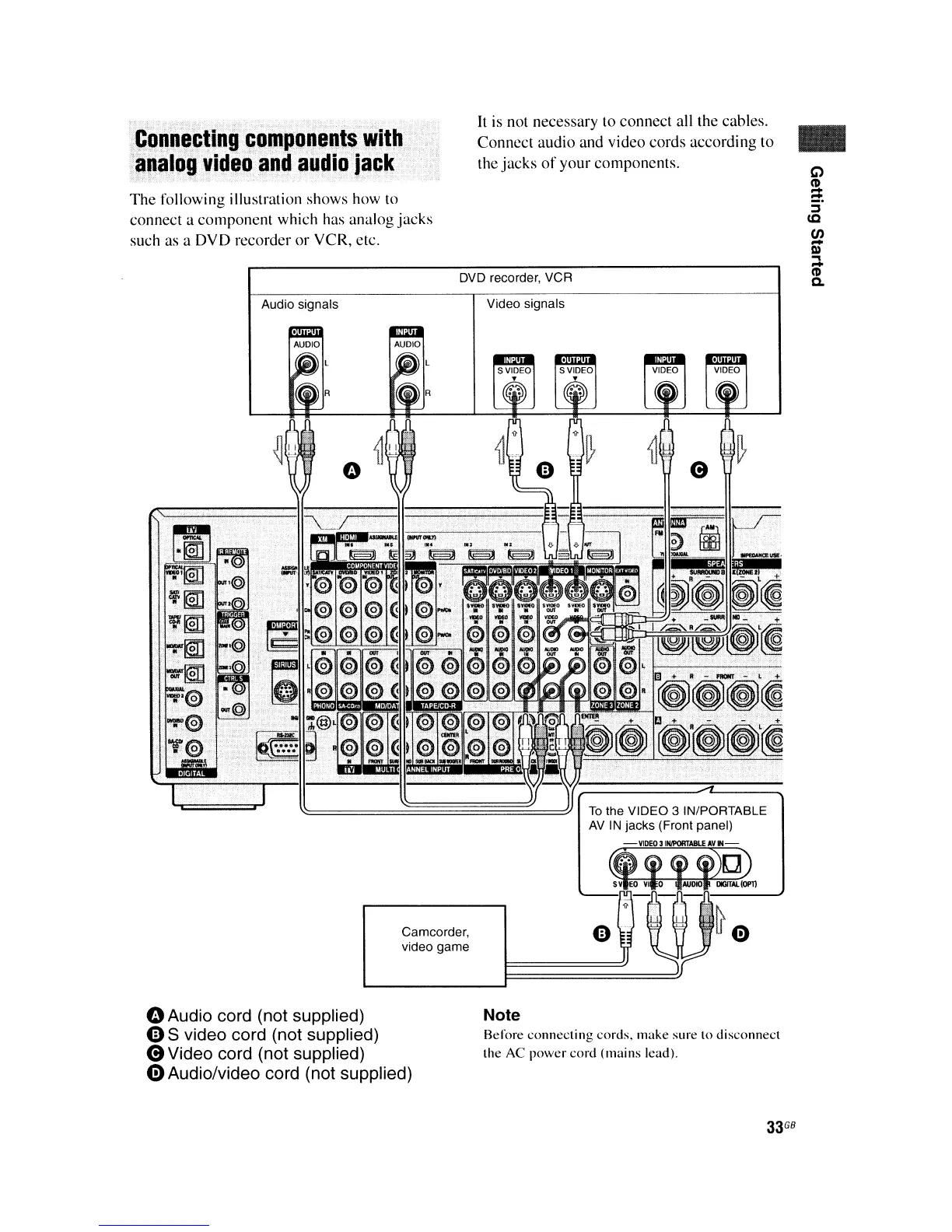
following illustration shows how to
connect a componcnt which has analog jacks
such as a DVD recorder or VCR, etc.
Audio signals
It is not necessary to connect all the cables.
Connect audio and video cords according to
the jacks
of
your componcnts.
DVD recorder, VCR
Video signals
To
the VIDEO 3 INIPORTABLE
AV
IN
jacks (Front panel)
VIDEO
31fWORTABlE
AV
IN
~
SV
EO
VI
0
AlK*)
OO'TAI.(DP'tl
•
Camcorder,
video game
oAudio cord (not supplied)
e S video cord (not supplied)
8Video
cord (not supplied)
e Audio/video cord (not supplied)
e--
Note
Before
connecting
cords. make sure
to
disconnect
the
AC
power
cord
(mains
lead).
33
GB















 To Next Page