Direct
tuning
..
Tip
I
I'
you have tuned in
an
AM
station, adjust
the
direction
of
the
AM
loop antenna
(aerial) for optimum reception.
If you cannot tune
in
a station
"-
-
-.-
-
MHz"
appears
and
then
the
display
returns
to
the current frequency.
Make sure you have entered
the
right
frequency. If not, repeat
step
4.
If you sti
II
cannot tune
in
a station,
the
frequency
is
not
used
in your
area.
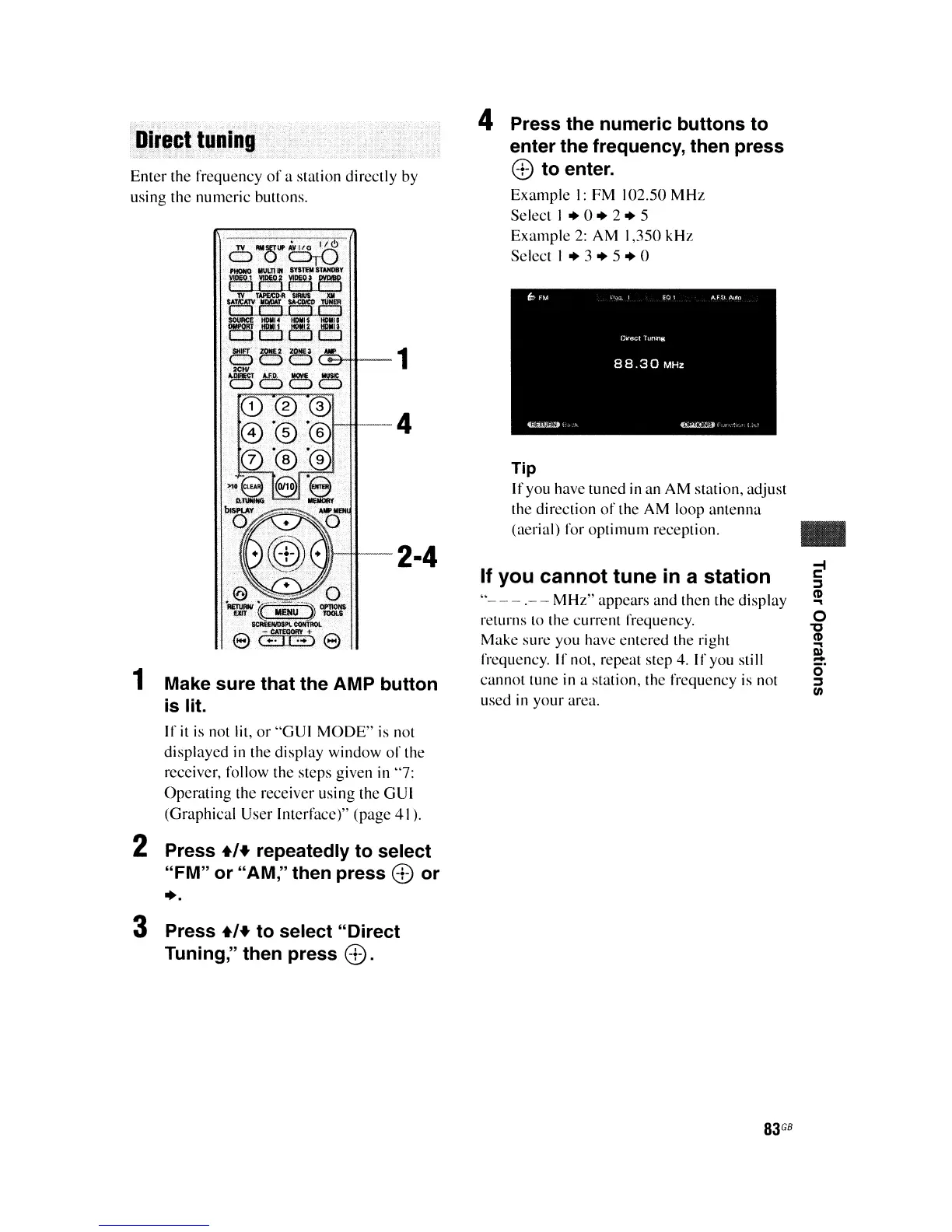
4 Press the numeric buttons to
enter the frequency, then press
8)
to enter.
Example
I:
FM
102.50
MHz
Select I •
o.
2.
5
Example
2:
AM
1,350
kHz
Select I
.3.5.0
··--4
1't-tt-2·4
Make sure that the AMP button
is lit.
If
it
is not lit,
or
"GUI
MODE"
is not
displayed in the display window
of
the
receiver,
follow
the
steps
given in "7:
Operating
the
receiver using
the
GUI
(Graphical User Interface)" (page
41
).
2 Press
+'+
repeatedly to select
"FM" or "AM," then press
8 or
••
Enter
the
frequency
of
a station directly by
using the numeric buttons.
1
3 Press
+'+
to select "Direct
Tuning," then press
8.
83
GB















 To Next Page