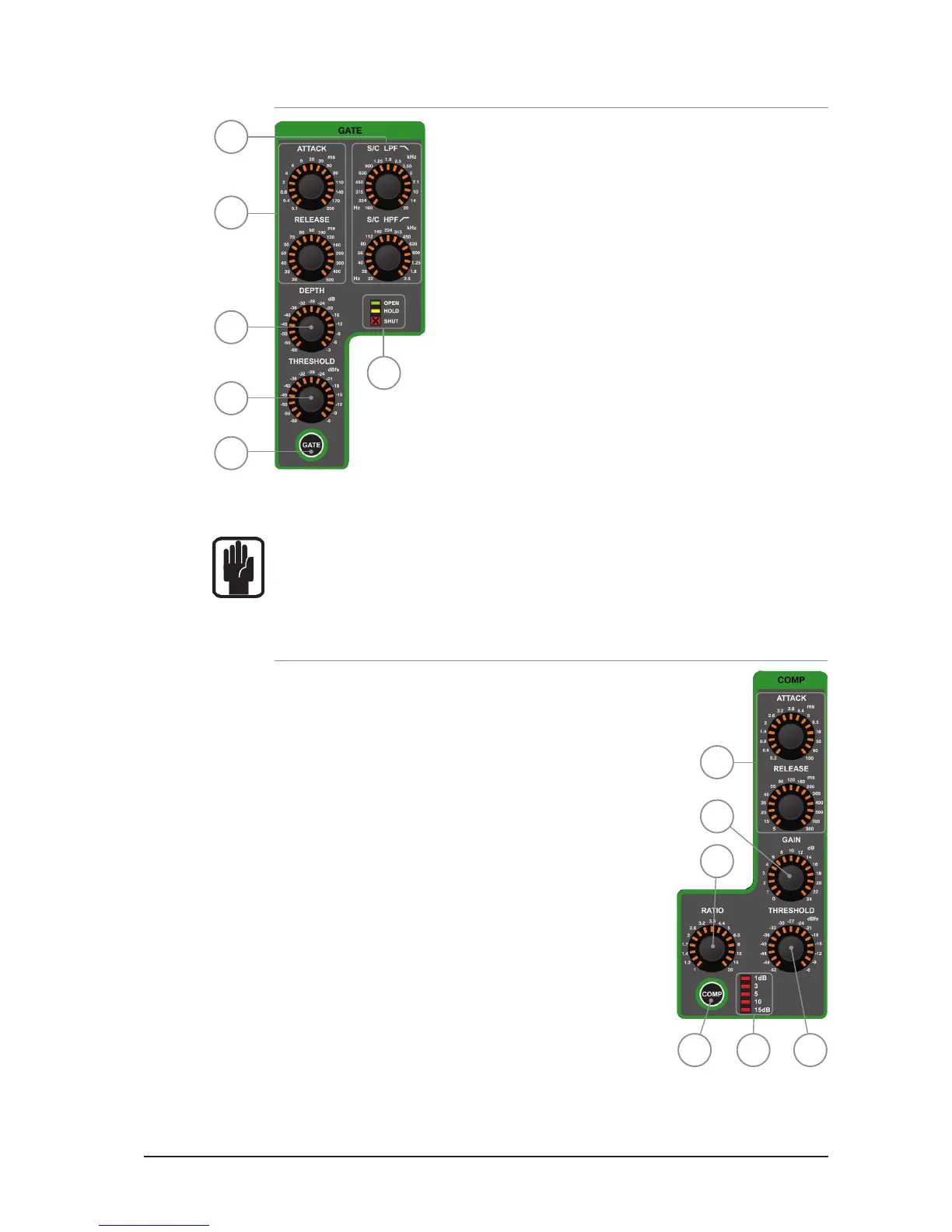
GATE SECTION
1. GATE ATTACK & RELEASE: indicates and adjusts the Attack
and Release Times of the Noise Gate.
2. GATE SC HPF/LPF: indicates & adjusts the High Pass and
Low Pass lters of the gate side chain to allow more accurate
gating of signals.
3. GATE DEPTH: indicates and adjusts how many dB of
attenuation the gate will apply when it is closed.
4. GATE THRESHOLD: indicates and adjusts the threshold of the
Noise Gate opening/closing.
5. OPEN/HOLD/CLOSED indicators: indicate the operation of
the gate:
OPEN = gate is passing signal and audio is above the threshold
HOLD = gate is passing signal but audio is below the threshold,
the gate will close soon
CLOSED = gate is NOT passing signal, audio is below the threshold
6. GATE key: toggles the GATE IN or OUT. Pressing and holding the key will activate
INTERROGATE mode for this function.
NOTE: Gate function is not available on output buses.
COMPRESSOR SECTION:
1. COMPRESSOR ATTACK & RELEASE: indicates and adjusts the
Attack and Release Times of the Compressor.
2. COMPRESSOR GAIN: indicates and adjusts the gain of
the compressor, is used to ‘make-up’ gain lost through
compression of the signal.
3. COMPRESSOR RATIO: indicates and adjusts the compression
ratio within the compressor.
4. COMPRESSOR THRESHOLD: indicates and adjusts the
threshold of the compressor.
5. GAIN REDUCTION INDICATOR: indicates the amount of dB
attenuation applied by the compressor.
6. COMP key: toggles the compressor IN or OUT. Pressing and
holding the key will activate INTERROGATE mode for this
function.
3
4
5
1
2
1
2
3
456
6













 To Next Page