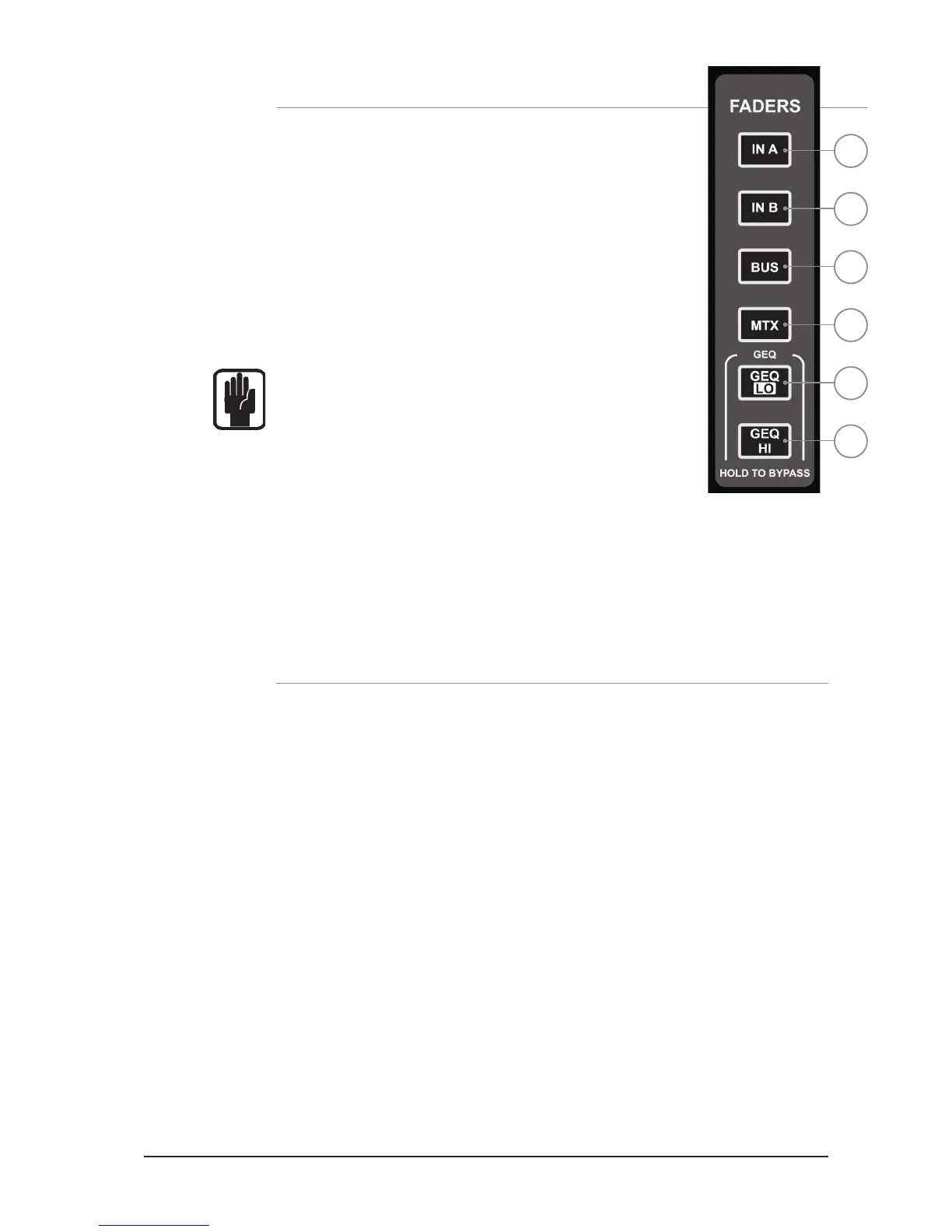
FADER LAYER KEYS
Fader Layer Keys change the function of the faders to the LEFT of the
Master faders:
1. INA: Input Layer ‘A’.
2. INB: Input Later ‘B’.
3. BUS: All Aux Bus Masters in the system.
4. MTX: All Matrix Masters in the system.
5. GEQ LO: The lower half of the GEQ.
6. GEQ HI: The upper half of the GEQ.
NOTE: The GEQ pages are only available when in BUS or MTX mode,
when the LR or MONO master is SELected or when FOLLOWing a bus.
1
2
3
4
5
6
FADER GLOW
TM
The Fader Glow™ system illuminates the fader slot when the function of the fader is anything
other than ‘a mono input channel level control’ according to the following list:
White: Channel faders linked.
Yellow: Faders in BUS mode, bus type is PRE FADE or faders in FOLLOW mode to a
PRE FADE aux bus.
Green: Faders in BUS mode, bus type is POST FADE or faders in FOLLOW mode to a
POST FADE aux bus.
Orange: Faders in matrix master OR faders in FOLLOW mode to a MATRIX bus.
Red: Faders in GEQ mode.
Cyan: A channel assigned as an FX Return or faders in FX follow mode.
Magenta: Channel Faders assigned to Stereo channels.













 To Next Page