SCREENS
The Soundcraft Si Compact has such a versatile control surface that the colour touch screen
is never required for mixing and is employed only for editing parameters like naming, channel
setup and patching.
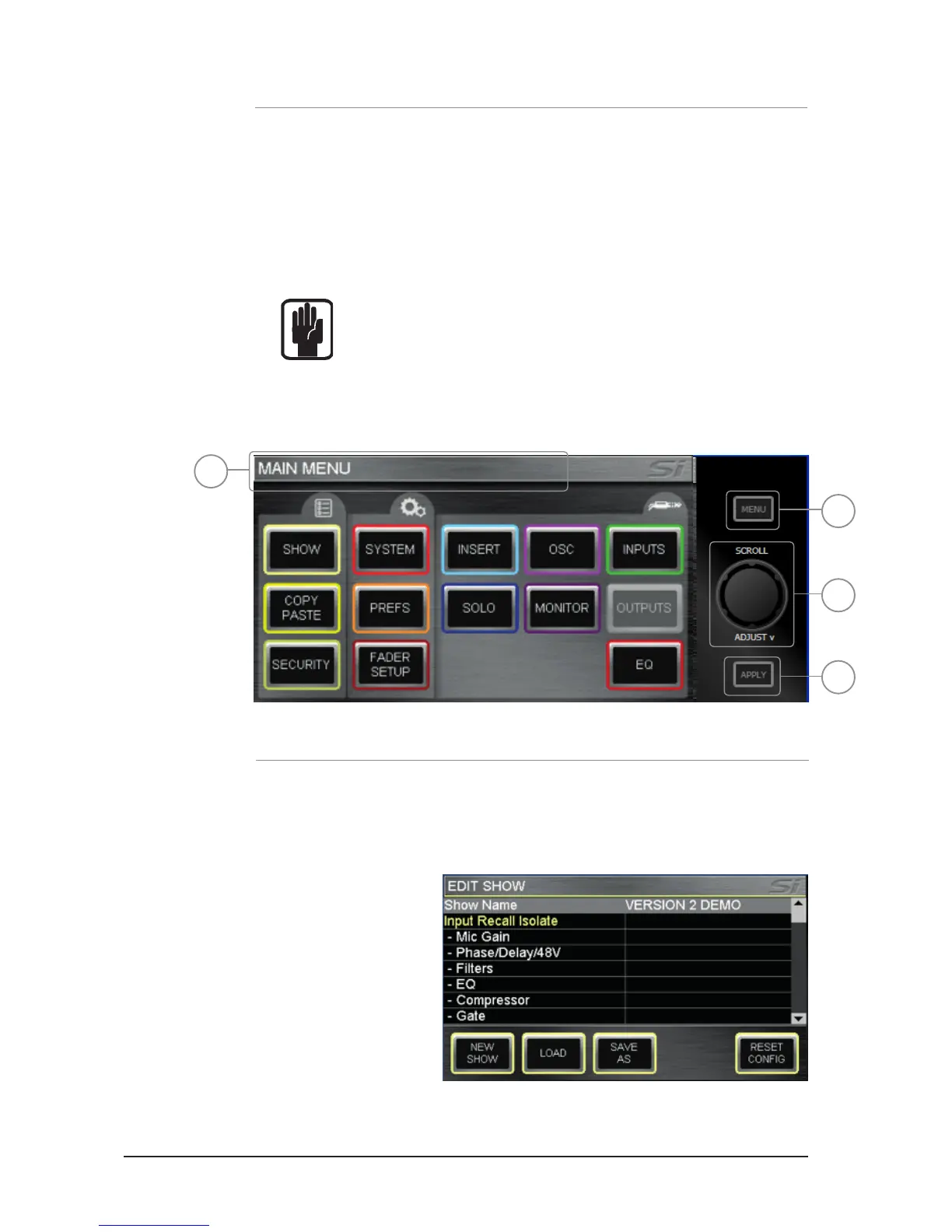
Typical main MENU screen & associated controls:
1. Title Bar – Name of the active cue on the console.
2. MENU key: Returns to main MENU page, or 'back-up' one level if in a sub menu
or screen such as QWERTY or PATCHING within the INPUTS or OUTPUTS page.
NOTE: Unconrmed data such as a name entry/edit is discarded if exiting
the page via the MENU key.
3. APPLY key: Press when lit to conrm a change to name or similar.
4. SCROLL/ADJUST: Press to access editing of a parameter or conrm a list view selection,
scroll to edit a parameter.
SHOW MENU
The SHOW menu manages show le save and load functions for the internal MMC (SD) card
and user's USB key along with Global Isolate lters.
EDIT SHOW Menu.
1
2
4
3













 To Next Page