4 Setup
Radio Parameter
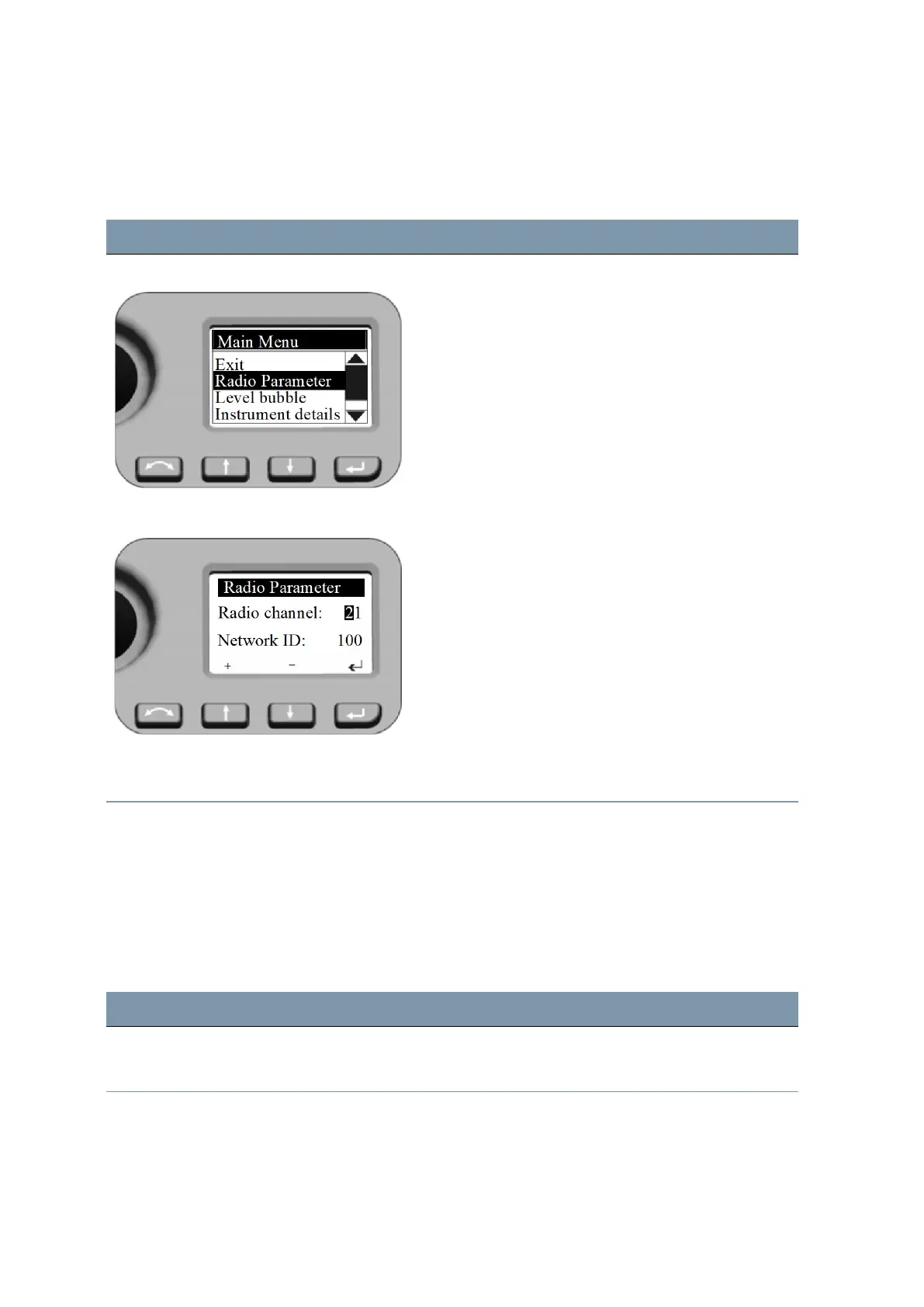
In the Radio Parameter menu it is possible to set the radio channel and network ID number.
Screen Actions and Comments
Main Menu To set
Radio Channel
and
Network ID
, press
N
and
O
to scroll to
Radio Parameter
and press
P
.
Radio Parameter When entering this menu the cursor jumps to the first
digit of the Radio channel, first digit is active (inverse)
and with N or O the numbers 0-9 can be selected.
Press P when number is correct - cursor jumps to the
next digit.
After you have selected the last digit for the Radio
channel the cursor jumps to the settings for Network ID
with the same procedure.
When last digit of Network ID is confirmed, the system
jumps back to the Main Menu.
Radio channel range: 1 - 30
Network ID range: 0 - 255
Level Bubble
These details are already described in Leveling, page 56.
Instrument Details
The Instrument Details menu displays the Instrument Version, Instrument name (your definition),
Serial number and Firmware version.
Screen Actions and Comments
Main Menu
To read Instrument Details, press N or O to scroll to
Instrument Details and press P.
FOCUS 35 Total Station User Guide | 61



 To Next Page