4G+ROUTER1200 - User Guide
44
/
84
Copyright © STRONG 2024. All Rights Reserved.
44
/
84
V. Wireless Settings
You can set up the settings for the guest Wi-Fi and main Wi-Fi network as well as the duration of the
Wi-Fi activation, a blacklist for device that cannot use your network.
1. Wi-Fi Settings
You can configure your 2.4 and 5 GHz Wi-Fi networks.
1.1. 2.4 GHz Wi-Fi
You can set a new name and password for your Wi-Fi Network, for more information please see:
Changing the SSID (Wi-Fi Network Name) and password.
1.2. 5 GHz Wi-Fi
You can setup a new name and password for your Wi-Fi Network, for more information please see:
Changing the SSID (Wi-Fi Network Name) and password.
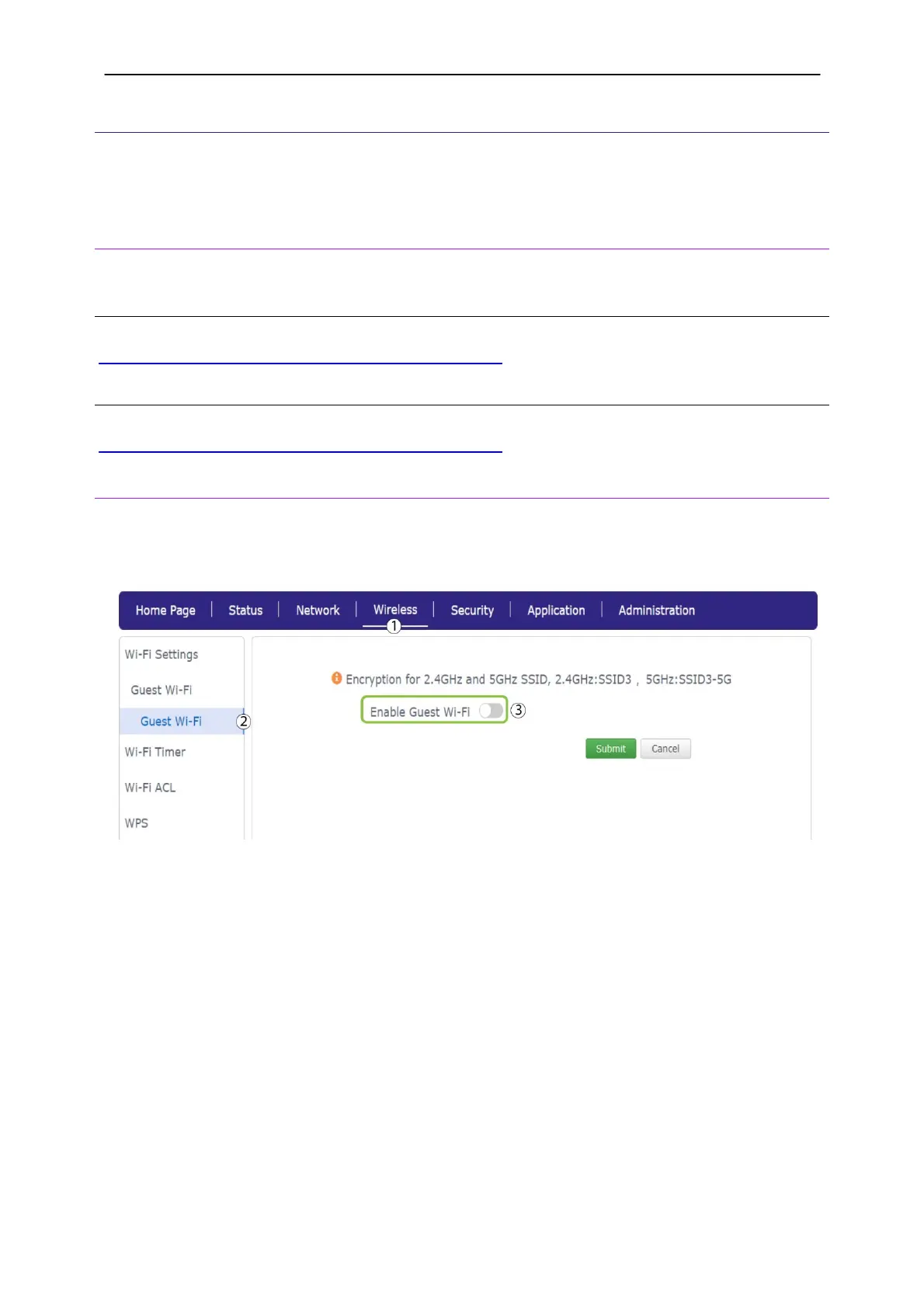
2. Guest Wi-Fi
If you do not want your guest to use your main Wi-Fi network for security reasons, you can easily set up a
guest Wi-Fi network.
1. Click Wireless and Guest Wi-Fi
2. Configure the Wi-Fi Name and password. Enter a work time in minutes before clicking submit.



 To Next Page