24 3006 -109 -101 REV A www.stryker.com
Return To Table of Contents
Siderail Operation Guide
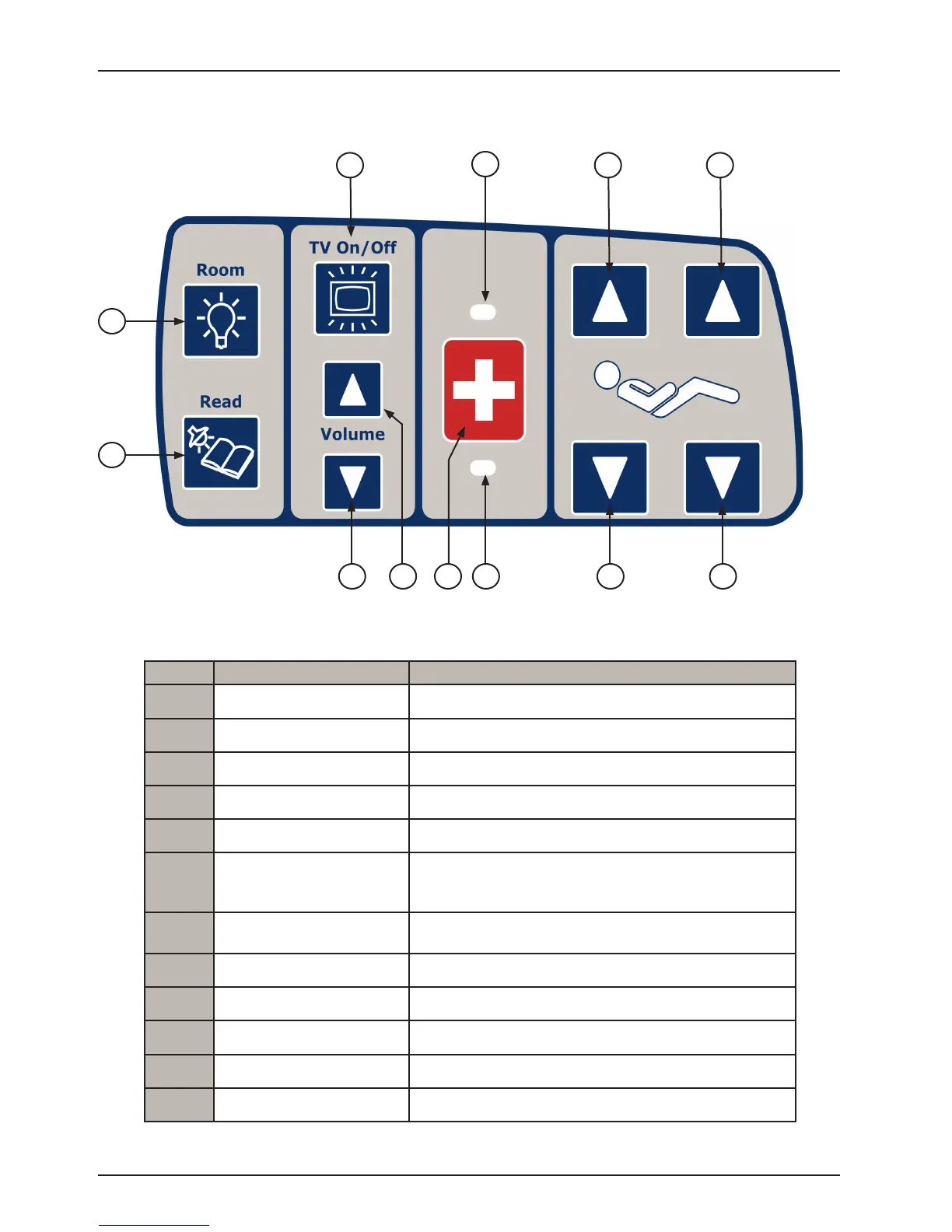
PATIENT CONTROL FUNCTIONS WITH OPTIONAL SMART TV (INSIDE SIDERAIL)
LEFT INSIDE SIDERAIL SHOWN
(Right Inside Siderail same as the Left)
2
9
10
12
114 7
1
3
5 6
8
Button Button Name Button Function
1
TV On/Off Press to turn TV on or off.
2
Room Light Press to turn the room light On/Off.
3
Bed Overhead Light Press to turn the bed overhead light On/Off.
4
TV/ Volume Down Press to decrease TV volume.
5
TV/ Volume Up Press to increase TV volume.
6
Nurse Call
Press to activate Nurse Call.
Note: Yellow LED will light when button is pushed.
Green LED will light with Nurse Station acknowledgment.
7
Nurse Call LED
Illuminates amber when nurse call has been pressed by
patient.
8
Nurse Call Answer LED Illuminates green when answered by Nurse.
9
Fowler Up Press to raise the Fowler.
10
Fowler Down Press to lower the Fowler.
11
Knee Gatch Down Press to lower the Knee Gatch.
12
Knee Gatch Up Press to raise the Knee Gatch.














 To Next Page