26 3006-109-101 REV A www.stryker.com
Return To Table of Contents
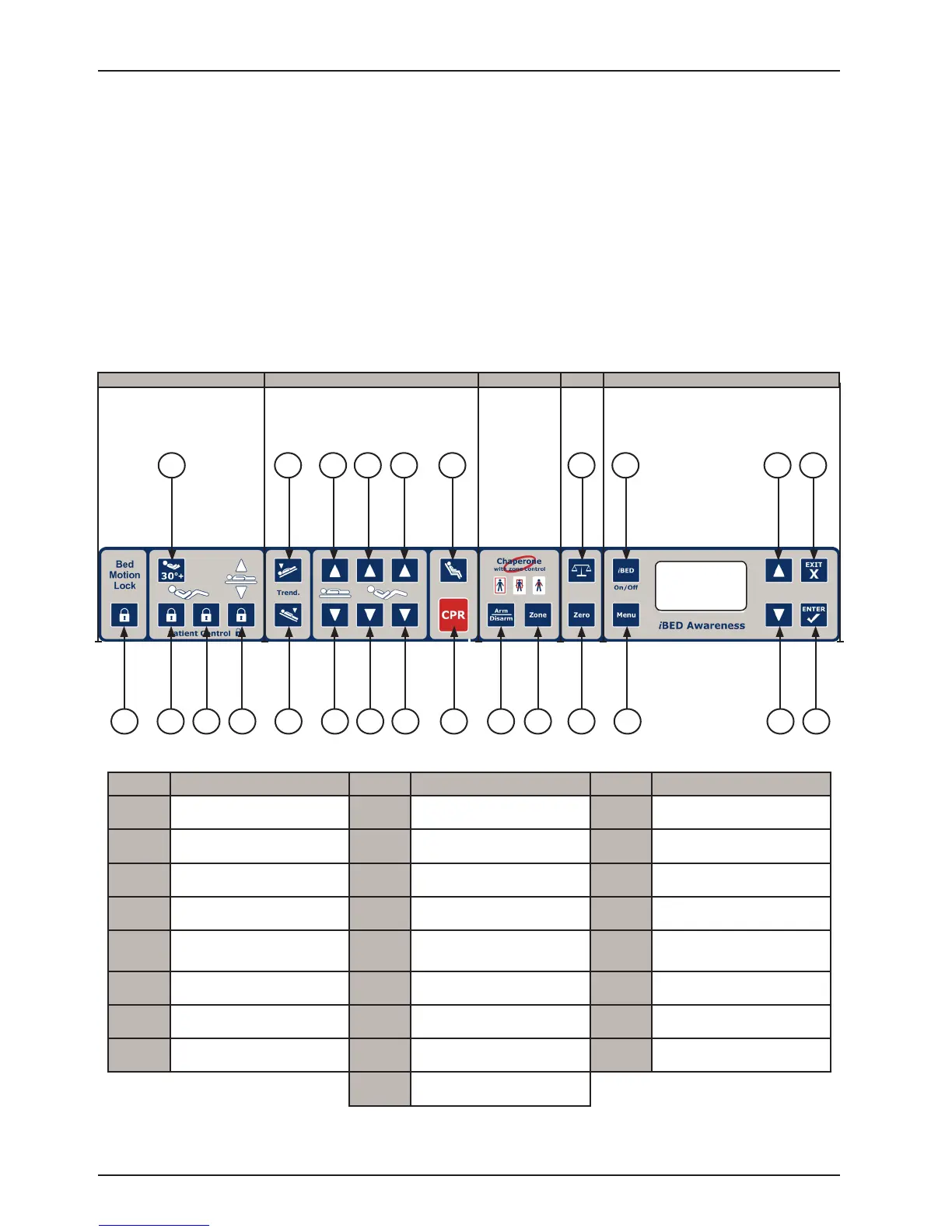
FOOTBOARD CONTROL PANEL BUTTONS
Footboard Operation Guide
INTENDED USE
The iBed
®
Awareness system is intended to serve as a secondary monitoring system, informing the operator via a
visual or audible alert when a preset condition changes.
• When the iBed
®
Awareness is turned “On”, the system has the ability to automatically monitor the following:
- Brake Set/Not Set
- Siderail Position
• Additionally, when the bed is in low height and/or Chaperone Bed Exit with Zone Control system is armed and/or
the Fowler 30+ is “On”, the system has the ability to monitor these features independently when iBed
®
Awareness
is turned “On”.
LOCKS
SCALE
MOTION
BED EXIT
iBED / MENU
8 10
11
12
1
2
4
6
73 5 9 13
14
1715 16
18
19
20
21
22 24
2523
Button Name Button Name Button Name
1
Bed Motion Lock 9 Bed/Litter Down 18 Scale
2
Fowler 30
0
+ 10 Fowler Up 19 Scale Zero
3
Patient Fowler Lock 11 Fowler Down 20 iBed On/Off
4
Patient Gatch Lock 12 Knee Gatch Up 21 Menu
5
Patient Bed Up/
Down Lock
13 Knee Gatch Down 22 Menu Up
6
Trend 14 Cardiac Chair 23 Menu Down
7
Reverse Trend 15 CPR Drop 24 Exit
8
Bed/Litter Up 16 Bed Exit Arm/Disarm 25 Enter
17 Bed Exit Zone Control














 To Next Page