42 3006 -109-101 REV A www.stryker.com
Return To Table of Contents
Footboard Operation Guide
IBED
®
AWARENESS MONITORING AND ALARMS (CONTINUED)
Bed Exit
• If the bed exit is disarmed:
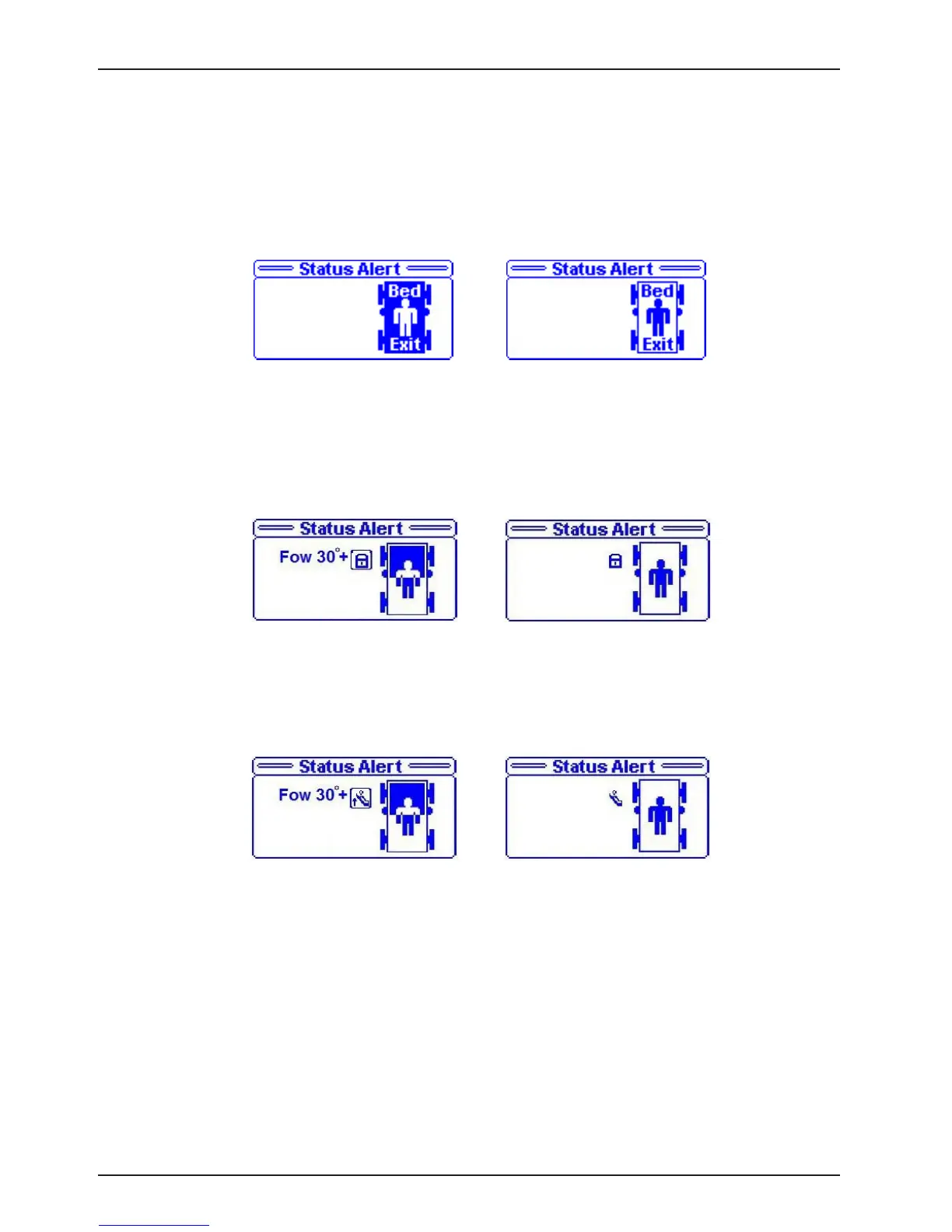
1. The bed exit LED on the dashboard blinks and the display screen flashes between the message in Figure
19 and the message in Figure 20.
Fowler 30
0
+ Lock
• If the fowler 30
0
+ lock state changes from a locked to an unlocked state:
1. The fowler 30
0
+ lock LED on the dashboard blinks and the display screen flashes between the message
in Figure 21 and the message in Figure 22.
• If the fowler 30
0
+ lock state changes to a lowered position:
1. The fowler 30
0
+ lock LED on the dashboard blinks and the display screen flashes between the message
in Figure 23 message and the message in Figure 24.
Additional Alarm Conditions
• If an audible alarm is required, the caregiver can set the Awareness alarm to “On” through the Advanced
Options Menu in the Main Menu.
• If the caregiver would like to set the Awareness alarm to the Nurse Call Station, the “Status To N/C” must be
turned “On” through the Advanced Options Menu in the Main Menu.
Note
• By default these two advanced options are turned “Off”.
Figure 19
Figure 20
Figure 23
Figure 24
Figure 21
Figure 22














 To Next Page