www.stryker.com 3006 -109-101 REV A 5
Return To Table of Contents
Symbols and Definitions
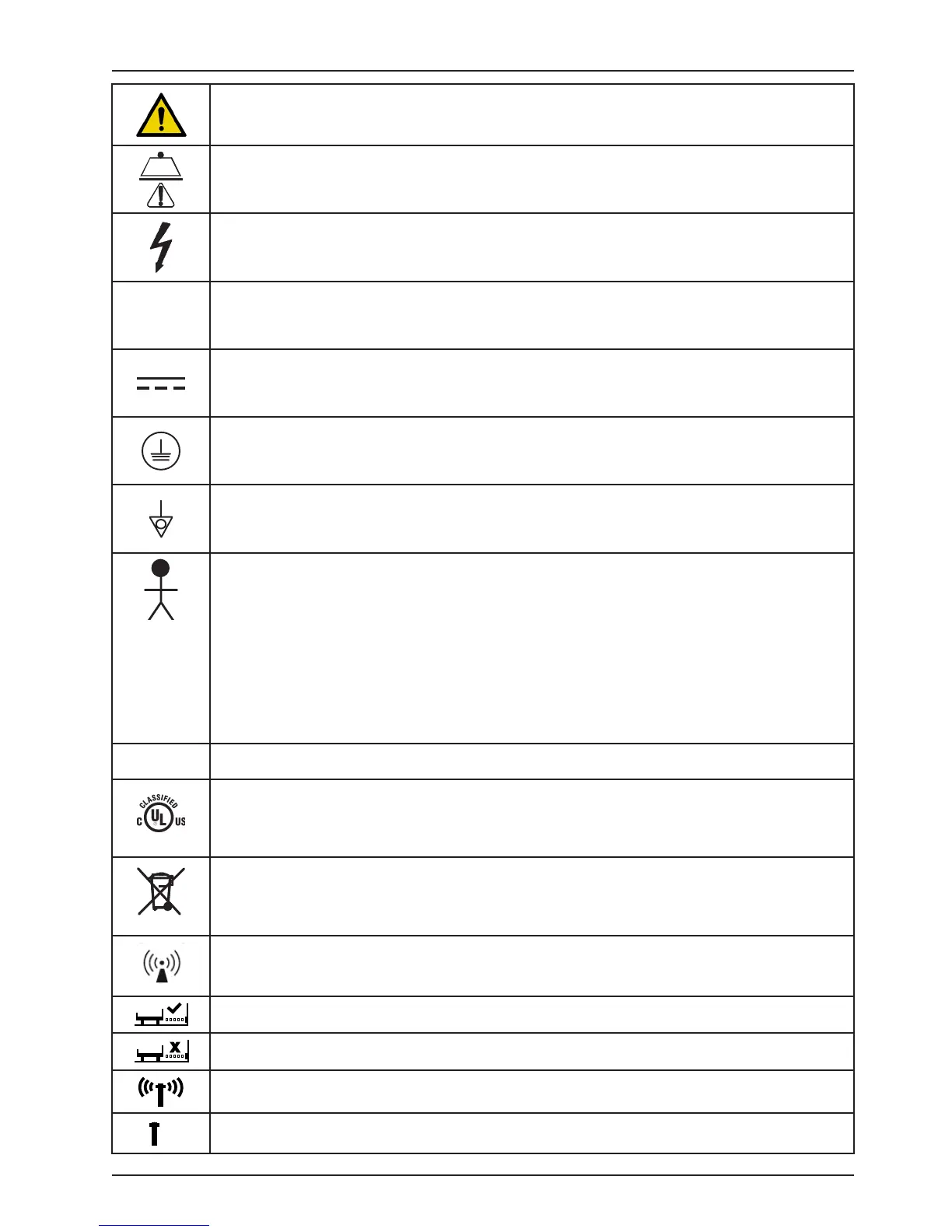
Warning, consult accompanying documentation
Safe Working Load Symbol
Dangerous Voltage Symbol
Alternating Current
Direct Current
Protective Earth Terminal
Potential Equalization Symbol
Type B Equipment: equipment providing a particular degree of protection against electric shock,
particularly regarding allowable leakage current and reliability of the protective earth connection.
Class 1 Equipment: equipment in which protection against electric shock does not rely on BASIC
INSULATION only, but which includes an additional safety precaution in that means are provided
for the connection of the EQUIPMENT to the protective earth conductor in the fixed wiring of the
installation in such a way that ACCESSIBLE METAL PARTS cannot become live in the event of a
failure of the BASIC INSULATION.
Mode of Operation: Continuous
IPX4
Protection from liquid splash
Medical Equipment Classified by Underwriters Laboratories Inc. with Respect to Electric Shock, Fire,
Mechanical and Other Specified Hazards Only in Accordance with UL 60601−1, First Edition (2003)
and CAN/CSA C22.2 No. 601.1−M90 with updates 1 and 2 and IEC 60601-1 (1998) with Amendment
1 (1991) and Amendment 2 (1995).
In accordance with European Directive 2002/96/EC on Waste Electrical and Electronic Equipment,
this symbol indicates that the product must not be disposed of as unsorted municipal waste, but
should be collected separately. Refer to your local distributor for return and/or collection systems
available in your country.
Non-ionizing radiation; i.e. RF transmitter (WiFi)
This icon means the iBed Locator is connected.
X
This icon means the iBed Locator is not connected.
This icon means the Network is connected.
This icon means the Network is not connected.














 To Next Page