SummaCut Series Cutters User’ s Manual
Maintenance and Cleaning 3-3
3.2. OPERATING VOLTAGE CONVERSION
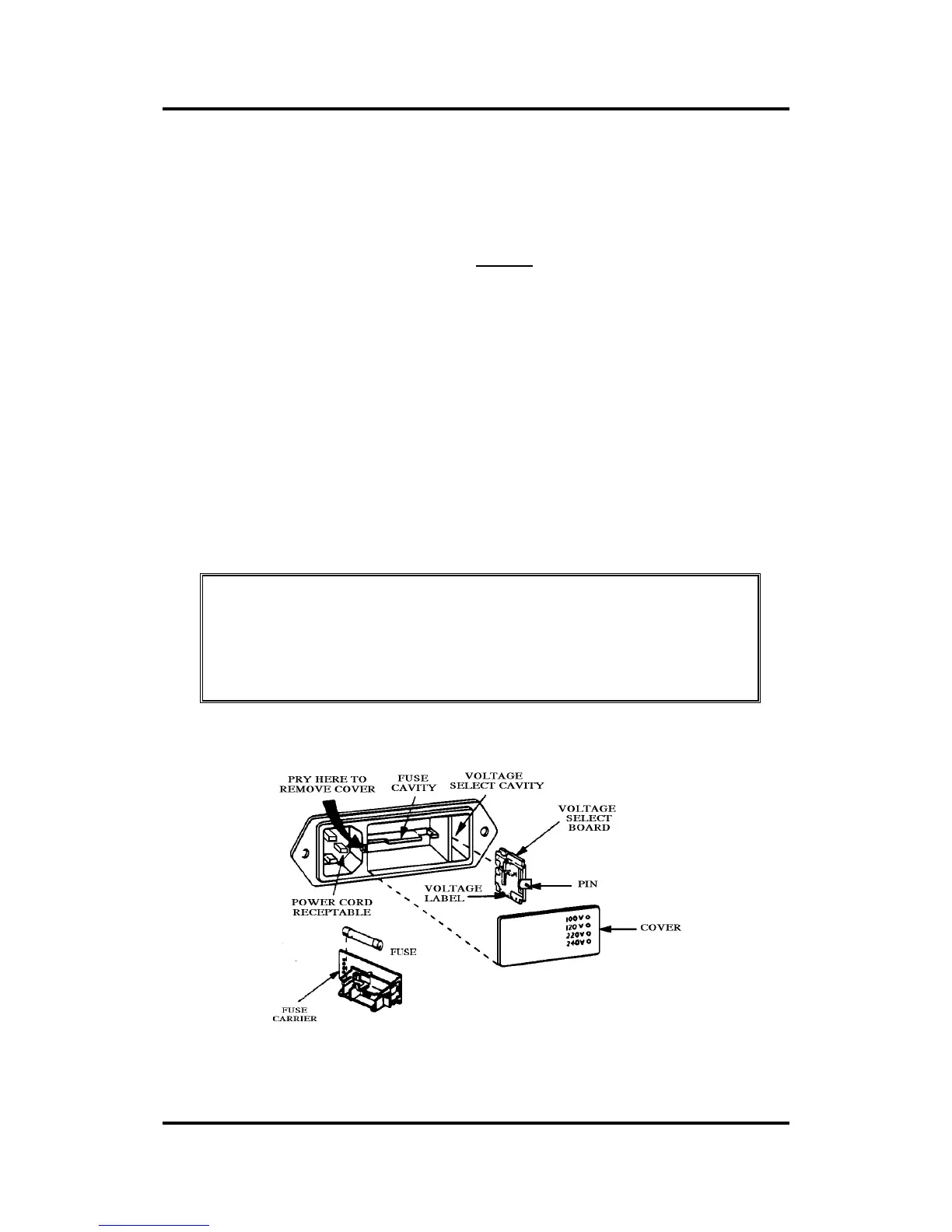
The power entry module cover shows four possible AC voltage settings (100 V,
120 V, 220 V and 240 V). The pin in one of the holes indicates the cutter’ s
active voltage setting. If this setting does not match the voltage supplied to
your site, you must change the voltage BEFORE powering on the cutter.
When changing the voltage setting, you will also have to change the fuses as
appropriate to the voltage.
To change the fuse(s), remove the fuse(s) from the fuse box behind the cover
plate of the power entry module.
For 100 or 120 V AC operation, use only 1.0 A Slo-Blo fuses in case of the D520,
D620 and the D760 SummaCut models.
For 220 or 240 V AC operation, use only 0.5 A Slo-Blo fuses in case of the D520,
D620 and the D760 SummaCut models.
For 100 or 120 V AC operation, use only 1.25 A Slo-Blo fuses in case of the D1020
and D1220 SummaCut models.
For 220 or 240 V AC operation, use only 0.6 A Slo-Blo fuses in case of the D1020
and D1220 SummaCut models.
NOTE
Always make sure that you are using the correct fuses for your
voltage selection.
FIGURE 3-3
POWER ENTRY MODULE



 To Next Page