Doc. Title
ST4940 User Manual
Features and how to configure ST4940
12. Appendices
12-1. How to install USB Driver on PC under environment of WINDOW 7
If you start usingWINDOW 7 on your PC and connect the PC, for the first time by using a USB cable, with the ST4940
which is off, you SHOULD take the procedure by step as described below.
Step 1.
Please install a USB Driver of the ST4940 on the PC:
\\MS_USB_ComPort_Driver_exe_v1.1032.1\InstallDriver.exe
Step 2.
Disconnectinternet if internet was already connected to the PC.
Step 3.
Please connect the ST4940 with PC by using the USB cable.
Step 4.
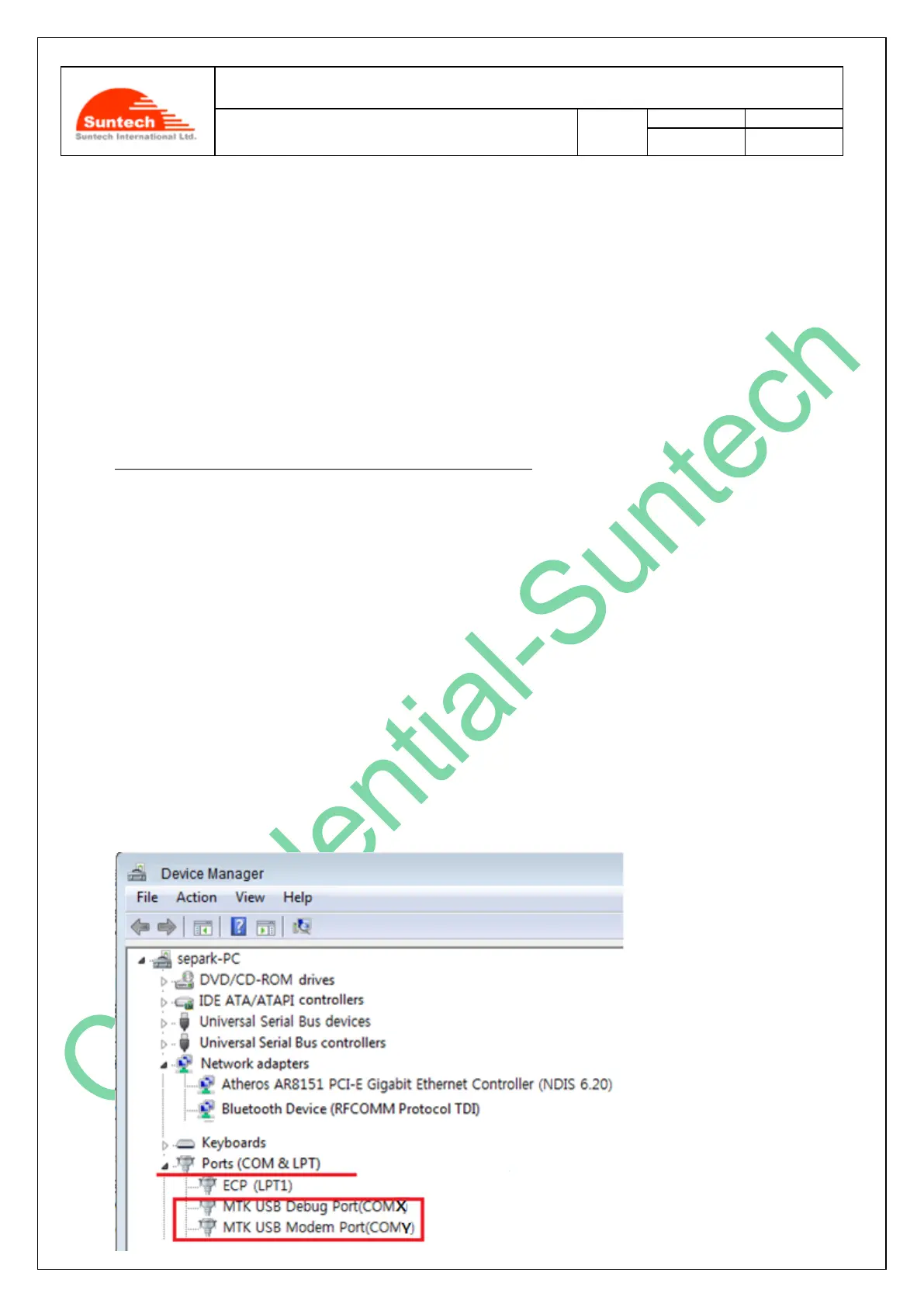
If “Device Manager” of your PCdisplays the 2 ports such as “MTK USB Debug Port (COMX)” and “MTK USB Debug
Port (COMY)” as shown in the picture below, it means that you have made a successful installation.



 To Next Page